HQbird Installation
Install HQbird on Windows (silent or GUI) or Linux, then activate online, via a client, or offline. Get the current packages from the download page. Full narrative: User Guide (HTML) · PDF.
Silent installation on Windows
Fastest path. Example: HQbird Enterprise with Firebird 3.0 64-bit:
HQBirdServer2024.exe /VERYSILENT /SP- /TYPE="hqbird30x64" /DIR="C:\HQbird2020" /CONFIGDIR=C:\HQBirdData\config /OUTPUTDIR=C:\HQBirdData\outputRequired
/VERYSILENT /SP-- no UI/TYPE- edition (must match an existing install when upgrading):HQBird25x86/HQBird25x64- Enterprise with Firebird 2.5HQBird30x86/HQBird30x64- Enterprise with Firebird 3.0StdHQBird- Standard (no Firebird engine)
/DIR- install folder (same path on upgrade)/CONFIGDIR- HQbird configuration/OUTPUTDIR- backups, reports, and other output
Optional
/DGPORT=8082- HQbird web console (FBDataGuard)/fbport=3050- Firebird port (Enterprise)/LOG=C:\temp\log.txt- installer log/[email protected]- Deploy Center email/REGPASS=yourpassword- Deploy Center password/REGTYPE=S|E|T- Standard, Enterprise, or Trial (needed to register during setup)- SMTP alerts:
/EAHOST,/EAPORT,/EALOGIN,/EAPASSWORD,/eato,/eafrom,/EAENABLED=true,/EADEFALT=true(copy alerts to IBSurgeon Control Center)
If the silent install targets a different folder than the current one, an error window appears and setup stops. After success, open a modern browser (not Internet Explorer) at http://localhost:8082.
Installation with the Windows installer
Run the installer and follow the wizard. Chapter 2 of the User Guide walks through every screen. To remove HQbird later, see uninstall instructions.
How to install HQbird on Linux
Download the current Linux package from Download HQbird (universal install.sh). You must be root or a sudoer. Install Java 8 first (OpenJDK or Oracle). If libtommath or ICU is missing, see this article.
- Remove any Firebird from OS repositories / previous installs before Enterprise-with-engine.
chmod +x install.sh- Run
install.shwith no arguments to print examples (for exampleinstall.sh --fb50). Firebird goes to/opt/firebird, HQbird to/opt/hqbird.
Default SYSDBA password after a bundled engine install is masterkey. Firebird 2.5 ships as Classic; we recommend SuperClassic via /opt/firebird/bin/changeMultiConnectMode.sh (choose thread). Firebird 3+ SuperServer can stay as SuperServer.
Standard (no Firebird binaries): use the no-engine option shown by install.sh (historically --nofirebird). Replication, multi-thread backup, encryption, and extra authentication need Enterprise with the HQbird Firebird binaries.
Services: service firebird stop/start (2.5) or service firebird-superserver stop/start (3.0); service hqbird stop/start. Check with ps aux | grep firebird and ps aux | grep dataguard.
Open http://server:8082, log in as admin / strong password, choose “I have HQbird Enterprise”, and register with the Deploy Center email and password. Then optionally set up replication.
Firewall
Firebird 3050, HQbird console 8082, licensing 8765. Change in /opt/firebird/firebird.conf (RemoteServicePort), /opt/hqbird/conf/network.properties (server.port), and /opt/hqbird/conf/license.properties (serverlicense.port). Allow those ports in the firewall.
How to activate HQbird
Activate once from any computer that can reach the HQbird server: the registration utility (Windows Start → IBSurgeon → HQbird Admin → Register HQbird), the wizard inside Admin tools, or the console at port 8082.
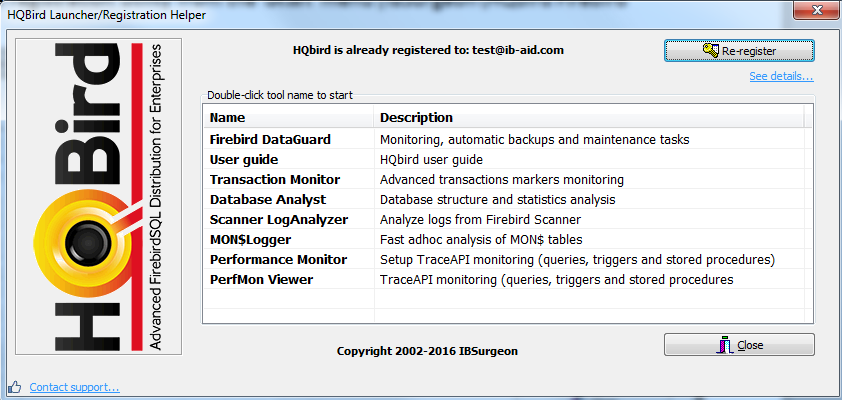
Click Register (or Re-Register). Enter the server IP or name, then Connect to HQbird Server.
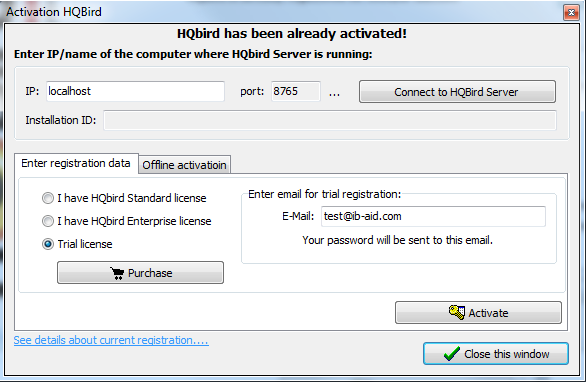
With a license, enter the Deploy Center email and password and click Activation. Without a license, enter an email - a password is sent and you are registered. The wizard talks to deploy.ib-aid.com. Forgotten password opens the recovery form. Order now! buys or renews a license.
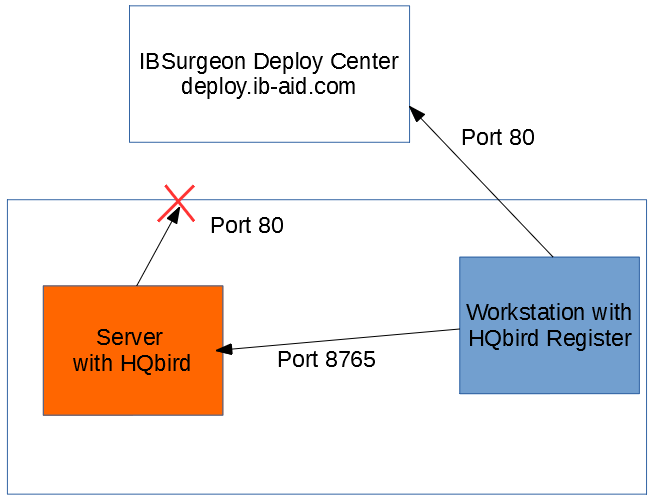
Server has no Internet - activate via a client
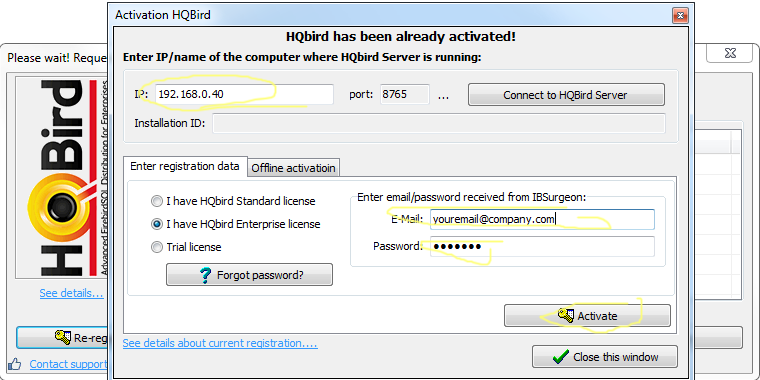
Install HQbird Administrator on a PC that can reach both the Internet and the HQbird server. Run Register, enter the server address, email, and license, then Activate.

Offline activation
If nothing has Internet access, email [email protected] with the order number.