Firebird Encryption plugin
Documentation · 1.2.3, 26.11.2026
Firebird Encryption plugin
Why do we need database encryption (and when do we not need it)?
Database encryption in Firebird was introduced in Firebird 3.0 (together with wire protocol encryption, which people often confuse with the topic of this article). It greatly extended the ways to protect data from unauthorized access. But it does not solve all problems. To use it correctly, you must understand its strong and weak points. In this article we look at the internal design of database encryption at a basic level. The goal is to give developers of Firebird applications a better understanding of how database encryption works.
Why do we need database encryption?
-
To protect databases with confidential or valuable data from “physical” theft. An attacker can steal a disk with a copy of an encrypted database, or get a copy of the database file in some other way. Without the correct key, it is not possible to read data from this file. It is also not possible to extract the data with recovery software such as FirstAID. Of course, this depends on the encryption algorithm and on the computing power, but to break AES256 needs too much time or too many computing resources.
-
To protect the database from access by unauthorized applications that do not have the encryption keys. Examples: direct access by an unauthorized person with developer tools to change confidential information (for example, money transactions), change or theft of the business logic (the source text of stored procedures and triggers).
-
To protect databases with pre-filled data from export or from access by unauthorized applications.
-
Recently, governments introduced data protection laws (GDPR/DSGVO in Europe, LGPD in Brazil and others). Among other things, these laws require a higher level of protection for personal and other confidential data. Encryption is named as one of the adequate protection measures.
When is database encryption not the correct tool?
In some cases it is better to use the security features and settings of Firebird instead of database encryption:
-
To protect the database from physical access over the network, configure network access. That is, close the network shared folders, because Firebird does not need network access to the database files. Also make the access rights stricter (for example, on Linux the database files must have read and write access only for the “firebird” user and group).
-
To limit access to a specific database to a specific group of users, a simpler solution is to configure a separate security database.
-
To limit access to database objects (tables, stored procedures), use the Firebird security mechanisms: users, roles and so on.
Of course, both lists above are not complete. But they give some idea of when you need database encryption and when you do not need it.
1. How Firebird database encryption works on the server side
Let us look at the internal details of Firebird database encryption. We start with the server part.
1.1. Which part of the database is encrypted?
The first thing to look at is: which part of the database is encrypted? As you probably know, a Firebird database consists of parts of the same size, called “database pages”. There are several types of these pages. Each type has a specific purpose.
The picture below shows the main page types:
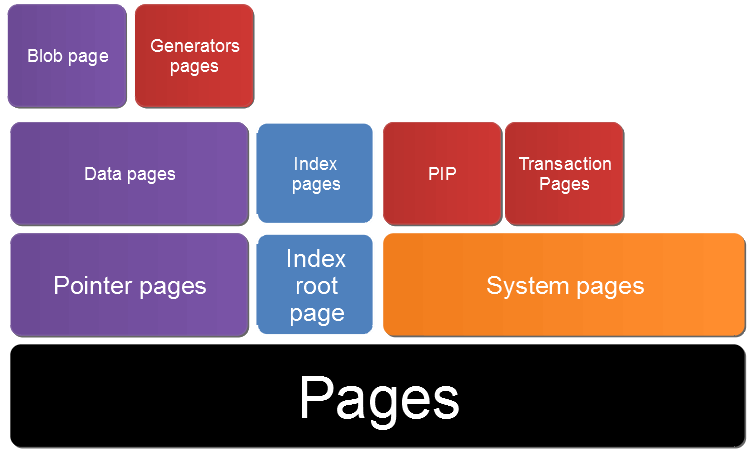
Some pages store user data. Other pages store system information, for example, transaction pages and page inventory pages (more information about database pages is available here).
When Firebird encrypts a database, it encrypts only the pages with user data: data pages, index pages, generator pages and BLOB pages.
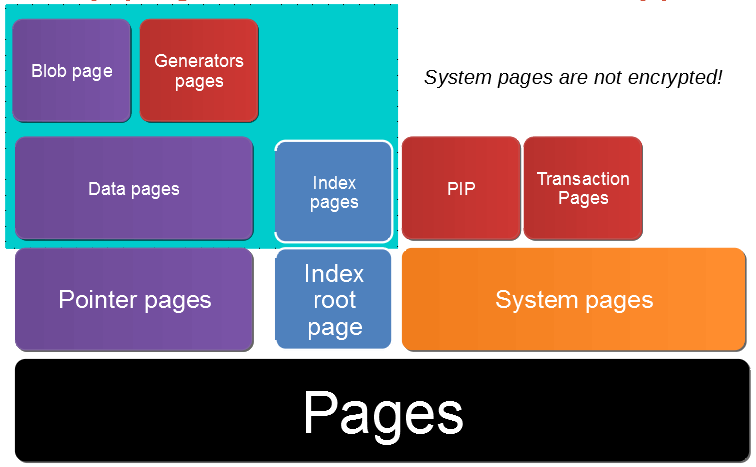
Note that the database metadata (stored procedures, tables, views, names of triggers, generators and so on) is not different from “user data” for the part of the engine that does the encryption. The metadata is encrypted.
Why are the system pages not encrypted? Mainly for performance reasons, and because they do not contain confidential data that needs protection.
The database header page is not encrypted, because it contains information that encryption needs (for example, the key name).
1.2. When are data pages encrypted?
When a user runs a SELECT query on an encrypted database, the data is read from the encrypted file. But the data goes to the application in the result set in decrypted form.
Let us look at the details of this process:
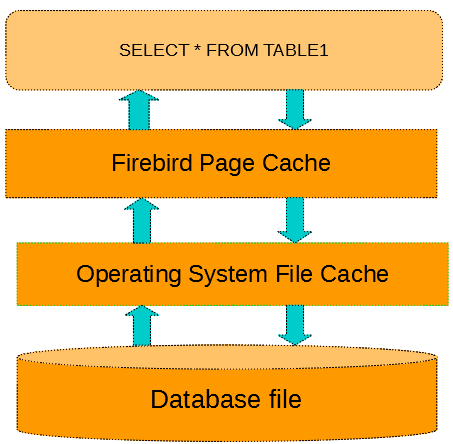
Usually the process starts with a series of reads of database pages from the database file. The operating system file cache keeps these pages.
You can also configure Firebird to bypass the file cache and use only its own cache. But by default Firebird uses the file cache.
After this, Firebird reads the pages and puts them into the Firebird page cache (its size is set by the DefaultDBCachePages parameter in firebird.conf and/or databases.conf, or in the database header page).
Then the pages from the cache are used to build the result set of the specific SQL query (SELECT in our example).
The picture below shows the details:
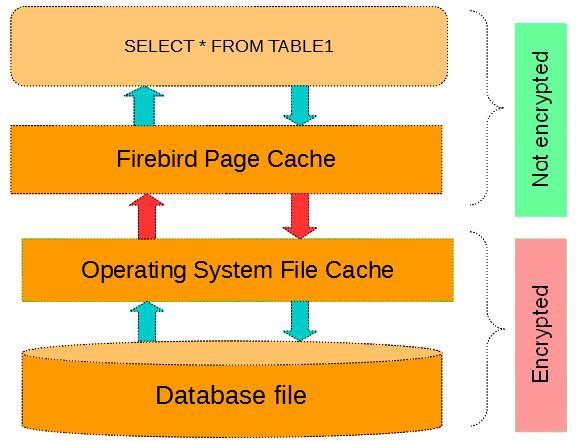
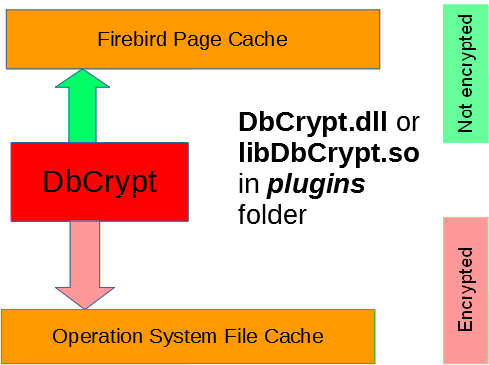
Thus, the database pages are encrypted in the operating system file cache, but they come to the Firebird page cache in decrypted form, and the other way round.
|
Important
|
Database encryption protects the data on the disk: the database file, its copies and encrypted backups. It does not encrypt the data in the server memory and the data that goes over the network. To protect the network traffic, use wire protocol encryption ( |
The part of the Firebird software that does encryption/decryption is called the “encryption plugin”. Most plugin implementations (known to the authors) are called DbCrypt, so we call it DbCrypt.
The picture below shows the variants for Windows (DbCrypt.dll) and Linux (libDbCrypt.so):
1.2.1. Encryption algorithm
The IBSurgeon DbCrypt plugin encrypts pages with the AES algorithm. The key length sets the variant of the algorithm:
| Key length | Algorithm |
|---|---|
16 bytes |
AES-128 |
24 bytes |
AES-192 |
32 bytes |
AES-256 (recommended) |
The aesKeyGen utility (see Key generation) creates keys with a length of 32 bytes.
The plugin takes the cryptographic functions from the OpenSSL library (libcrypto). This library must be available both to the server and to the client utilities (see The OpenSSL library).
1.3. Key management
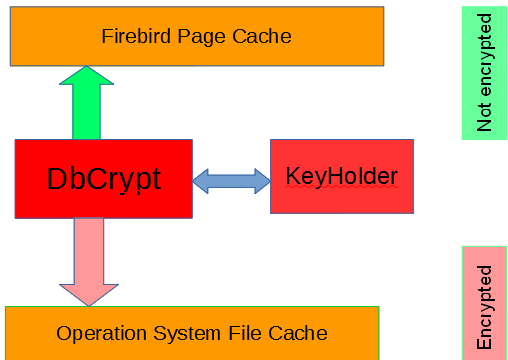
If you look at the previous picture long enough, the next question comes quite quickly: how does DbCrypt get the correct key to encrypt/decrypt the database pages?
The answer: there is another plugin for key management.
Usually, a plugin called KeyHolder manages the keys. It stores and manages the keys for the encryption plugin (DbCrypt). KeyHolder implements the key management interface that DbCrypt uses.
|
Note
|
Also (if the code of the encryption plugin is written for it), the encryption plugin can load the key itself, for example from an external USB flash drive. But this document does not discuss this variant. |
What does “key management” mean?
In the simplest case, KeyHolder reads the keys from a file on the server and gives them to the DbCrypt plugin. In the IBSurgeon plugins this is the text file KeyHolder.conf in the plugins folder.
The key file can contain several keys. For convenience, they are stored as a named list. The file can look like this (the example below is taken from the IBSurgeon encryption plugin framework):
Key=Red 0xec,0xa1,0x52,0xf6,0x4d,0x27,0xda,0x93,0x53,0xe5,0x48,0x86,0xb9,0x7d,0xe2,0x8f,0x3b,0xfa,0xb7,0x91,0x22,0x5b,0x59,0x15,0x82,0x35,0xf5,0x30,0x1f,0x04,0xdc,0x75,
Key=Green 0xab,0xd7,0x34,0x63,0xae,0x19,0x52,0x00,0xb8,0x84,0xa3,0x44,0xbd,0x11,0x9f,0x72,0xe0,0x04,0x68,0x4f,0xc4,0x89,0x3b,0x20,0x8d,0x2a,0xa7,0x07,0x32,0x3b,0x5e,0x74,
When the database is encrypted, its header (page zero) stays not encrypted. Among other things, it stores information about the encryption plugin and the key name. Encrypted hashes protect the header. They prevent attempts to decrypt the database by a change of its state. You can see this information with the gstat -h databasename command:
Database header page information:
....
Creation date    Jan 11, 2017 15:12:20
Attributes       force write, encrypted, plugin DBCRYPT

Variable header data:
 Crypt checksum: MUB2NTJqchh9RshmP6xFAiIc2iI=
 Key hash:       ask88tfWbinvC6b1JvS9Mfuh47c=
 Encryption key name:    RED
 Sweep interval:         0
*END*
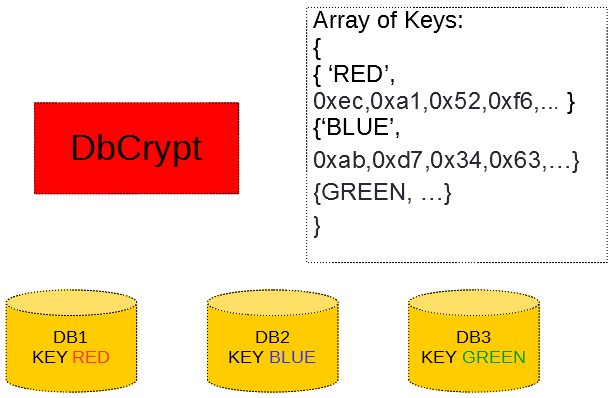
DbCrypt can process the pages of several databases with several keys:
1.3.1. Selection of the correct key
Developers often ask: “How does the plugin know which key is for which database?” The answer is quite simple: by the key name, which is stored on the database header page.
|
Note
|
The |
A less frequent, but still important question: what happens if the key name is the same as the name in the header, but the key value is different? Firebird protects against this with two checks:
-
Key hash. When Firebird encrypts the database, it asks the
DbCryptplugin to encrypt a test sequence (0123456789ABCDEF). It stores the hash of the result in the header. At each connection, Firebird repeats this operation with the received key and compares the hash with the stored one. If the values are different, the connection fails with an error, and no page is read with the incorrect key. -
Crypt checksum. The header fields that relate to encryption (the “encrypted” and “encryption in progress” flags, the number of the current encryption page, the plugin name, the key name and the key hash) are encrypted with the database key and stored as a checksum. You cannot change these fields without the key and keep the checksum correct.
1.3.2. Where KeyHolder gets the keys
The IBSurgeon KeyHolder plugin can get keys from three sources:
| Source | How to configure | When to use |
|---|---|---|
Client application (over the network) |
The application sends the key at connection time: through |
Production system. There is no key on the server. |
|
The |
The server needs the key without the clients, but the key must not be in a text file. |
File |
Lines |
Debugging, testing, initial encryption. |
The KeyHolder.conf file is optional. A production server that gets the keys from the clients works without it.
If a client sends a key with the same name as a key from the KeyHolder.conf file, the client key is used.
The approach with the keys on the server is simple and convenient for debugging, performance tests and so on, because it makes encryption transparent: client applications and developer tools do not know that the database is encrypted.
But in real life you must limit the access of applications to the database: only the client application that has the key must be able to connect to the encrypted database.
For this purpose, the KeyHolder plugin can get the key from the client application (which is usually on another computer) over the Firebird network protocol.
|
Important
|
The IBSurgeon This also applies to service connections: |
1.4. How to protect the key transfer?
We may need to protect the database in a situation when a customer decides to get direct access to the encrypted database and bypass the authorized applications (many vendors want to limit access to the data and allow access only from a special application).
This is the same situation as when an attacker has access to the server, but does not have the keys.
Let us look at the following attack scenarios to intercept the keys on the server side:
-
The attacker creates a fake encryption plugin (
DBCrypt.dll) and puts it on the server. WhenKeyHoldergives the key, the fakeDbCryptdumps the key: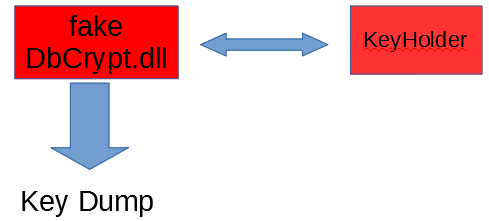 Figure 8. Attack with a fake DbCrypt.dll file
-
The attacker creates a fake
firebird.exefile and uses it to make a dump: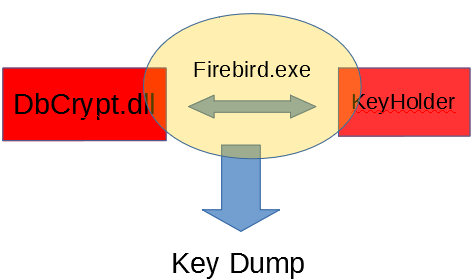 Figure 9. Attack with a fake firebird.exe
To protect against such attacks, a good implementation of the encryption plugin and the key holder plugin must protect the key exchange.
You can protect the key exchange with asymmetric encryption, with a pair of public/private keys.
These keys are generated during the build and are embedded into a specific pair of encryption plugin and key holder plugin. For the best protection, use specially built DbCrypt/KeyHolder pairs.
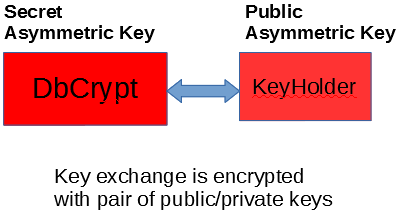
In the IBSurgeon plugins, the key goes through two segments: from the client application to KeyHolder, and from KeyHolder to DbCrypt. Each segment uses the same protocol, but its own embedded RSA key pair. We call the sides “receiver” (the side that needs the database key) and “sender” (the side that has this key):
Receiver → Sender:
	Request to start the exchange
Sender → Receiver:
	Random sequence (new for each exchange)
Receiver:
	Creates a one-time RSA key pair
	Signs with the embedded private key
		(random sequence + one-time public key)
	Sends the one-time public key and the signature
Sender:
	Checks the signature with the embedded public key
	If the signature is not correct - does not send the key
	Encrypts the database keys with the one-time public key
	Sends the encrypted keys (in parts, if necessary)
Receiver:
	Decrypts the keys with the one-time private key
	Ready to work
This exchange gives the following properties:
-
The database key is never sent in plain form.
-
The sender gives the key only to “its own” receiver: a fake plugin without the embedded private key cannot create a correct signature.
-
An intercepted exchange cannot be repeated: the random sequence and the one-time RSA pair are new for each connection.
The key exchange protection in the IBSurgeon plugin also protects the data during transfer over an unfriendly wide area network. This includes the cases when the key must go over a channel that is not yet ready to encrypt all data in the standard Firebird way. This situation occurs when you use a self security database.
|
Important
|
Note that the encryption and the correctness of the transferred keys depend on the plugin implementation. The Firebird engine gives only a basic low-level transfer service: “send N bytes from this plugin instance to the instance of the paired plugin”. |
|
Note
|
The |
Summary of the server part of encryption
-
The database encryption plugin (
DbCrypt) does encryption/decryption page by page, during the data exchange between the operating system file cache and the Firebird page cache. -
Data pages, index pages, BLOB pages and generator pages are encrypted. The header and the service pages are not encrypted.
-
The
KeyHolderplugin manages the keys. It gets the keys from the client application, from theKeySourcelibrary or from theKeyHolder.conffile. -
The key goes between the application,
KeyHolderandDbCryptonly in encrypted form. -
If there is no key on the server, each connection must send it.
Now let us see how client applications work with encrypted databases.
2. How Firebird encryption works on the client side
2.1. Ways to send the key
A client can send the key to the server in several ways. The choice depends on the application type:
| Method | For which applications | Key exchange is protected |
|---|---|---|
|
Native applications with source code (Delphi, Lazarus, C++ and others) |
Yes |
|
Native applications without source code |
Yes |
|
Firebird command line utilities |
Yes |
Key request to the user (Key request to the user) |
Applications without source code, when a person types the key |
Yes |
Driver connection property (Java applications, .NET applications) |
Java (Jaybird), .NET |
No. You need |
2.2. Native applications
To understand what occurs when a client application connects to an encrypted database, let us look at the usual connection process to a database that is not encrypted, for native applications.
Note: here and below, a “native” application is an application that makes a network connection to the server with fbclient.dll. Usually such applications are made with Delphi, C++, PHP. Unlike native applications, Java and .NET implement their own versions of the protocol. We discuss them below.
The connection process:
-
The client application loads the client library
-
fbclient.dll– native Windows applications -
libfbclient.so– native Linux applications
-
-
The client application starts the connection and sends
-
The user name, for example, SYSDBA
-
The password, for example, masterkey
-
The database path/alias
-
For an encrypted database, an additional step is necessary: the client must send the name of the encryption key and its value.
It is important to know that the key transfer must occur before the usual connection, because the data pages with the metadata (including the database owner name, the character set and so on) are encrypted.
This gives us the following:
-
An additional network data exchange is necessary to send the key before the usual connection.
-
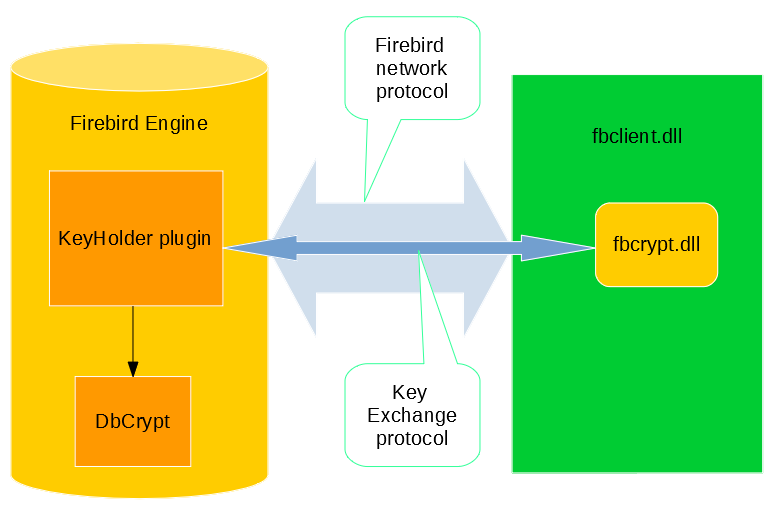
To send the key from the client application to Firebird, you must write code that uses asymmetric encryption and implements a callback interface. This can be quite difficult. To make this task simpler, plugin developers give sample code for the connection. Or, as in the IBSurgeon plugin framework, they make an additional library
fbcrypt.dll/libfbcrypt.so. This library implements an easy-to-use interface to send keys from the client application.
2.2.1. Functions of the fbcrypt library
The fbcrypt.dll/libfbcrypt.so library exports three simple functions. Call them before your application connects to the database:
int fbcrypt_init(const char* clientPathName);
int fbcrypt_key(const char* name, const unsigned char* data, unsigned dl);
int fbcrypt_callback(void* provider);
On Windows the functions use the stdcall calling convention, on Linux — cdecl.
fbcrypt_init-
Loads the Firebird client library from the specified path and clears the list of keys that were stored before.
-
A repeated call with the same path is allowed.
-
A repeated call with a different path returns an error: in one process,
fbcryptworks only with one client library. -
A call with
NULL(nil) only clears the list of keys. Use it to replace the keys.
-
fbcrypt_key-
Adds a named key to the list: the name, the value and the value length in bytes.
-
You can call the function several times to add several keys.
-
The key name is a null-terminated string, not longer than 255 bytes. The letter case of the name is not significant.
-
The key length is 16, 24 or 32 bytes (see Key generation).
-
fbcrypt_callback-
Registers a callback in the client library. The callback sends the keys from the list to the server.
-
If the application uses the object-oriented API, give the pointer to the provider (
IProvider) that creates the connections. -
If the application uses the ISC API (
isc_attach_database), giveNULL(nil). In this case the callback is registered for the current thread.
-
All functions return 0 if the function completed without errors, and a value < 0 in other cases.
Error codes:
- fbcrypt_init
-
-
-1the client library with the specified name cannot be loaded, or the library was already loaded from a different path.
-
- fbcrypt_key
-
-
-1unknown error when the key is stored, possibly not enough memory.
-
- fbcrypt_callback
-
-
-10the client library was not loaded withfbcrypt_init; -
-5the library loaded withfbcrypt_initdoes not have thefb_get_master_interfaceorfb_database_crypt_callbackcall - usually a very old (<=2.5)fbclientor an incorrect library; -
-1unknown error when the stored keys are registered infbclient- usually does not occur.
-
|
Important
|
The application must use the The bitness of |
2.2.2. Example
To connect a native application (that uses fbclient.dll) to an encrypted database, you must make 3 calls. Below is an example in Delphi (simplified, without error handling).
Function declarations:
function fbcrypt_init(clientPathName: PAnsiChar): Integer; stdcall;
  external 'fbcrypt.dll';
function fbcrypt_key(name: PAnsiChar; data: PByte; dl: Cardinal): Integer; stdcall;
  external 'fbcrypt.dll';
function fbcrypt_callback(provider: Pointer): Integer; stdcall;
  external 'fbcrypt.dll';
In the BeforeConnect event handler:
const keyRed: array [0..31] of byte  = ($ec,$a1,$52,$f6,$4d,$27,$da,$93,$53,$e5,$48,$86,$b9,$7d,$e2,$8f,$3b,$fa,$b7,$91,$22,$5b,$59,$15,$82,$35,$f5,$30,$1f,$04,$dc,$75);

fbcrypt_init(PAnsiChar('C:\Firebird30\fbclient.dll'));
fbcrypt_key(PAnsiChar('RED'), @keyRed, SizeOf(keyRed));
fbcrypt_callback(nil);

 // Then connect as usual
Database1.Active:=True;|
Warning
|
In the example, the key is written in the code as a constant. Do this only in training examples: it is easy to find the constant in the executable file. In a production application, get the key from a protected storage or build it while the program runs. |
The picture below gives a general view of the connection process to an encrypted database in a native application:
The source code of the examples is in the examples folder of the repository https://github.com/IBSurgeon/FirebirdEncryptionGuide.
2.2.3. Several keys and several databases
There is one fbcrypt key list for the whole process. At each connection, all keys from the list are sent to the server. The server selects the necessary key by the key name that is written in the database header.
Thus, to work with several databases, it is sufficient to give the keys different names and add all of them:
fbcrypt_init(PAnsiChar(ClientLibPath));
fbcrypt_key(PAnsiChar('RED'), @keyRed, SizeOf(keyRed));
fbcrypt_key(PAnsiChar('GREEN'), @keyGreen, SizeOf(keyGreen));
fbcrypt_callback(nil);
To replace the keys, clear the list with the call fbcrypt_init(nil) and add the new keys. The keys stay in memory until the next call of fbcrypt_init or until fbcrypt.dll is unloaded. A disconnect from the database does not clear the list.
2.2.4. What about thread safety in multithreaded client applications?
Let us recall some general points about the implementation of multithreaded client applications.
Since Firebird 2.5, several threads in an application can safely use one database connection, because fbclient.dll does all the necessary synchronization.
But in this case the threads can work with the connection only one after another.
This is acceptable for applications that do not need high-performance data exchange with the database. If it is not a problem that one thread waits for its SQL query while another thread runs a different SQL query, it is simpler to use the simple model: one connection is used by several threads.
If the application needs parallel execution of SQL queries (that is, it is a full-scale client application), it is better to use a separate database connection for each thread.
The key exchange for connections to encrypted databases is a bit more complex.
At each connection, the client library sends the keys from the client. But this is not directly related to the threads in the client application. The situation depends on the API that you use.
As you know, since version 3.0 the Firebird client library gives 2 types of API: the new object-oriented API, based on the concept of providers, and the legacy isc_ API, implemented as a workaround to keep compatibility with old Firebird drivers.
If you use the new object-oriented client API, it is sufficient to create a provider, give it the necessary keys (fbcrypt_callback(provider)), and then use it for new connections from any threads.
If you use the client isc_ API, for each connection the client library creates its own temporary provider. The end user cannot see or access this provider.
In this case, the callback is taken from the thread where isc_attach_database is called: the client library keeps a pointer to it in the thread local storage.
In practice, many access libraries use the isc_ API (for example, FireDAC). For them, you must call fbcrypt_callback(nil) in each thread that connects to the encrypted database, before the connection. For example, IBX for Lazarus and firebird-driver for Python use the object-oriented API.
Rules for a multithreaded application:
| Function | Where to call |
|---|---|
|
One time at application start. The function clears the shared key list, so do not call it while other threads connect to the database. |
|
After |
|
In each thread that makes a connection, before the connection. One call per thread is sufficient. |
|
One time for each provider. |
If you use a connection pool (isc_ API), remember: a new physical connection is made by the thread that requested it from the pool. Call fbcrypt_callback(nil) in each worker thread.
Set the key values before the connection. After the connection, you cannot change the key value.
2.3. Legacy applications without source code
What if you want to use database encryption, but you do not have the source code of your application? We prepared for this situation. In this case you must create a dynamic library with the name KeySource.dll and put it near fbclient.dll.
|
Note
|
The client files for a workstation are in the plugin archive (folder |
2.3.1. How it works
-
The application does not register a callback to send the key.
-
At connection time,
fbclientreads theKeyHolderPluginparameter from itsfirebird.conffile and loads theKeyHolderplugin from thepluginsfolder. -
The
KeyHolderplugin looks for theKeySourcelibrary in the Firebird library folder (Windows: in the folder that containsfbclient.dll), calls itsMakeKeysfunction and gets the keys. -
KeyHolderon the client sends the keys to theKeyHolderplugin on the server over the protected protocol.
You do not need to change the application code.
2.3.2. Which files are necessary
The folder from which the application loads fbclient.dll must contain the files from the client package (Client\32bit or Client\64bit):
fbclient.dll            client library from the plugin package
firebird.conf           contains the line KeyHolderPlugin = KeyHolder
firebird.msg
libcrypto-*.dll         OpenSSL library
KeySource.dll           your library with the keys
plugins\keyholder.dll   key holder plugin
... other dll files from the package folder
| Platform | Name and location of the KeySource library |
|---|---|
Windows |
|
Linux |
|
The bitness of the files (32 or 64 bit) must be the same as the bitness of the application, not of the operating system.
2.3.3. The MakeKeys function
The library must export one function with the cdecl calling convention:
char* MakeKeys(char* (*allocator)(unsigned int size), unsigned int* size);Rules:
-
Allocate the memory for the text with the keys only with the
allocatorfunction that the plugin gives. The plugin releases this memory itself. -
Write the text length in bytes, without the terminating null, to
*size. The functionallocator(n)allocatesn + 1bytes. -
The function returns a pointer to the allocated buffer. If you return
NULL, the plugin takes the keys from theKeyHolder.conffile.
The code of the dynamic library KeySource.dll is simple.
Example in C/C++:
#include <stdio.h>
#include <string.h>

const char* keys =
"Key=Zero 0x30,0x30,0x30,0x30,0x30,0x30,0x30,0x30,0x30,0x30,0x30,0x30,0x30,0x30,0x30,0x30,0x30,0x30,0x30,0x30,0x30,0x30,0x30,0x30,0x30,0x30,0x30,0x30,0x30,0x30,0x30,0x30,\n"
"Key=White 0x25,0x83,0x46,0x88,0xf4,0x1d,0x2c,0x69,0x48,0x53,0x7a,0x4a,0x0a,0x15,0x35,0x22,0x2c,0x02,0x4f,0x65,0xb8,0x73,0x77,0x07,0x89,0xb2,0xc6,0x04,0xda,0xe4,0x03,0x5d,\n";

extern "C" char* MakeKeys(char* (*allocator)(unsigned int size), unsigned int* size)
{
	*size = strlen(keys);			// store keys length
	char* rc = allocator(*size);	// allocate memory for keys data
	memcpy(rc, keys, (*size) + 1);	// store keys data

	return rc;
}
Example in Delphi:
library KeySource;

type
  Allocator = function(size: Cardinal): PAnsiChar; cdecl;

const
  keys: AnsiString =
    'Key=Zero 0x30,0x30,0x30,0x30,0x30,0x30,0x30,0x30,0x30,0x30,0x30,0x30,0x30,0x30,0x30,0x30,0x30,0x30,0x30,0x30,0x30,0x30,0x30,0x30,0x30,0x30,0x30,0x30,0x30,0x30,0x30,0x30,'#10 +
    'Key=White 0x25,0x83,0x46,0x88,0xf4,0x1d,0x2c,0x69,0x48,0x53,0x7a,0x4a,0x0a,0x15,0x35,0x22,0x2c,0x02,0x4f,0x65,0xb8,0x73,0x77,0x07,0x89,0xb2,0xc6,0x04,0xda,0xe4,0x03,0x5d,'#10;

function MakeKeys(alloc: Allocator; var size: Cardinal): PAnsiChar; cdecl;
begin
  size := Length(keys);
  Result := alloc(size);
  Move(keys[1], Result^, size);
end;

exports
  MakeKeys;

begin
end.
Complete projects for C++, Delphi and Lazarus are in the examples/keysource folder of the repository https://github.com/IBSurgeon/FirebirdEncryptionGuide.
A ready example for a Windows GUI application with four variants of the library (key in the code, key in a file, key from a tray program, key from a REST service) is described in a separate guide: Firebird database encryption for a closed-source application. It also describes encryption with a pass phrase, an encrypted backup and deployment scripts for Firebird 3.0, 4.0 and 5.0. The source code is in the examples/closed-gui folder.
2.3.4. Format of the text with the keys
The MakeKeys function returns several named keys at one time. The text has the same format as the KeyHolder.conf file: one key per line, the lines are separated by a line feed.
<keys> ::= <key-line> \n [ <key-line> \n ... ]

<key-line> ::= Key=<KeyName> <key_value>
             | Password=<KeyName> <passphrase>

<key_value> ::= 0x<hex-pair>,[0x<hex-pair>,...]
Each key has a name, which is written after Key=. After a space comes the key itself. Each byte is written as a hexadecimal pair with the prefix 0x. The bytes are separated by a comma without spaces. For more information about the format, see Key format.
|
Note
|
If the |
|
Warning
|
The The key is inside |
2.3.5. How the plugin calls the library
These properties are the same for Firebird 3.0, 4.0 and 5.0 on Windows:
-
The plugin loads the library before each connection and unloads it after the
MakeKeyscall. The global variables of the library are not kept between connections. To keep a state, for example a cache, pin the library in the process: callGetModuleHandleExwith theGET_MODULE_HANDLE_EX_FLAG_PINflag. -
MakeKeysis called one time for each successful connection. If the function returnedNULLand the key is not in theKeyHolder.conffile, the client calls it several times for the same connection: 9 times on Firebird 3.0 and 4.0, 5 times on Firebird 5.0. Only after that the application gets an error. Thus, a refusal must be fast. -
The function can be called from several threads at the same time.
-
The client sends to the server all keys that the function returned. Return only the necessary keys.
-
The plugin loads the library by the full path from the folder that contains
fbclient.dll. If theFIREBIRDenvironment variable is set, the client looks forfirebird.conf,pluginsandKeySource.dllin its folder. -
Do not put the client
KeySource.dllinto the server folder. The serverKeyHolderalso calls it, and the key is then on the server.
What is necessary in the client firebird.conf file and in its folder:
| Mode | firebird.conf |
Additional files |
|---|---|---|
Usual connection |
|
|
Embedded |
|
the same, and also |
The line Providers = Remote leaves the client only the network connection: it does not load the embedded engine with its plugins and does not look for a local server.
|
Warning
|
Firebird 3.0: the standard |
2.4. Key request to the user
The KeyHolder plugin on the client side can itself ask the user for the key. The client firebird.conf file must contain the line KeyHolderPlugin = KeyHolder. Add the Prompt parameter with the prompt text to the plugins/KeyHolder.conf file:
Prompt = Enter key %k for database %dYou can use substitutions in the text:
| Substitution | Value |
|---|---|
|
the key name from the database header |
|
the database name |
|
the |
How it works:
-
The application connects to the encrypted database, and the key is not found.
-
The plugin shows an input window (Windows) or asks for input in the terminal (Linux).
-
If the typed text has the format
0x..,0x..,, it is used as the key. Otherwise the text is a pass phrase, and the key is calculated from it (see Pass phrase instead of a key). -
The connection is tried again. On an error, the plugin shows the error text and asks for the key again.
-
After a successful connection, the key is kept in the process memory until the process ends.
The client shows the request. The Firebird server does not ask the user for the key.
Tested on Windows with a usual connection to the server: Firebird 3.0, 4.0, 5.0. In embedded mode with the setting Providers = Engine13, the input window did not appear in the test: for embedded mode, use the KeySource library.
2.5. Java applications
The Java driver (JayBird) has its own implementation (in pure Java) of the Firebird protocol. Jaybird 4 (and 3.0.4+) adds support for the Firebird 3 database encryption callbacks in the pure Java implementation of protocol version 13. From the Jaybird 4 Readme file:
The current implementation is simple and supports only a reply with a static value from a connection property. Note that a reply with a static value for database encryption is not very secure, because it can easily lead to replay attacks or to an unintended disclosure of the key.
Future versions of Jaybird (probably 5) will add support for database encryption plugins that need a more complex callback.
For the features of newer Jaybird versions, see their release notes.
In practice, this means that we must set the value for the encryption callback (the key name and the key value, separated by a colon) in the dbCryptConfig connection property.
The value format:
<KeyName>:<key_value>[:<KeyName>:<key_value>...]

<key_value> ::= 0x<hex-pair>,[0x<hex-pair>,...]
For example:
String url = "jdbc:firebirdsql://localhost/g:/Databases/ODS12/crypt.fdb?lc_ctype=utf8"
    + "&dbCryptConfig=MyKey:0xec,0xa1,0x52,0xf6,0x4d,0x27,0xda,0x93,0x53,0xe5,0x48,0x86,0xb9,0x7d,0xe2,0x8f,0x3b,0xfa,0xb7,0x91,0x22,0x5b,0x59,0x15,0x82,0x35,0xf5,0x30,0x1f,0x04,0xdc,0x75,";
It is better to give the key in the connection properties, not in the URL. Then the key does not go to the logs where the URL is printed:
Properties props = new Properties();
props.setProperty("user", "SYSDBA");
props.setProperty("password", "masterkey");
props.setProperty("dbCryptConfig", "MyKey:" + keyHex);
Connection con = DriverManager.getConnection(
    "jdbc:firebirdsql://localhost/g:/Databases/ODS12/crypt.fdb", props);
You can also give a string in base64 format. From the readme file:
For strings with the prefix
base64:, the rest of the string is decoded as base64 into bytes. The padding characters "=" are optional, but if they are present, they must be valid (that is, if you use padding, you must use the correct number of padding characters for the length). If the base64 encoded value contains "+", it must be escaped as %2B in the JDBC URL. For backward compatibility with Jaybird 3, we cannot switch to the URL-safe variant of base64.
The whole string MyKey:0xec,0xa1,… is encoded in base64, not the binary value of the key.
2.5.1. The UnsafeClient parameter
With this method, the driver does not do the protected exchange that is described in How Firebird database encryption works on the server side. It sends the key to the server as it is. If wire protocol encryption is not on, it is easy to intercept the key with a network traffic analyzer, such as WireShark.
Thus, the IBSurgeon KeyHolder plugin does not accept such keys by default. To allow the transfer of keys with this method:
-
Set the parameter
UnsafeClient = truein theplugins/KeyHolder.conffile on the server. -
Turn on mandatory wire protocol encryption:
WireCrypt = Requiredinfirebird.confon the server. -
Use
SrporSrp256authentication. TheLegacy_Authplugin does not create a session key, and wire protocol encryption does not work with it.
# plugins/KeyHolder.conf
UnsafeClient = true
# firebird.conf
WireCrypt = Required2.6. .NET applications
The Firebird.NET provider implements a similar key exchange scheme for encrypted databases. It also needs the parameter UnsafeClient=true in the KeyHolder.conf file (see The UnsafeClient parameter).
An example of a connection string for encrypted databases in .NET:
string connectionString =
                "User=SYSDBA;" +
                "Password=masterkey;" +
                "Database=G:\\Databases\\ODS12\\CRYPT.FDB;" +
                "DataSource=localhost;" +
                "Port=3053;" +
                "Dialect=3;" +
                "Charset=NONE;" +
                "Role=;" +
                "Connection lifetime=15;" +
                "Pooling=true;" +
                "MinPoolSize=0;" +
                "MaxPoolSize=50;" +
                "Packet Size=8192;" +
                "ServerType=0;" +
                "cryptkey = TXlLZXk6MHhlYywweG...;";
You can see that the encryption key looks different from the example for native applications and JayBird. This is because it is the result of a Base64 conversion. Thus, to get the key for .NET applications, calculate Base64 from the string:
"MyKey:0xec,0xa1,0x52,0xf6,0x4d,0x27,0xda,0x93,0x53,0xe5,0x48,0x86,0xb9,0x7d,0xe2,0x8f,0x3b,0xfa,0xb7,0x91,0x22,0x5b,0x59,0x15,0x82,0x35,0xf5,0x30,0x1f,0x04,0xdc,0x75,"
and use it as the parameter for "cryptkey=xxx;" with a semicolon at the end of the connection string.
For example, in C#:
string plain = "MyKey:0xec,0xa1,0x52,...,0xdc,0x75,";
string cryptKey = Convert.ToBase64String(Encoding.ASCII.GetBytes(plain));
3. Key generation
To generate keys for encryption, we made the aesKeyGen utility. It generates keys for the AES256 encryption algorithm. The use of the utility is simple
aesKeyGen.exefor Linux the command is:
./aesKeyGenThe output of the utility is:
const unsigned char aes256[] = {
0xd6,0xd8,0x8d,0x07,0x09,0x70,0xfe,0x8c,0x2e,0xfd,0xa2,0xee,0xcd,0x84,0xab,0xd3,0x89,0x48,0x29,0xa1,0x2b,0xf0,0xb9,0x81,0x65,0x2c,0xb2,0x92,0xad,0x22,0xb6,0xe1,
};
The utility gets 32 random bytes from the cryptographic generator of the OpenSSL library. Each run gives a new key.
If you do not have the aesKeyGen utility, you can get a key in the same format with openssl:
openssl rand -hex 32 | sed 's/../0x&,/g'|
Important
|
Keep a copy of the key in a safe place outside the database server. You cannot recover a lost key: the data in the database and in the encrypted backups becomes unavailable. |
3.1. Key format
The text form of the key is used in the KeyHolder.conf file, in the KeySource library, in the input stream of the KeyHolderStdin plugin and in the Java and .NET connection properties.
<key_value> ::= 0x<hex-pair>,[0x<hex-pair>,...]Rules:
-
Each byte is written with exactly five characters:
0x, two hexadecimal digits and a comma. -
Spaces between the bytes are not allowed.
-
A comma after the last byte is allowed. The
aesKeyGenutility writes the key with this comma. You do not need to remove it. -
The key length is 16, 24 or 32 bytes (AES-128, AES-192, AES-256). A key of a different length causes the error
Invalid key length. -
The key name does not contain spaces. The letter case of the name is not significant.
3.2. How to use this key?
3.2.1. In the KeyHolder.conf file
Use this file only for debugging.
The format to store the key is:
Key=<KeyName> <key_value>

<key_value> ::= 0x<hex-pair>,[0x<hex-pair>,...]
Each key has a name, which is written after Key=. After a space comes the key itself. The file can contain several Key= lines.
Example:
Key=Red 0xec,0xa1,0x52,0xf6,0x4d,0x27,0xda,0x93,0x53,0xe5,0x48,0x86,0xb9,0x7d,0xe2,0x8f,0x3b,0xfa,0xb7,0x91,0x22,0x5b,0x59,0x15,0x82,0x35,0xf5,0x30,0x1f,0x04,0xdc,0x75,On Linux, limit the access to the file:
chown root:firebird /opt/firebird/plugins/KeyHolder.conf
chmod 640 /opt/firebird/plugins/KeyHolder.conf
3.2.2. Pass phrase instead of a key
Instead of a binary key, you can set a pass phrase. For this, use the Password parameter:
Password=<KeyName> <passphrase>The plugin calculates a key with a length of 32 bytes from the phrase with the PBKDF2 function (HMAC-SHA256, 10000 iterations). The same phrase always gives the same key.
You can use the Password= line in the same places as the Key= line: in the KeyHolder.conf file, in the KeySource library and in the input stream of the KeyHolderStdin plugin.
The plugin reads the line as a Firebird configuration file. Thus, not all characters are allowed in the phrase:
| Character | What occurs |
|---|---|
|
The line is not parsed. Error |
|
The plugin gets a different phrase. The key does not match: |
|
The plugin does not get the key. From the |
|
Start of a substitution. The plugin gets a different phrase or does not parse the line. |
spaces at the start and at the end |
Are removed. |
These pass without changes: letters, digits, spaces inside the phrase, the characters ', ;, =, \ and letters of national alphabets. Save a file with such a phrase in UTF-8 encoding without BOM.
|
Note
|
The strength of such a key is the same as the strength of the phrase. A random key of 32 bytes is more secure. Use a long phrase if you select this method. |
3.2.3. In command line utilities with the KeyHolderStdin plugin
The general format to call command line utilities with the KeyHolderStdin plugin is (Firebird 4.0 and 5.0; for version 3.0 see Firebird 3.0):
echo Key=<KeyName> <key_value> | <utils> -KeyHolder KeyHolderStdin ...

<key_value> ::= 0x<hex-pair>,[0x<hex-pair>,...]
For more information, see Support in the Firebird command line utilities.
3.2.4. In a C/C++ application
You can take the generated key as it is. Remove the final comma.
const unsigned char aes256[] = {
0xd6,0xd8,0x8d,0x07,0x09,0x70,0xfe,0x8c,0x2e,0xfd,0xa2,0xee,0xcd,0x84,0xab,0xd3,0x89,0x48,0x29,0xa1,0x2b,0xf0,0xb9,0x81,0x65,0x2c,0xb2,0x92,0xad,0x22,0xb6,0xe1
};
3.2.5. In a Delphi and Lazarus application
This is quite simple: replace all 0x characters of the key with $ and remove the final comma.
const keyRed: array [0..31] of byte = ($d6,$d8,$8d,$07,$09,$70,$fe,$8c,$2e,$fd,$a2,$ee,$cd,$84,$ab,$d3,$89,$48,$29,$a1,$2b,$f0,$b9,$81,$65,$2c,$b2,$92,$ad,$22,$b6,$e1);3.2.6. In a Java and .NET application
The Jaybird and Firebird .NET drivers get the key in text form. The key name and the value are separated by a colon:
MyKey:0xd6,0xd8,0x8d,0x07,0x09,0x70,0xfe,0x8c,0x2e,0xfd,0xa2,0xee,0xcd,0x84,0xab,0xd3,0x89,0x48,0x29,0xa1,0x2b,0xf0,0xb9,0x81,0x65,0x2c,0xb2,0x92,0xad,0x22,0xb6,0xe1,For more information, see Java applications and .NET applications.
3.3. Individual client keys
In some systems, many clients (branches, workstations, partners) get the same database key. The ClientKeygen utility lets you give each client its own key and see in the server log which key was used for the connection.
|
Note
|
Only the plugin for Firebird 5.0 (HQbird 5) supports individual client keys. The versions for Firebird 3.0 and 4.0 do not have this feature. The |
3.3.1. How it works
-
The
ClientKeygenutility takes the database key and creates a client key with a length of 64 bytes. The client key contains random data, the key number and the database key. The utility encrypts it with the value of theLicenseparameter from theDbCrypt.conffile. -
The client sends the client key to the server instead of the database key. The key name stays the same.
-
The
DbCryptplugin on the server decrypts the client key with its license. It gets the database key and the number of the client key.
From this it follows:
-
You do not need to encrypt the database again. All client keys open the same database.
-
A client key works only on a server with the same
Licensevalue that theClientKeygenutility had. -
The database key must have a length of 32 bytes.
-
The usual database key continues to work. Keep it only with the administrator.
3.3.2. Creation of keys
Syntax:
ClientKeygen {keyname} {keycount} [starting]| Parameter | Value |
|---|---|
|
the name of the database key in the |
|
how many client keys to create |
|
the number of the first key (default |
The utility reads the database key from the KeyHolder.conf file and the license from the DbCrypt.conf file. Both files must be in the current folder or in the ../plugins folder. The utility writes the result to the current folder.
Procedure:
-
On the administrator computer, create an empty folder.
-
Copy the server
DbCrypt.conffile into it. -
Create in it a
KeyHolder.conffile with the lineKey=<name> <value>for the database key. -
Run the utility in this folder:
ClientKeygen Red 20 1The utility creates 20 files:
KeyHolder.conf.1,KeyHolder.conf.2, …KeyHolder.conf.20. Each file contains one lineKey=Red <key_value>with a value with a length of 64 bytes. -
Give each client its file over a protected channel. Write down which key number each client got.
-
Delete the folder. It contains the database key.
To add clients later, run the utility with the third parameter. For example, ClientKeygen Red 5 21 creates keys with the numbers from 21 to 25.
3.3.3. Use on the client
Use a client key in the same way as a usual key. The key name is the same, the value length is 64 bytes.
| Method to send the key | What to do |
|---|---|
|
Give the value to |
Client |
Save the file |
|
Return the line from the file in the |
|
Give the line from the file to the input stream of the utility. |
Driver property (Jaybird, .NET) |
Use the value in the form |
3.3.4. Connection log
To make the server write to firebird.log which client key was used, add the parameter to the server plugins/DbCrypt.conf file and restart Firebird:
Logger = trueThe message in the log looks like this:
DbCrypt login from 192.168.1.15/54907 using key 7
Here 192.168.1.15/54907 is the client address and port, 7 is the number of the client key.
Properties of the log:
-
A record is created for each connection with a client key.
-
Connections with the usual database key do not go to the log.
-
The record is created before the key check. A connection attempt with a damaged client key also goes to the log.
3.3.5. Replacement of a client key
The plugin does not have a list of revoked keys. You cannot disable one client key.
To close access for a client that has a key:
-
Decrypt the database and encrypt it with a new key (see Encryption, decryption and key change).
-
Create new client keys for the new database key.
-
Give the new keys to the other clients.
An example of the work with client keys is in the examples/clientkeygen folder of the repository FirebirdEncryptionGuide.
4. Installation of the encryption plugin
Firebird 3.0 (from 3.0.3), 4.0 and 5.0 are supported. Firebird 2.5 is not supported: it does not have the encryption plugin interface.
|
Note
|
If you have HQbird, you do not need to download the plugin archive or copy its files: HQbird already contains them. You need only the license file |
The installation has the same steps for all platforms:
-
Copy the plugin files to the Firebird folder.
-
Put the license file
DbCrypt.confinto thepluginsfolder. -
Set the parameter
KeyHolderPlugin = KeyHolderinfirebird.confordatabases.conf. -
Restart Firebird.
-
Test encryption on a test database.
4.1. If HQbird is installed
HQbird already contains the files of the encryption plugin for the server and for workstations. You do not need to run the installation scripts. You do not need to download the plugin archive. You do not need to copy the Server and Client folders from the archive.
| Files | Folder |
|---|---|
Server plugins |
|
Libraries |
|
Client files for workstations: |
|
Here C:\HQbird is the default installation folder, and <NN> is 30, 40 or 50.
What you must do:
-
Put the license file
DbCrypt.confinto thepluginsfolder of the server. -
Set the parameter
KeyHolderPlugin = KeyHolderinfirebird.confordatabases.conf. In thefirebird.conffile of HQbird this parameter is a comment line. -
Restart Firebird.
-
Encrypt the database: see Encryption, decryption and key change.
-
For a workstation, take the files from the
ClientLibsfolder with the correct bitness and version. In thefirebird.conffile nearfbclient.dll, setKeyHolderPlugin = KeyHolder.
HQbird does not contain the test library KeySource.dll and the script run-tests.ps1. They are only in the plugin archive and are necessary only for tests.
|
Note
|
The 64-bit client plugin |
4.2. Windows
4.2.1. Installation of the encryption plugin on Windows with a script
Download 2 files from https://github.com/IBSurgeon/FirebirdEncryptionPluginInstall/tree/main/ForWindows: install-Firebird-encryption-plugin.bat and inst-crypt-plugin.ps1
To make the deployment of the encryption plugin simpler, we prepared a PowerShell script. It automatically finds the installed Firebird instances, downloads the necessary archive with the plugin, extracts the archive, changes the configuration file and runs encryption tests to check that the plugin works.
Open the cmd command prompt as administrator and go to the folder that contains the install-Firebird-encryption-plugin.bat script.
cd d:\IBase\crypt-pluginNow you can run the plugin installation script:
install-Firebird-encryption-plugin.batThe script shows this message:
This script will install Firebird crypt plugin.
Now script will scan OS registry for Firebird installations.
You can run script silently adding --crypt="c:\path\to\firebird" parameter
(Do not forget double-quotes in path like "C:\Program Files", etc...)
Press Enter to continue or Ctrl+C to exit script.
If you press Enter, the installer looks for the installed Firebird in the registry and asks you to select the instance for the plugin installation. It checks that the Firebird version is compatible (3.0.3+, 4.0.x, 5.0.x).
You can also press Ctrl+C, exit and run the command again with an additional switch.
First, let us press Enter.
== Choose from installed instances ==
============= WARNING! ==============
If you select service that is running
it will be restarted to install plugin
 -------------------------------------
1) Service Name: FirebirdServerDefaultInstance (Running, OK)
Installed in: C:\Firebird\5.0
Version: 5.0.4.1812 (64bit)
 -------------------------------------
0) Exit script
Enter number (0-1) and press Enter:
The script shows the Firebird instances that it found. Select the necessary one and press Enter (in this case, type 1 and then press Enter).
Alternatively, you can explicitly give the path to the Firebird root folder where the encryption plugin must be installed:
install-Firebird-encryption-plugin.bat --crypt="C:\Firebird\5.0"After this, the installer does the following steps:
-
Automatic download of files
The installer downloads the necessary files (dll files, configuration files and the trial license), and then saves them to the selected Firebird folder. -
Change of firebird.conf
The installer changesfirebird.conf: it adds the lineKeyHolderPlugin = KeyHolder -
Restart of Firebird (be careful in a production environment!)
The installer restarts the Firebird instance. At this step Firebird is ready to encrypt databases with the trial license. -
Creates folders with files for client applications
The installer creates a folder with the client files in the folder where it was started:Client\32bitandClient\64bit.You can use these files to develop an application that uses encryption: copy all files from this folder to the folder that contains the executable file of your application. It is very important to use the supplied
fbclient.dllfile. -
Check of the installation
The installer checks that encryption works:-
Creates a copy of the
employee.fdbdatabase from%Firebird_Root%\examples\empbuild\employee.fdb→emp_crypted.fdb -
Encrypts the
emp_crypted.fdbdatabase with the key that is sent from the console with theKeyHolderStdinplugin -
If the encryption is successful, connects to the database with
isqland runs theshow databasecommand to show that the encryption was successful.
-
Downloading plugin... https://cc.ib-aid.com/download/distr/crypt/CryptPlugin-FB_50_WINDOWS_64bit.zip
Extracting plugin...
Copying plugin files to C:\Firebird\5.0
Copying client files...
Client files successfully copied to C:\Users\vboxuser\Downloads\crypt-plugin\CryptClient
DB copied to C:\Users\vboxuser\Downloads\crypt-plugin\CryptClient\db-crypt\employee.fdb
Adding KeyHolderPlugin to firebird.conf
Starting "FirebirdServerDefaultInstance"...
C:\Users\vboxuser\Downloads\crypt-plugin\CryptClient\64bit\gbak.exe
C:\Users\vboxuser\Downloads\crypt-plugin\CryptClient\db-crypt\emp_crypted.fdb
Initial encryption of employee database...
Executing SQL> alter database encrypt with dbcrypt key Green;
Executing
echo Key=Green 0xab,0xd7,0x34,0x63,0xae,0x19,0x52,0x00,0xb8,0x84,0xa3,0x44,0xbd,0x11,0x9f,0x72,0xe0,0x04,0x68,0x4f,0xc4,0x89,0x3b,0x20,0x8d,0x2a,0xa7,0x07,0x32,0x3b,0x5e,0x74, | "C:\Users\vboxuser\Downloads\crypt-plugin\CryptClient\64bit\isql.exe" -user SYSDBA -password masterkey -q -i "C:\Users\vboxuser\AppData\Local\Temp\tmp1AC.tmp" localhost:"C:\Users\vboxuser\Downloads\crypt-plugin\CryptClient\db-crypt\emp_crypted.fdb"
Database: localhost:C:\Users\vboxuser\Downloads\crypt-plugin\CryptClient\db-crypt\emp_crypted.fdb
        Owner: SYSDBA
PAGE_SIZE 8192
Number of DB pages allocated = 346
Number of DB pages used = 315
Number of DB pages free = 31
Sweep interval = 20000
Forced Writes are OFF
Transaction - oldest = 162
Transaction - oldest active = 163
Transaction - oldest snapshot = 163
Transaction - Next = 164
ODS = 13.1
Database encrypted
Wire crypt plugin: Arc4
Creation date: Jul 2, 2026 16:34:12
Replica mode: NONE
Protocol version = 19
Default Character set: NONE
Publication: Disabled

Let's make some tests
Creating backup of encrypted database...
Executing echo Key=Green ... | gbak -b localhost:"C:\Users\vboxuser\Downloads\crypt-plugin\CryptClient\db-crypt\emp_crypted.fdb" "C:\Users\vboxuser\Downloads\crypt-plugin\CryptClient\db-crypt\emp_crypted.fbk" -KeyHolder KeyHolderStdin
Encrypted backup: C:\Users\vboxuser\Downloads\crypt-plugin\CryptClient\db-crypt\emp_crypted.fbk
Starting test restore...
Executing echo Key=Green=... | gbak -c -KeyHolder KeyHolderStdin "C:\Users\vboxuser\Downloads\crypt-plugin\CryptClient\db-crypt\emp_crypted.fbk" localhost:"C:\Users\vboxuser\Downloads\crypt-plugin\CryptClient\db-crypt\emp_restore.fdb"
Encrypted restore: "C:\Users\vboxuser\Downloads\crypt-plugin\CryptClient\db-crypt\emp_restore.fdb"
Starting nbackup test...
Executing echo Key=Green=... | nbackup -b 0 localhost:"C:\Users\vboxuser\Downloads\crypt-plugin\CryptClient\db-crypt\emp_crypted.fdb" "C:\Users\vboxuser\Downloads\crypt-plugin\CryptClient\db-crypt\emp_nbackup.fdb" -KeyHolder KeyHolderStdin
time elapsed    1 sec
page reads      327
page writes     326
Encrypted nbackup: "C:\Users\vboxuser\Downloads\crypt-plugin\CryptClient\db-crypt\emp_nbackup.fdb"
Starting gfix test...
Executing echo Key=Green=... | gfix -v -full -KeyHolder KeyHolderStdin localhost:"C:\Users\vboxuser\Downloads\crypt-plugin\CryptClient\db-crypt\emp_crypted.fdb"
Press any key to continue . . .
-
Checks that an encrypted backup can be created
The installer checks the creation of an encrypted backup withgbak.exeGbak creates the backup file with the key that is sent through the
KeyHolderStdinplugin (in Firebird 5.0 and 4.0) or with the-Keyoption (in Firebird 3.0). The result is theemp_crypted.fbkfile in theCryptClient\db-cryptfolder. -
Checks that a restore from an encrypted backup is possible
The installer checks the restore from an encrypted backup withgbak.exe. The key is sent with theKeyHolderStdinplugin. -
Checks that a backup with nbackup is possible
-
Checks that database validation with gfix is possible
-
The trial license is installed: do not forget to update it.
Important! Note that the script installs the trial license fileDbCrypt.conf. It has a limited validity period. In a production environment you must replace it with a current license file.
|
Warning
|
The client package ( |
4.2.2. Manual installation
In some cases, the installation with the script is not possible, for example if Firebird works on a non-standard port. In this case you can install the encryption plugin manually. Download the zip archive of the installer for the applicable version from one of these addresses:
The internal structure of the archive is:
FB_50_WINDOWS_64bit
├── Client
│   ├── 32bit                    the same files for 32 bit
│   ├── 64bit
│   │   ├── fbclient.dll
│   │   ├── fbcrypt.dll
│   │   ├── firebird.conf        KeyHolderPlugin = KeyHolder
│   │   ├── firebird.msg
│   │   ├── gbak.exe
│   │   ├── gfix.exe
│   │   ├── isql.exe
│   │   ├── nbackup.exe
│   │   ├── icudt63.dll, icudt63l.dat, icuin63.dll, icuuc63.dll
│   │   ├── libcrypto-1_1-x64.dll, libssl-1_1.dll
│   │   ├── msvcp140.dll, vcruntime140.dll, vcruntime140_1.dll
│   │   ├── key-plugins
│   │   │   ├── keyholderstdin.dll
│   │   │   └── KeySource.dll
│   │   └── plugins
│   │       ├── DbCrypt.conf
│   │       ├── dbcrypt.dll
│   │       └── keyholder.dll
│   └── db-crypt
│       ├── EMPLOYEE.FDB
│       └── run-tests.ps1
└── Server
    ├── decrypt.exe
    ├── fbclient.dll
    ├── fbcrypt.dll
    ├── firebird.msg
    ├── libcrypto-1_1-x64.dll
    ├── libssl-1_1.dll
    └── plugins
        ├── DbCrypt.conf
        ├── dbcrypt.dll
        └── keyholder.dll
This is the content of the archive for Firebird 5.0 from 26.11.2026. The archives of this date contain the files of HQbird 3.0.15.33894, 4.0.8.3332 and 5.0.5.1979, and a trial license that is valid until 31.12.2026. The archive for Firebird 3.0 has different ICU libraries (icu*52) and C++ libraries (msvcp100.dll, msvcr100.dll).
The Server folder in the archive contains binary files ONLY for the x64 architecture. It assumes that the server installation has this architecture, which is almost always true. The Client folder in the archive contains binary files both for the x86 (32bit) and for the x64 (64bit) architecture.
Extract the files from the Server folder to the root folder of the Firebird server. Some Firebird binary files are replaced. Stop the Firebird service before you copy the files.
The Client folder contains two subfolders Client\32bit and Client\64bit. You can use the files from these folders to develop an application that uses encryption: copy all files from this folder to the folder that contains the executable file of your application. It is very important to use the supplied fbclient.dll file.
The key-plugins folder contains two key sources. Copy the necessary file yourself:
| File | Where to copy | Purpose |
|---|---|---|
|
to the client folder, near |
Test library with test keys. The application and the utilities get the key without switches. See Legacy applications without source code. |
|
to the client |
The |
Without the copy, a utility with the switch -KeyHolder KeyHolderStdin reports Key holder plugin KeyHolderStdin failed to load.
The Client/db-crypt folder contains a script to test encryption and a test database.
Configuration
After you extract the archive, you must configure Firebird.
To turn on the database encryption plugin and the key management, set the name of the key holder plugin in the firebird.conf configuration file:
KeyHolderPlugin = KeyHolderOr, alternatively, set it for the alias of the encrypted database in the databases.conf file:
myencrypted = C:\Temp\EMPLOYEE30\EMPLOYEE30.FDB
{
    KeyHolderPlugin = KeyHolder
}
In the second case, connect to the database by the alias (localhost:myencrypted).
After you change the configuration, restart the Firebird service.
Testing
After the installation and configuration, you can run a series of tests to check that encryption and decryption work. The tests are in the Client/db-crypt folder.
|
Note
|
In the archives from 01.10.2026 and later, there is one script |
|
Warning
|
All tests use test keys. If in your installation the test keys are in the file |
First, let us encrypt the test database employee.fdb.
.\01-encrypt.batThis script runs the following commands:
-- Start encryption with the dbcrypt plugin and the key with the name Green
alter database encrypt with dbcrypt key Green;
commit;
-- Show information about the database, including encryption
show database;
exit;
As a result, the encryption starts, and the information shows that the encryption is in progress.
Executing "C:\Firebird\crypt-plugin\CryptClient\64bit\isql.exe" -user SYSDBA -password masterkey -q -i "C:\Users\Administrator\AppData\Local\Temp\2\tmp6A6A.tmp" localhost:"C:\Firebird\crypt-plugin\CryptClient\db-crypt\emp-crypted.fdb"
Database: localhost:C:\Firebird\crypt-plugin\CryptClient\db-crypt\emp-crypted.fdb
        Owner: SYSDBA
PAGE_SIZE 8192
Number of DB pages allocated = 346
Number of DB pages used = 315
Number of DB pages free = 31
Sweep interval = 20000
Forced Writes are OFF
Transaction - oldest = 162
Transaction - oldest active = 163
Transaction - oldest snapshot = 163
Transaction - Next = 164
ODS = 13.1
Database encrypted, crypt thread not complete
Wire crypt plugin: Arc4
Creation date: Jul 2, 2026 16:34:12
Replica mode: NONE
Protocol version = 19
Default Character set: NONE
Publication: Disabled
Note that the encryption process is asynchronous. For large databases it can take quite a long time. The phrase "crypt thread not complete" means that the encryption process is started, but not complete. When the encryption is complete, this phrase disappears, and the output shows only "Database encrypted".
Now let us check the backup with the gbak utility.
.\02-backup.batThis file runs the following command:
echo Key=Green 0xab,0xd7,0x34,0x63,0xae,0x19,0x52,0x00,0xb8,0x84,0xa3,0x44,0xbd,0x11,0x9f,0x72,0xe0,0x04,0x68,0x4f,0xc4,0x89,0x3b,0x20,0x8d,0x2a,0xa7,0x07,0x32,0x3b,0x5e,0x74, | gbak -b localhost:"C:\Firebird\crypt-plugin\CryptClient\db-crypt\emp-crypted.fdb" "C:\Firebird\crypt-plugin\CryptClient\db-crypt\emp-crypted.fbk" -KeyHolder KeyHolderStdinNow let us check the restore from the backup with the gbak utility.
.\03-restore.batThis file runs the following command:
echo Key=Green 0xab,0xd7,0x34,0x63,0xae,0x19,0x52,0x00,0xb8,0x84,0xa3,0x44,0xbd,0x11,0x9f,0x72,0xe0,0x04,0x68,0x4f,0xc4,0x89,0x3b,0x20,0x8d,0x2a,0xa7,0x07,0x32,0x3b,0x5e,0x74, | gbak -c "C:\Firebird\crypt-plugin\CryptClient\db-crypt\emp-crypted.fbk" localhost:"C:\Firebird\crypt-plugin\CryptClient\db-crypt\emp-restore.fdb" -KeyHolder KeyHolderStdinNow let us check the backup with the nbackup utility.
.\04-nbackup.batThis file runs the following command:
echo Key=Green 0xab,0xd7,0x34,0x63,0xae,0x19,0x52,0x00,0xb8,0x84,0xa3,0x44,0xbd,0x11,0x9f,0x72,0xe0,0x04,0x68,0x4f,0xc4,0x89,0x3b,0x20,0x8d,0x2a,0xa7,0x07,0x32,0x3b,0x5e,0x74, | nbackup -b 0 localhost:"C:\Firebird\crypt-plugin\CryptClient\db-crypt\emp-crypted.fdb" "C:\Firebird\crypt-plugin\CryptClient\db-crypt\emp-nbackup.fdb" -KeyHolder KeyHolderStdinThe output is:
time elapsed    0 sec
page reads      327
page writes     326
Now let us check the database validation with the gfix utility.
.\05-gfix.batThis file runs the following command:
echo Key=Green 0xab,0xd7,0x34,0x63,0xae,0x19,0x52,0x00,0xb8,0x84,0xa3,0x44,0xbd,0x11,0x9f,0x72,0xe0,0x04,0x68,0x4f,0xc4,0x89,0x3b,0x20,0x8d,0x2a,0xa7,0x07,0x32,0x3b,0x5e,0x74, | gfix -v -full -KeyHolder KeyHolderStdin localhost:"C:\Firebird\crypt-plugin\CryptClient\db-crypt\emp-crypted.fdb"If all tests completed without errors, the encryption plugin is installed and configured correctly. Delete or rename the file %root%/plugins/KeyHolder.conf, if it exists: it gives keys only for testing. Then start to work with real keys.
Before you encrypt a real database, do not forget to make a backup of the original database. Then, if a failure occurs, you have a way to go back.
4.3. Linux
The scripts to install Firebird and the encryption plugin on Linux are at https://github.com/IBSurgeon/firebirdlinuxinstall
To install on "vanilla" Firebird versions, use one of the scripts with the name fb_vanilla-<version>.sh. For example, for Firebird 5.0 this is the file fb_vanilla-50.sh.
wget https://raw.githubusercontent.com/IBSurgeon/firebirdlinuxinstall/refs/heads/main/fb_vanilla-50.sh
chmod +x fb_vanilla-50.sh
sudo ./fb_vanilla-50.sh
The script shows this message:
This program will install Firebird 5.0 on this computer
    Command line switches:
    --debug - also install debug information, takes more traffic;
    --crypt - install and configure crypto plugin
    --crypt-only[=/path/to/firebird] - install and configure ONLY crypto plugin without Firebird
Press Enter to start installation or ^C to abort
The --crypt switch installs Firebird together with the encryption plugin. The --crypt-only switch installs only the plugin into an already installed Firebird:
sudo ./fb_vanilla-50.sh --crypt-only=/opt/firebird|
Note
|
The script does not install the OpenSSL 1.1 compatibility package and does not create a file with the keys. If encryption does not start after the script, do the manual installation steps described below. |
4.3.1. Manual installation on Linux
The steps below were tested on AlmaLinux 9 with Firebird 3.0, 4.0 and 5.0, installed in /opt/firebird. Run all commands as root.
Differences between the versions:
| FB 3.0 | FB 4.0 | FB 5.0 | |
|---|---|---|---|
Archive |
|
|
|
OpenSSL 1.1 is necessary |
yes |
yes |
no (OpenSSL 3) |
systemd service name |
|
|
|
Encrypted backup with the standard |
no |
yes |
yes |
|
no |
yes |
yes |
V=50      # 30 = Firebird 3.0, 40 = Firebird 4.0, 50 = Firebird 5.0
FB=/opt/firebirdcd /root
curl -LO https://cc.ib-aid.com/download/distr/crypt/CryptPlugin-FB_${V}_LINUX_64bit.tar.xz
mkdir -p /root/crypt
tar xJf CryptPlugin-FB_${V}_LINUX_64bit.tar.xz -C /root/crypt --strip-components=1
ls /root/crypt/Server/pluginsThe Server/plugins folder contains the files libDbCrypt.so, libKeyHolder.so and DbCrypt.conf (the trial license). The Client folder contains the client utilities and libraries.
dnf install -y compat-openssl11
ls /usr/lib64/libcrypto.so.1.1
The plugins for Firebird 3.0 and 4.0 load libcrypto.so.1.1. Without this library, the ALTER DATABASE ENCRYPT statement fails with the error Library libcrypto.so.1.1 failed to load. In Debian and Ubuntu the package has a different name. Install the package that contains libcrypto.so.1.1.
Ubuntu 22.04 and 24.04 have no package with OpenSSL 1.1 in the standard repositories. In the test of the archives from 26.11.2026 on Ubuntu 24.04, the package libssl1.1 of Ubuntu 20.04 was installed with dpkg -i. With this package, the script Client/db-crypt/run-tests.sh passed for Firebird 3.0, 4.0 and 5.0. In Debian and Ubuntu the library is in the folder /usr/lib/x86_64-linux-gnu.
cp /root/crypt/Server/plugins/* $FB/plugins/
ls -l $FB/plugins | grep -iE 'crypt|key'KEY=$(openssl rand -hex 32 | sed 's/../0x&,/g')
echo "Key=Red $KEY" > $FB/plugins/KeyHolder.conf
chown root:firebird $FB/plugins/KeyHolder.conf
chmod 640 $FB/plugins/KeyHolder.confKeep a copy of the key outside the server. A file with the key on the same disk as the database is good only for tests and development.
For one database (databases.conf):
cat >> $FB/databases.conf <<'EOF'

employee = /opt/firebird/examples/empbuild/employee.fdb
{
    KeyHolderPlugin = KeyHolder
}
EOF
Or for all databases (firebird.conf):
echo "KeyHolderPlugin = KeyHolder" >> $FB/firebird.confThe second variant is necessary if you restore an encrypted backup to a new file.
# Firebird 3.0:
systemctl restart firebird-superserver
# Firebird 4.0 and 5.0:
systemctl restart firebird$FB/bin/isql localhost:employee -user SYSDBA -password masterkey <<'EOF'
alter database encrypt with "DbCrypt" key Red;
commit;
show database;
EOFOn Linux the plugin name "DbCrypt" is case sensitive. Do not remove the double quotes.
$FB/bin/gstat -h /opt/firebird/examples/empbuild/employee.fdb | grep -iE 'attrib|key name'
#   Attributes      force write, encrypted, plugin DbCrypt
# Encryption key name: REDmv $FB/plugins/KeyHolder.conf $FB/plugins/KeyHolder.conf.off
systemctl restart firebird # firebird-superserver for 3.0
echo "select count(*) from employee;" | $FB/bin/isql localhost:employee -user SYSDBA -password masterkey
# Statement failed, SQLSTATE = 08006
# Invalid crypt key RED
# -Key not set
mv $FB/plugins/KeyHolder.conf.off $FB/plugins/KeyHolder.conf
systemctl restart firebird # firebird-superserver for 3.0Backup on Linux is described in Backup and restore (gbak).
4.4. License file
The DbCrypt plugin works only with the license file plugins/DbCrypt.conf. The archives contain a trial license with a limited validity period. For a production system, replace the file with the license that you got from IBSurgeon, and restart Firebird.
The license file is necessary in all places where the DbCrypt plugin is loaded: on the server and near the gbak utility that creates encrypted backups.
The file parameters are described in DbCrypt.conf.
5. Encryption, decryption and key change
This chapter describes the main operations with an encrypted database.
5.1. Before you start
Check the following:
-
You made a backup of the database. Do the first tests only on a copy.
-
The plugin is installed, the license file
DbCrypt.confis in thepluginsfolder (see Installation of the encryption plugin). -
The parameter
KeyHolderPlugin = KeyHolderis set infirebird.confor indatabases.conf. -
The key is created, and its copy is kept outside the server (see Key generation).
-
The key is available to the server. There are three ways:
-
temporarily write the key to the
plugins/KeyHolder.conffile; -
send the key from the client with the
isqlutility and theKeyHolderStdinplugin (see Support in the Firebird command line utilities); -
run the statement with the
isqlutility from the client folder that contains theKeySourcelibrary (see Legacy applications without source code). The clientKeyHolderplugin sends the key to the server, a file on the server is not necessary.
-
If the client sends the key, connect over TCP/IP (localhost: or inet://), not with a local path without a server name and not over XNET. See Connection kinds.
5.2. Connection kinds
The Firebird server asks the client for the key only on a TCP/IP connection. On an XNET connection the key must be on the server.
| Connection | Key in the file KeyHolder.conf on the server |
The client sends the key |
|---|---|---|
TCP/IP: |
works |
works |
XNET: |
works |
does not work, error |
The client sends the key in each of these methods: fbcrypt, KeySource, KeyHolderStdin, the switch -KeyHolder of the utilities. The Firebird server sets this rule, so it is the same for all methods.
-
Local path without a server name (Windows). The result depends on the client parameter
Providers. The providerEngine13(in 3.0:Engine12) opens the file inside the client process: this is embedded mode, there is no network, and the pluginKeyHolderof this process gets the key. The providerLoopbackon Windows tries XNET first, and the client key is not sent. With onlyRemoteinProviders, the connection fails with the errorunavailable database. Write the server name, and the result does not depend on the settings. -
Wire encryption. On XNET the data goes through the shared memory of the computer. The
WireCryptplugins do not encrypt it:WIRE_ENCRYPTED = FALSE. This is the standard behaviour of Firebird. -
WNET (named pipes). It exists only in Firebird 3.0 and 4.0. Not tested. By the source code of the server, the rule is the same as for XNET.
-
XNET name. If the server has the parameter
IpcName, the clientfirebird.confneeds the same value.
Tested on 24.11.2026 with Firebird 3.0.14, 4.0.7 and 5.0.4 for Windows: isql with the KeySource library, and gbak (on 4.0 and 5.0 with the switch -KeyHolder KeyHolder).
5.3. Database encryption
ALTER DATABASE ENCRYPT WITH "DbCrypt" KEY Red;
COMMIT;| Element | Comment |
|---|---|
|
The name of the encryption plugin. On Linux the name is case sensitive, so write it in double quotes. On Windows the quotes are optional. |
|
The key name. Without quotes, the name is stored in upper case ( |
The statement only starts the encryption. A background thread of the server encrypts the pages:
-
The encryption continues while there is at least one connection to the database. For a large database, keep a connection open until the encryption is complete.
-
You can work with the database during the encryption.
-
If the server was stopped, the encryption continues at the next connection with the key.
How to check that the encryption is complete is described in How to monitor the encryption progress.
|
Warning
|
After the encryption, run The |
After the encryption is complete:
-
If the key was written to
plugins/KeyHolder.confonly for the encryption, delete or rename this file and restart Firebird. The server works without theKeyHolder.conffile: it is necessary only for the plugin parameters (see KeyHolder.conf). -
Check that a connection without the key is not possible.
-
Check that the applications and the backup work.
5.4. Database decryption
ALTER DATABASE DECRYPT;
COMMIT;
Decryption also runs in a background thread. Do not delete the key and the KeyHolderPlugin parameter while gstat -h shows the encrypted attribute.
5.5. Key change
Firebird cannot replace the key of an encrypted database with one command. An attempt to run ALTER DATABASE ENCRYPT for an already encrypted database fails with an error. There are two ways to change the key.
Method 1. Decrypt and encrypt again.
-
Run
ALTER DATABASE DECRYPTand wait until it is complete. -
Run
ALTER DATABASE ENCRYPT WITH "DbCrypt" KEY <new name>.
Between the steps, the database is on the disk in plain form. Both operations read and write all pages.
Method 2. Backup and restore.
-
Make a backup with the
gbakutility. -
Restore it to a new database with the parameter
-KEYNAME <new name>.
|
Tip
|
Give the new key a new name. Then the key name in the header ( |
5.6. Who can encrypt the database
The ALTER DATABASE ENCRYPT and ALTER DATABASE DECRYPT statements can be run by the database owner, by an administrator (SYSDBA, the RDB$ADMIN role) or by a user with the ALTER DATABASE privilege.
Encryption does not replace access control. A user who connected with the correct key sees the data according to the SQL privileges of this user.
6. Support in the Firebird command line utilities
As described above, the main problem when you work with encrypted databases is how to store the encryption keys. In the ideal case, only the client application must know the encryption key, so that nobody can steal it. This problem is especially important for applications that use embedded connections, when the database and the client application are on the same computer. But how do you work in this case with the Firebird command line utilities that need a connection to the database, such as gbak, nbackup and others?
To use the Firebird utilities and not store the key on the server, we modified the gbak, nbackup, isql and gfix utilities. The modified utilities let you specify an alternative key holder plugin (KeyHolder). We also made the KeyHolderStdin plugin, which reads the encryption key from the console input stream.
The modified utilities are in the client package of the encryption plugin (Client\32bit, Client\64bit) and in HQbird.
6.1. Differences between Firebird versions
The set of switches depends on the Firebird version and on the origin of the utility: standard ("vanilla") or from the plugin package.
| Utility | Version | Standard Firebird | Plugin package and HQbird |
|---|---|---|---|
|
3.0 |
no |
|
|
4.0, 5.0 |
|
|
|
3.0 |
no |
no (key through |
|
4.0, 5.0 |
no |
|
|
3.0, 4.0, 5.0 |
|
|
The main conclusions from the table:
-
In Firebird 4.0 and 5.0 you can also make an encrypted backup with the standard
gbak. -
For
gfix,isqlandnbackup, the-KEYHOLDERswitch is only in the utilities from the plugin package and HQbird, starting from version 4.0. -
In Firebird 3.0 the utilities have different switches. The commands from the sections for 4.0 and 5.0 do not work in version 3.0.
There are no differences in the switches between versions 4.0 and 5.0.
6.2. Firebird 4.0 and 5.0
6.2.1. Switches
| Utility | Switch | Purpose |
|---|---|---|
|
|
The key holder plugin on the utility side. Turns on the encryption of the backup file. |
|
|
The key name for the encryption of the backup or of the restored database. |
|
|
The name of the encryption plugin. |
|
|
The key holder plugin on the utility side. |
|
|
The key holder plugin on the utility side. |
|
|
The key holder plugin on the utility side. |
|
|
Statistics of page encryption (see How to monitor the encryption progress). |
The letter case in the switches is not significant. Abbreviations: -KEYH, -KEYN, -CRY.
The -KEYHOLDER switch sets the KeyHolderPlugin parameter for the utility. The utility loads the specified plugin from its plugins folder and, through it, sends the key to the server over the protected protocol.
|
Important
|
Near the utility, there must be the The In the client package for Windows, the |
6.2.2. The KeyHolderStdin plugin
The KeyHolderStdin plugin reads the key from the standard input stream of the utility.
Let us look at an example of gbak with the KeyHolderStdin plugin:
echo Key=Green 0xab,0xd7,0x34,0x63,0xae,0x19,0x52,0x00,0xb8,0x84,0xa3,0x44,0xbd,0x11,0x9f,0x72,0xe0,0x04,0x68,0x4f,0xc4,0x89,0x3b,0x20,0x8d,0x2a,0xa7,0x07,0x32,0x3b,0x5e,0x74, | gbak -b localhost:"C:\Firebird\crypt-plugin\CryptClient\db-crypt\emp-crypted.fdb" "C:\Firebird\crypt-plugin\CryptClient\db-crypt\emp-crypted.fbk" -KeyHolder KeyHolderStdinHere the key comes from the input stream. The format of the key is:
Key=<KeyName> <key_value>

<key_value> ::= 0x<hex-pair>,[0x<hex-pair>,...]
Here <KeyName> is the key name. It must be the same as the key name that was used to encrypt the database.
Instead of a key, you can give a pass phrase (see Pass phrase instead of a key):
Password=<KeyName> <passphrase>The key generation process is described in Key generation.
Properties of the plugin:
-
The plugin accepts one key. The whole input stream is read as one
Key=orPassword=line. -
If the input stream is empty, the utility fails with the error
No input. -
The key uses the input stream. Thus, give the commands for
isqlin a file with the-iswitch, not through the input stream.
Key from a file
The echo command with the key stays in the command history and is visible in the process list. It is more secure to keep the line with the key in a file with limited access.
Windows:
type C:\Secure\dbkey.txt | gbak -b localhost:D:\DB\app.fdb E:\Backup\app.fbk -KeyHolder KeyHolderStdin -user SYSDBA -password ********Linux:
gbak -b localhost:/data/app.fdb /backup/app.fbk -KeyHolder KeyHolderStdin -user SYSDBA -password '********' < /secure/dbkey.txtThe dbkey.txt file contains one line:
Key=MyKey 0x35,0xa1,...,0x1e,Recommendations for scheduled runs:
-
Run the job under a separate service account.
-
Give read access to the key file only to this account.
-
Regularly test the restore from the backup on a test server.
Key from a program
An application can start the utility as a child process and write the key to its input stream. Then the key is not stored in a file. An example in C for Linux:
#include <stdio.h>

int main()
{
	FILE* f = popen("./gbak -b -KeyHolder KeyHolderStdin /mnt/db/stdin.fdb std.fbk", "w");
	const char* key = "Key=Red 0xec,0xa1,0x52,0xf6,0x4d,0x27,0xda,0x93,0x53,0xe5,0x48,0x86,0xb9,"
					  "0x7d,0xe2,0x8f,0x3b,0xfa,0xb7,0x91,0x22,0x5b,0x59,0x15,0x82,0x35,0xf5,0x30,0x1f,0x04,0xdc,0x75,";

	if (f)
	{
		fputs(key, f);
		int x = pclose(f);
		if (x)
			printf("gbak error, code %d\n", x >> 8);
	}
	else
		perror("popen gbak");
}
6.2.3. Backup and restore (gbak)
|
Warning
|
The If |
For a backup with the -KEYHOLDER switch, the utility takes the key name and the name of the encryption plugin from the database. The -KEYNAME and -CRYPT switches are necessary only if you want to specify different values.
echo Key=Green 0xab,0xd7,...,0x74, | gbak -b localhost:C:\db\emp-crypted.fdb C:\db\emp-crypted.fbk -KeyHolder KeyHolderStdin -user SYSDBA -password masterkeyecho Key=Green 0xab,0xd7,...,0x74, | gbak -c C:\db\emp-crypted.fbk localhost:C:\db\emp-restore.fdb -KeyHolder KeyHolderStdin -user SYSDBA -password masterkeyDuring the restore, gbak reads the key name and the plugin name from the header of the backup file. The new database is encrypted immediately after it is created. To encrypt it with a different key, specify -KEYNAME <new name> (the key with this name must be available to the utility and to the server).
If the keys are on the server in the KeyHolder.conf file, you can use the KeyHolder plugin instead of KeyHolderStdin. In this case gbak runs on the server and reads the same file. The standard gbak of Firebird 4.0 and 5.0 also works in this way:
gbak -b -user SYSDBA -password masterkey -keyholder KeyHolder -keyname Red -crypt DbCrypt localhost:employee /backup/employee.fbkKey from the KeySource library
The KeyHolder plugin in the utility folder takes the key from the KeySource library, which is near fbclient (see Legacy applications without source code). The key is not in the command and not in the input stream:
gbak -b -KeyHolder KeyHolder -user SYSDBA -password masterkey localhost:C:\db\emp-crypted.fdb C:\db\emp-crypted.fbk
gbak -c -KeyHolder KeyHolder -user SYSDBA -password masterkey C:\db\emp-crypted.fbk localhost:C:\db\emp-restore.fdb
The result of gbak -b depends on the command and on the files in the plugins folder of the utility:
In the plugins folder of the utility |
Command | Result |
|---|---|---|
only |
|
the backup is not encrypted |
only |
|
error |
|
|
the backup is not encrypted |
|
|
the backup is encrypted |
A restore of an encrypted backup without the key fails with the error Unknown key name <name> - key can’t be found.
A ready example with a test restore: the script examples/closed-gui/deploy/50-backup.ps1 in the repository https://github.com/IBSurgeon/FirebirdEncryptionGuide.
How to make sure that the backup is encrypted
-
In a backup that is not encrypted, the table names are written as plain text. The command
findstr /m CUSTOMER emp-crypted.fbk(Linux:grep -l CUSTOMER emp-crypted.fbk) shows the file name if it found the word in the file. For an encrypted backup, it shows nothing. Use a table name of your database. -
A restore without the key must fail with an error.
-
Regularly restore the backup on a test server.
|
Note
|
For a restore to a new file, the |
6.2.4. nbackup
The nbackup utility copies the database pages as they are. The copy stays encrypted with the same key as the database. The utility needs the key to connect to the database:
echo Key=Green 0xab,0xd7,...,0x74, | nbackup -b 0 localhost:C:\db\emp-crypted.fdb C:\db\emp-nbackup.fdb -KeyHolder KeyHolderStdin -user SYSDBA -password masterkeyThe gstat -h command for the backup file shows the encrypted attribute and the same key name as the database has. If the KeySource library gives the key, specify -KeyHolder KeyHolder and do not send anything to the input stream.
6.2.5. gfix
echo Key=Green 0xab,0xd7,...,0x74, | gfix -v -full -KeyHolder KeyHolderStdin localhost:C:\db\emp-crypted.fdb -user SYSDBA -password masterkey6.2.6. isql
echo Key=Green 0xab,0xd7,...,0x74, | isql -KeyHolder KeyHolderStdin -user SYSDBA -password masterkey -i script.sql localhost:C:\db\emp-crypted.fdbWith this method, you can encrypt a database and not write the key to a file on the server. The script.sql file:
alter database encrypt with "DbCrypt" key Green;
commit;
show database;
You can run the same statement from the client folder that contains the KeySource library and has the line KeyHolderPlugin = KeyHolder in the firebird.conf file. Then you need neither the switch nor the input stream. This method also works in version 3.0.
6.3. Firebird 3.0
The standard Firebird 3.0 utilities do not have switches for keys. Use the utilities from the client package of the encryption plugin for Firebird 3.0 or from HQbird 3.
6.3.1. gbak
| Switch | Purpose |
|---|---|
|
A file with keys. The line format is the same as in |
|
The key value in the form |
|
The key name. Needs |
Abbreviations: -KEYF, -KEYN. There are no -KEYHOLDER and -CRYPT switches in version 3.0. The name of the encryption plugin is always DbCrypt.
If -KEYFILE or -KEY is specified, the utility sends the key to the server for the connection and encrypts the backup file.
gbak -b -user SYSDBA -password masterkey -keyfile /opt/firebird/plugins/KeyHolder.conf -keyname Red localhost:employee /backup/employee.fbkgbak -b -user SYSDBA -password masterkey -key 0xec,0xa1,...,0x75, -keyname Red localhost:C:\db\emp-crypted.fdb C:\db\emp-crypted.fbkgbak -c -user SYSDBA -password masterkey -keyfile /opt/firebird/plugins/KeyHolder.conf -keyname Red /backup/employee.fbk localhost:/data/employee_restored.fdb|
Warning
|
The key in the If |
On Linux, the gbak utility from the 3.0 client package loads OpenSSL by the name libcrypto.so, without a version number. It needs a libcrypto.so link to OpenSSL 1.1 in its lib folder. Without the link, gbak stops with the error Error loading OpenSSL dynamic library libcrypto.so. Encryption of the database and nbackup work without the link. In Debian and Ubuntu the library is in /usr/lib/x86_64-linux-gnu, not in /usr/lib64.
cp -r /root/crypt/Client /opt/fbcrypt-client
ln -sf /usr/lib64/libcrypto.so.1.1 /opt/fbcrypt-client/lib/libcrypto.so
6.3.2. gfix, isql, nbackup and the KeyHolderStdin plugin
In version 3.0 these utilities do not have the -KEYHOLDER switch. For them, the key holder plugin is set in the firebird.conf file in the utility folder (the folder of the client package):
KeyHolderPlugin = KeyHolderStdinAfter this, the key is sent through the input stream, as in versions 4.0 and 5.0, but without the switch:
echo Key=Green 0xab,0xd7,...,0x74, | gfix -v -full localhost:C:\db\emp-crypted.fdb -user SYSDBA -password masterkeyYou can also set KeyHolderPlugin = KeyHolder. Then the utility takes the keys from the plugins/KeyHolder.conf file or from the KeySource library in its folder.
The gbak 3.0 utility without -KEYFILE and -KEY also uses the plugin from firebird.conf. If the plugin sent the key, the backup file is encrypted. With the KeyHolder plugin, the KeySource library gives the key; with the KeyHolderStdin plugin, the input stream gives it.
For this, the plugins folder of the utility must contain dbcrypt.dll and the license DbCrypt.conf. Without them, gbak 3.0 does not create the file and fails with the error Crypt plugin DbCrypt failed to load.
In the client package for Windows, the keyholderstdin.dll file is in the key-plugins folder. Copy it to the plugins folder. Otherwise the version 3.0 utility reports Key not set.
|
Note
|
The |
6.4. The decrypt utility
The server package for Windows contains the decrypt utility. It decrypts the database file directly, without the Firebird server:
decrypt <database file>The utility reads the key name from the database header and takes the key from the plugins/KeyHolder.conf file. Before you run it:
-
Stop all connections to the database.
-
Make a copy of the database file. The utility changes the file in place.
-
Write the key to
KeyHolder.conf.
The usual way to decrypt is the ALTER DATABASE DECRYPT statement (see Encryption, decryption and key change). The decrypt utility is necessary in special cases, for example to work with a damaged database.
7. How to monitor the encryption progress
Firebird encrypts the database only when it has active connections. The encryption process runs in a separate parallel thread. For large databases, the full encryption can take a long time.
7.1. The MON$DATABASE table
To monitor the encryption process, run an SQL query on the monitoring table MON$DATABASE:
select mon$crypt_page * 100.0 / mon$pages as Percent from mon$database;
commit;
The MON$CRYPT_PAGE field contains the number of the page that the encryption thread reached. When the encryption is complete, the field is 0.
The monitoring tables show a snapshot at the time of the first access in the transaction. To see a new value, end the transaction (commit) and run the query again.
In Firebird 4.0 and 5.0 there is also the MON$CRYPT_STATE field:
select mon$crypt_state from mon$database;| Value | State |
|---|---|
|
the database is not encrypted |
|
the database is encrypted |
|
decryption is in progress |
|
encryption is in progress |
7.2. isql
The show database command shows one of these lines:
| Line | State |
|---|---|
|
the database is not encrypted |
|
the encryption is started, but not complete |
|
the encryption is complete |
7.3. gstat
The gstat -h command shows the header attributes: the encrypted flag, the plugin name and the key name. It works fast.
The gstat -e command also counts the encrypted pages and the pages that are not encrypted:
gstat -e dbname

Database "D:\ENCDB\TESTENCRYPT.FDB"
Gstat execution time Tue Mar 16 11:45:11 2021

Database header page information:
        Flags                   0
        Generation              10697
        System Change Number    3
        Page size               8192
        ODS version             12.0
        Oldest transaction      7053
        Oldest active           7054
        Oldest snapshot         7054
        Next transaction        7054
        Sequence number         0
        Next attachment ID      17834
        Implementation          HW=Intel/i386 little-endian OS=Windows CC=MSVC
        Shadow count            0
        Page buffers            0
        Next header page        0
        Database dialect        3
        Creation date           Oct 9, 2019 6:42:31
        Attributes              encrypted, plugin DBCRYPT

    Variable header data:
        Database backup GUID:   {866B4967-ED58-427E-A481-DB9206CEA2ED}
        Crypt checksum: MUB2NTJqchh9RshmP6xFAiIc2iI=
        Key hash:       ask88tfWbinvC6b1JvS9Mfuh47c=
        Encryption key name:    RED
        Database GUID:  {323FE494-1771-4608-E99D-C1B69C84578B}
        *END*

Data pages: total 105, encrypted 105, non-crypted 0
Index pages: total 95, encrypted 95, non-crypted 0
Blob pages: total 0, encrypted 0, non-crypted 0
Generator pages: total 1, encrypted 1, non-crypted 0
Gstat completion time Tue Mar 16 11:45:11 2021
The encryption is complete when all lines show non-crypted 0.
Note that the gstat -e command can take a long time: the utility reads all pages of the database.
8. Parameter reference
This chapter collects all parameters and files that the IBSurgeon encryption plugin uses.
8.1. Plugin files
| File (Windows / Linux) | Location | Purpose |
|---|---|---|
|
|
The page encryption plugin ( |
|
|
The license and the parameters of the |
|
|
The key holder plugin ( |
|
|
The parameters of the |
|
client |
The plugin that reads the key from the input stream of the utility. In the package for Windows, the file is in the |
|
near the application / |
The library to send the key from the application. |
|
near |
Your library with the keys (optional). |
|
near |
The OpenSSL library. |
8.2. firebird.conf and databases.conf
| Parameter | Description |
|---|---|
|
The list of key holder plugins. For the IBSurgeon plugin: |
|
The list of client providers. The default value: |
|
Wire protocol encryption. It is not related to database encryption, but it is mandatory ( |
8.3. DbCrypt.conf
| Parameter | Type | Description |
|---|---|---|
|
string |
The license key. Mandatory. |
|
string |
The name of the license owner. Mandatory. |
|
string |
The e-mail address of the license owner. Mandatory. |
|
number |
The end date of the trial license (Unix time in seconds). Not present in a permanent license. |
|
boolean |
If |
The License value is related to the RegName, RegEmail and ExpireDate values. Do not change these parameters: the license becomes invalid.
Example:
License = 0123456789abcdef0123456789abcdef
RegName = My Company
RegEmail = [email protected]
8.4. KeyHolder.conf
| Parameter | Type | Description |
|---|---|---|
|
string |
A named key: |
|
string |
A named key set with a pass phrase: |
|
boolean |
If |
|
string |
The prompt text for the key input by the user on the client side. See Key request to the user. |
The file is optional. Without it, the plugin works with the default values. A server that gets the keys from the clients needs the file only for the UnsafeClient parameter.
An example file for a test server:
Key = Red 0xec,0xa1,0x52,0xf6,0x4d,0x27,0xda,0x93,0x53,0xe5,0x48,0x86,0xb9,0x7d,0xe2,0x8f,0x3b,0xfa,0xb7,0x91,0x22,0x5b,0x59,0x15,0x82,0x35,0xf5,0x30,0x1f,0x04,0xdc,0x75,
Password = Blue my long secret phrase
An example file for a production server to which Java applications connect:
UnsafeClient = true|
Warning
|
In a production system, the |
8.5. The OpenSSL library
The plugins and the fbcrypt library load the libcrypto library from OpenSSL. The library name depends on the version of the plugin package:
| Platform | OpenSSL 3 | OpenSSL 1.1 |
|---|---|---|
Windows 64 bit |
|
|
Windows 32 bit |
|
|
Linux |
|
|
The plugins from HQbird 5 first look for OpenSSL 3, then for OpenSSL 1.1. The plugins for Firebird 3.0 and 4.0 need OpenSSL 1.1.
On Windows the library is in the plugin package. On Linux the system library is used. If necessary, install the compatibility package (see Installation of the encryption plugin).
8.6. Additional libraries
At startup, the KeyHolder plugin looks for two optional libraries in the Firebird library folder.
| Library | Function | Purpose |
|---|---|---|
|
|
Returns a list of keys. See Legacy applications without source code. |
|
|
Gets each key that the plugin loaded. See The KeyChecker library. |
The library folder: on Windows, it is the folder that contains firebird.exe or fbclient.dll; on Linux — the lib folder.
8.6.1. The KeyChecker library
File name: KeyChecker.dll (Windows) or libKeyChecker.so (Linux). The library exports the CheckKey function:
void CheckKey(const char* keyName, const char* exeName, unsigned keyLen, void* keyValue);| Parameter | Value |
|---|---|
|
the key name |
|
the full path to the executable file of the current process |
|
the key length in bytes |
|
a pointer to the key value |
What the function can do:
-
Write information about the key to its own log: the key name, the length, the program name.
-
Change the key value in place. It cannot change the length.
The function returns nothing. It cannot reject a key.
The plugin does not call CheckKey for all keys:
| Where the plugin works | Source of the key | Call |
|---|---|---|
Server, |
the |
yes |
Server, |
the client sent a static value ( |
yes |
Server, |
the client did the protected key exchange ( |
no |
Client, |
the |
yes |
Utility, |
the input stream of the utility |
yes |
Application, |
the |
no |
The client KeyHolder plugin calls the function for each of its keys at each connection.
|
Warning
|
Do not write the key value to the log. |
|
Note
|
The |
Examples of the library in C++ and Free Pascal are in the examples/keychecker folder of the repository FirebirdEncryptionGuide.
9. Troubleshooting
The tables below collect the messages of the encryption plugin, their causes and the ways to correct them.
9.1. Key errors
| Message | Cause | What to do |
|---|---|---|
|
The |
Add |
|
The connection did not send the key, and the key is not on the server. Or the connection uses XNET: on XNET the server does not ask the client for the key. |
Send the key from the client ( |
|
A key with this name was received, but its value is not correct. A frequent cause: the pass phrase contains the character |
Check the key value or the pass phrase. See Pass phrase instead of a key. |
|
The |
Check the key name in the header ( |
|
There is no key with this name in the |
Add the key or correct the name. |
|
The |
Check the text that the |
|
The database is encrypted, but this connection did not send the key. Other connections with the key do not help: each connection needs the key. |
Send the key from this client. For the utilities, use |
|
The key length is not correct. |
Use a key with a length of 16, 24 or 32 bytes. Check that the key text does not contain spaces or extra characters. |
|
The key value does not match the format |
See Key format. |
|
In the |
Correct the line: |
|
The |
Remove the character from the phrase. See Pass phrase instead of a key. |
|
The backup file is encrypted, but the utility did not get the key. |
Specify |
|
The |
Send the key: |
9.2. Key exchange errors
| Message | Cause | What to do |
|---|---|---|
|
The client sent the key without the protected exchange (Jaybird, Firebird .NET), and the |
Set |
An application with |
The callback is registered in a different thread or in a different instance of |
Call |
|
The client library is not found, has a different bitness, or dependent dll files are missing. Or |
Check the path, the bitness and that the dll files from the client package are present. |
|
There was no successful call of |
First call |
|
An |
Use |
9.3. License errors
| Message | Cause | What to do |
|---|---|---|
|
There is no |
Copy the license file to the |
|
A mandatory parameter is missing in the license file. |
Use the license file without changes. |
|
The license parameters were changed, or the file is damaged. |
Restore the original license file. |
|
The trial license period ended. |
Install a permanent license. |
The same errors occur in the gbak utility if there is no plugins/DbCrypt.conf file near it.
9.4. Environment errors
| Message | Cause | What to do |
|---|---|---|
|
The OpenSSL library of the necessary version is not found. |
See The OpenSSL library. On Linux, install the package with |
|
The |
Make a |
|
An OpenSSL library of an unsuitable version is found. |
Use |
|
The backup file is encrypted, but the |
Add |
|
An incorrect combination of switches. |
See Firebird 3.0. |
|
The backup file is encrypted, but the |
Add |
|
The utility could not find the name of the encryption plugin. |
Add |
|
The |
Copy |
|
The plugin name in the |
Write the name in double quotes: |
|
The plugin specified in |
Check the plugin name and that the file is present. The utilities need the |
9.5. Frequent questions
The database is encrypted, but a connection without the key is possible.
The key is on the server: in the plugins/KeyHolder.conf file or in the KeySource library. Remove it from the server and restart Firebird. Another cause: the client itself sends the key. The KeySource library is near its fbclient, or a key is written in its plugins/KeyHolder.conf.
The ALTER DATABASE ENCRYPT statement completed without an error, but the database is not encrypted.
Check the pass phrase in the KeyHolder.conf file: with curly brackets in the phrase, the plugin does not get the key and does not report an error. See Pass phrase instead of a key.
The line crypt thread not complete does not disappear.
The encryption thread works only while there are connections to the database. Keep a connection open. See How to monitor the encryption progress.
The backup file is not encrypted.
The gbak utility was run without the -KEYHOLDER switch (in version 3.0 — without -KEYFILE and -KEY). In versions 4.0 and 5.0, the switch is necessary also when the KeySource library sends the key. See Backup and restore (gbak) and Firebird 3.0.
The key is lost.
You cannot recover the data without the key. Keep a copy of the key separately from the server and from the backups.
10. Summary
-
Firebird database encryption is a strong feature that protects the data in databases from unauthorized access.
-
The encryption process needs a server dynamic library: the encryption plugin (usually called
DbCrypt). In almost all cases it also needs a key holder plugin (usually calledKeyHolder). -
A safe and reliable implementation of the
DbCryptandKeyHolderplugins must take into account the most common types of attacks. -
To work with an encrypted database, client applications must send the encryption key. Each connection must send the key.
-
The installation and configuration of the encryption plugin on the server side is simple. It needs 1 parameter in
firebird.conf/databases.confand a few files. -
The encryption process can take a long time. It runs in a separate background thread. You can monitor its progress with the
MON$DATABASEtable or with thegstatutility. -
A
gbakbackup is encrypted only when you give the key holder plugin to the utility (-KeyHolder; in Firebird 3.0 —-KeyFileor-Key). The utility switches in version 3.0 are different from versions 4.0 and 5.0. The utility needs theDbCryptplugin and the license in itspluginsfolder. -
You cannot recover a lost key. Keep a copy of the key separately from the server and from the backups.
What is next?
We are working on detailed performance tests of Firebird database encryption. In general, performance decreases by 4-8%, but this depends on the hardware and on the Firebird settings. Watch for updates!
Appendix A: Contacts
Please send your suggestions, corrections of typos, errors and so on, and also any questions by e-mail: [email protected]