Demo Firebird Encryption
How to encrypt a Firebird database with the IBSurgeon plugin: install on the server, connect from an application, use developer tools, and run encrypted backup/restore. Full product: Encryption Plugin Framework.
1-step installation scripts
Windows: run the installer from GitHub - English · Português.
Linux: use the vanilla Firebird installer from IBSurgeon/firebirdlinuxinstall with -crypt-only.
Prerequisites for a manual install
- Firebird 3.0.3 or higher (3.x, 4.x, 5.x). Older versions are not supported by this demo.
- Trial plugin archives and the Delphi/Lazarus/.NET/PHP examples (below).
- Trial DbCrypt.conf in
plugins. - A SYSDBA user. If missing: stop Firebird, run
isql -user sysdba employee.fdb, executeCREATE USER SYSDBA PASSWORD 'masterkey';, start the service.
The walkthrough uses 64-bit Firebird. For 32-bit, take files from the matching WINDOWS_32bit (or Linux 32-bit) archive.
Downloads
ExampleApplications.zip - compiled demo client and sources. DbCrypt.conf - trial key.
Step 1 - Initial encryption (Windows example)
Place an unencrypted database somewhere convenient, for example C:\Temp\EMPLOYEE30\EMPLOYEE30.FDB.
1. Alias in databases.conf
crypt = C:\Temp\EMPLOYEE30\EMPLOYEE30.FDB
{
KeyHolderPlugin = KeyHolder
}
To apply the key holder to every database, add KeyHolderPlugin = KeyHolder in firebird.conf, or copy the sample firebird.conf from the archive (step 3).
2. Files into server/plugins
From FB_NN_WINDOWS_64bit\Server\plugins:
DbCrypt.dllDbCrypt.conf(trial key)KeyHolder.dllKeyHolder.conf- text file with keys for development only. Do not ship it to end users.
3. Files into the Firebird root
From FB_NN_WINDOWS_64bit\Server: fbcrypt.dll, libcrypto-1_1-x64.dll, libssl-1_1-x64.dll, gbak.exe, firebird.msg, and optionally firebird.conf.
4. Encrypt with isql
isql localhost:C:\Temp\EMPLOYEE30\EMPLOYEE30.FDB -user SYSDBA -pass masterkey
SQL> alter database encrypt with dbcrypt key red;
SQL> show database;
show database; (or gstat -h) should report Database encrypted.
dbcrypt is the plugin name; red is a key defined in KeyHolder.conf. On Linux, quote names and match case:
alter database encrypt with "DbCrypt" key Red;After this step the server holds keys in KeyHolder.conf (development / admin mode).
What lives on the server vs the client
| Server | Client |
|---|---|
plugins/dbcrypt.dll, plugins/keyholder.dll, DbCrypt.conflibssl-1_1-x64.dll, libcrypto-1_1-x64.dll, fbcrypt.dllEncrypted gbak: gbak.exe, firebird.msgOptional: plugins/KeyHolder.conf (dev keys), firebird.conf
|
fbclient.dll, fbcrypt.dll, libcrypto-1_1.dllOptional: firebird.conf
|
Step 2 - Connect from a client application
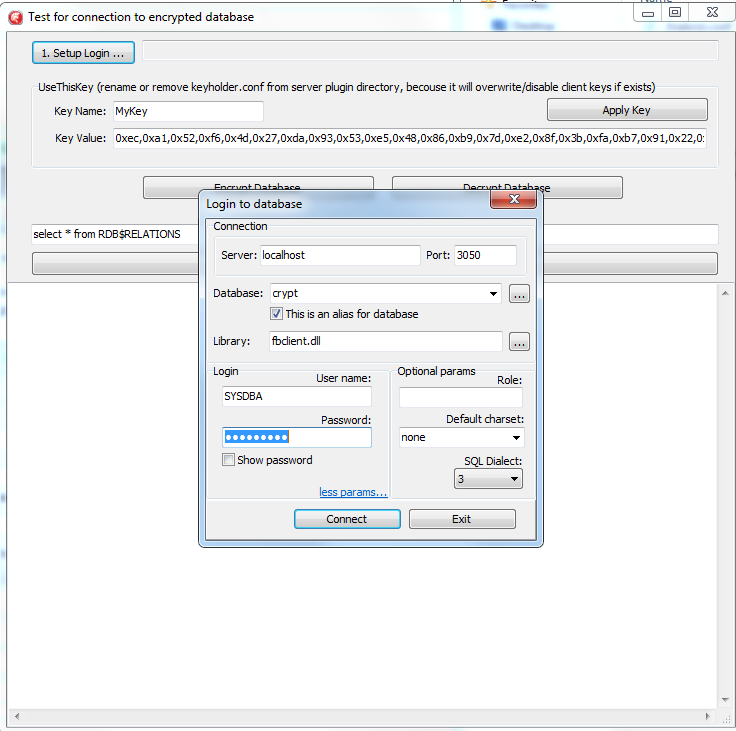
To mimic a customer site, rename or remove plugins/KeyHolder.conf. The plugin then expects the key from the application. ExampleApplications.zip has a compiled Delphi XE8 client plus Lazarus, .NET, and PHP samples.
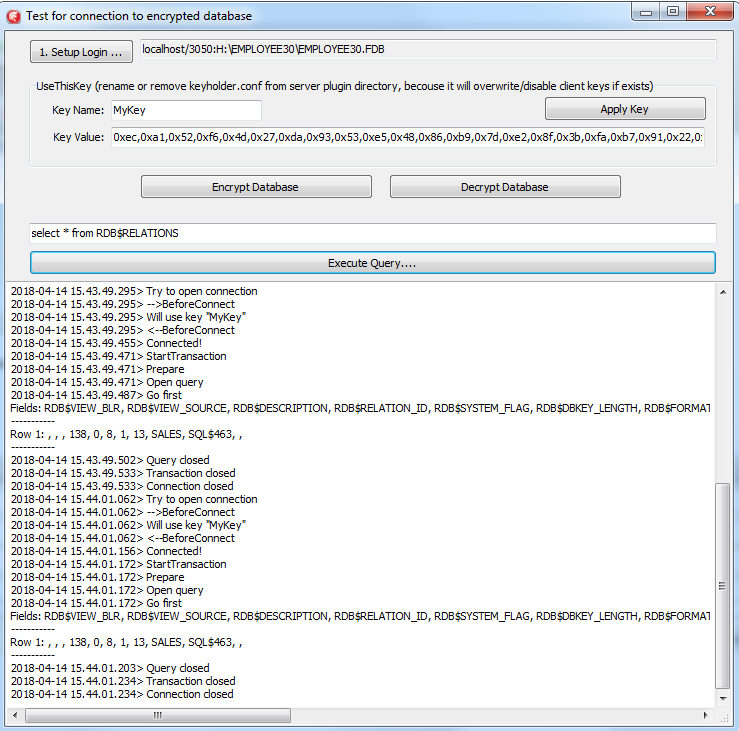
Before the usual connect, the app sends the key (a few extra calls). After that, Firebird use is unchanged. The Delphi demo is under Example_Delphi_EnhancedCryptTestClient\Win32\Debug:
- Set the database path or alias under “1. Setup Login”.
- Enter the key name and value (for key RED, copy the value from
KeyHolder.conf). - You can encrypt/decrypt with that key - encryption needs an active connection and takes time.
- Click Execute query to run a simple SELECT through the encrypted connection.
The demo connects over TCP/IP only - XNET is not supported. The sample keeps connect, transaction, and query steps explicit so you can copy the pattern.
Step 3 - Developer tools and command-line
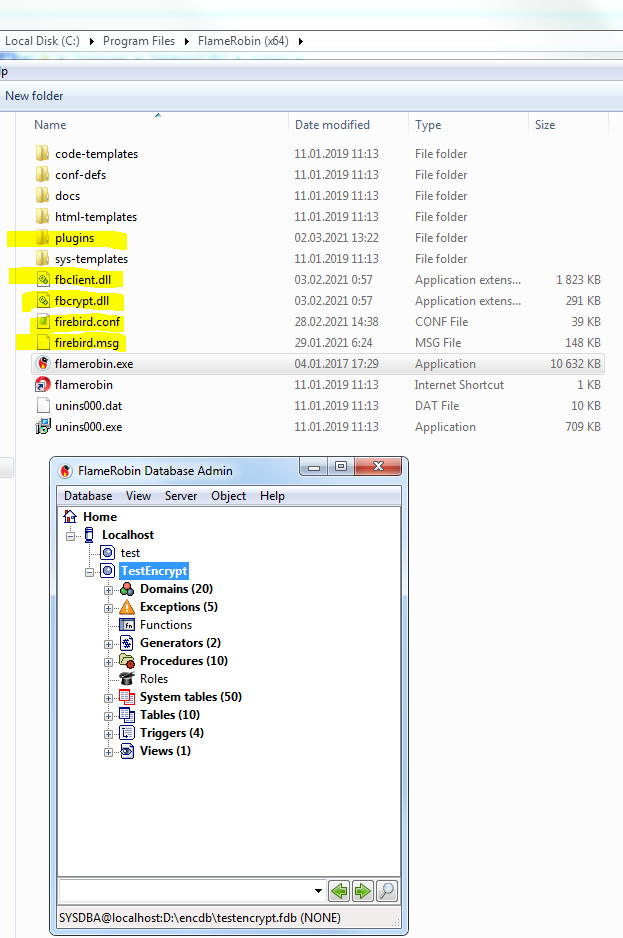
From Encryption Plugin Framework v2021, fbclient.dll can load keys itself. IBExpert, FlameRobin, SQLLY, Database Workbench, RedExpert, gfix, nbackup, and similar tools then work without code changes.
Match client bitness:
- Firebird command-line tools (
isql,gfix,nbackup) match the server - copyWindows_64bit\WindowsClientPart_64bitnext to those binaries. - Most GUI tools are 32-bit - copy
Windows_32bit\WindowsClientPart_32bitinto the tool’s folder.
Command-line tools then use plugins\KeyHolder.conf beside that copy of fbclient. Other apps still pass the key themselves.
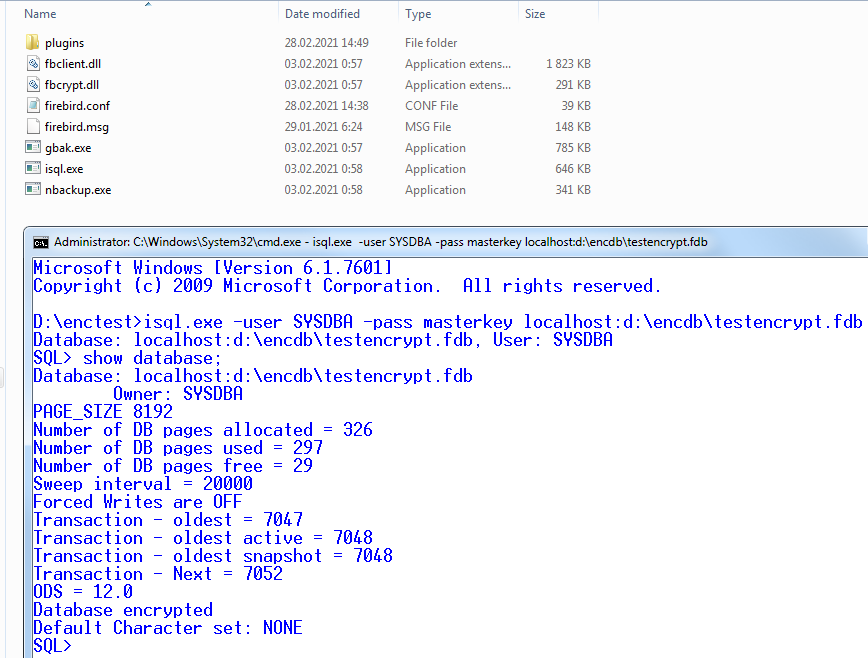
- The tool starts and loads
fbclient.dll. fbclientreadsfirebird.conf, seesKeyHolderPlugin=KeyHolder, and loadsplugins\keyholder.dll.- KeyHolder reads
KeyHolder.conf(e.g. key Red). isqlconnects and canSHOW DATABASE.
gbak: client-side key load produces an unencrypted .fbk. Use the framework gbak with explicit -KEYFILE / -KEYNAME / -KEY so the backup stays encrypted.
nbackup: incremental copies stay encrypted.
Step 4 - Backup and restore
Stock gbak cannot open a production encrypted database (no keys on the server, no key from the client). The framework ships a gbak that encrypts the backup with the same key as the database. gbak -? adds:
-KEYFILE   name of a file with DB and backup crypt key(s)
-KEYNAME   name of a key to be used for encryption
-KEY       key value in "0x5A," notation
Backup
Supply the key so gbak can read the database and encrypt the .fbk - either a key file (same layout as KeyHolder.conf) or an explicit value. Backing up an unencrypted database with these switches still produces an encrypted backup.
gbak.exe -b -KEYFILE h:\Firebird\examplekeyfile.txt -KEYNAME RED localhost:h:\employee_30.fdb h:\testenc4.fbk -user SYSDBA -pass masterkey
gbak -b -KEY 0xec,0xa1,0x52,0xf6,0x4d,0x27,0xda,0x93,0x53,0xe5,0x48,0x86,0xb9,0x7d,0xe2,0x8f,0x3b,0xfa,0xb7,0x91,0x22,0x5b,0x59,0x15,0x82,0x35,0xf5,0x30,0x1f,0x04,0xdc,0x75, -keyname RED localhost:h:\employee30\employee30.fdb h:\testenc303.fbk -user SYSDBA -pass masterkey
With -KEY you must still pass -KEYNAME.
Restore
Same idea: key file or explicit key. Restoring an unencrypted backup with these switches creates an encrypted database.
gbak -c -v -keyfile h:\Firebird\examplekeyfile.txt -keyname white h:\testenc4.fbk localhost:h:\employeeenc4.fdb -user SYSDBA -pass masterkey
gbak -c -v -key 0xec,0xa1,0x52,0xf6,0x4d,0x27,0xda,0x93,0x53,0xe5,0x48,0x86,0xb9,0x7d,0xe2,0x8f,0x3b,0xfa,0xb7,0x91,0x22,0x5b,0x59,0x15,0x82,0x35,0xf5,0x30,0x1f,0x04,0xdc,0x75, -keyname RED h:\testenc4.fbk localhost:h:\employeeenc4.fdb -user SYSDBA -pass masterkey