HQbird 2027 cluster on Linux: master and replica with RCM
Other languages: Русский, Português.
This guide goes from two clean servers to a working Firebird 5.0 replica.
You do everything in the browser, in the RCM console, except the
installation and one folder. The screenshots come from the run of
2026-11-17: kit 2027.2.33, RCM and nodes 2027.5.12, Ubuntu 24.04, the
English UI. The report of the earlier run of 2026-11-08:
hqbird2027-rcm-cluster-check-report.ru.md
(Russian, section “Прогон 2”). Commands only, without screenshots:
hqbird2027-linux-cluster-runbook.md. Each RCM page in detail:
the RCM user guide (repository hqcluster-node, docs/user-guide/).
This guide is for kit 2027.2.24 and later. For kit 2027.2.22, see the edition of this file from 2026-11-07 in the git history.
The kit to download is 2027.2.33 (2026-11-16): agent 3.4.0, HQ Monitor 1.57.0, RCM and nodes 2027.5.12, Firebird 5.0.5.1917. This guide was checked with it on 2026-11-17 (two servers, Ubuntu 24.04, databases of 3 MB and 167 MB): all steps passed. The text names the results of that run as “the run of 2026-11-17”. The screenshots come from a second pass of that day with the same kit (databases of 3 MB and 2.88 GB). The other numbers still come from the run of 2026-11-08. What the kits after 2027.2.27 changed for a cluster:
| Kit | Change |
|---|---|
| 2027.2.29 (agent 3.1.0, RCM 2027.5.9) | No cluster by default (see below). Several agents of one host can join a cluster: each has its own pairing port (7450–7459) and node port. fbagent --cluster-leave. The Clusters page of HQ Monitor |
| 2027.2.30 (RCM 2027.5.10) | Switchover and failover of a service, routers |
| 2027.2.31 (agent 3.3.0, RCM 2027.5.11) | The installer opens a text interface in a terminal (step 1). The Services pages of RCM. A server that is attached to no HQCenter updates the agent, HQ Monitor and fbmcp by itself |
| 2027.2.33 (agent 3.4.0, RCM 2027.5.12) | RCM sends its alerts to Telegram, a webhook or e-mail (“What to watch next”). A cluster of two Docker containers: Docker guide |
All changes: What’s New.
Kits with agent (fbagent) 3.1.0 and later (from 2027.2.29) make no cluster by default: no RCM, no pairing window, and the cluster ports stay closed in the firewall. In step 1 you turn on RCM on the master and discovery mode on the replica.
Time: ≈30 minutes plus the copy of the databases (≈1 minute per 3 GB on a 1 Gbit/s network).
What you get
| Server 1 | Server 2 | |
|---|---|---|
| Role | master + RCM console | replica |
| Databases | /databases/master/*.fdb |
/databases/replica/<replica node>/<master node>/*.fdb |
| Services | firebird, hqbirdfbagent-fb50, hqbirdmonitor-fb50, fbmcp, hqbirdrcm, hqclusternode-master-p3050 |
the same, but hqclusternode-replica-p3050 and no hqbirdrcm (an older kit leaves its own RCM there, stopped) |
What you need
- Two Linux x86-64 servers (checked on Ubuntu 24.04), 2 cores, 4 GB of memory.
- Disk space. Master: free ≥ 105 % of the database size (the
.deltafile grows during the lock). Replica: free ≥ 105 % of the database size plus the floorlimits.free_space_floor_gb(default 1 GB). A reinit over an existing replica keeps the old file until the end, so the replica volume needs about 2 × the database size. With the Remove the old replica if space is short box (step 8), 105 % plus the floor is enough. - Network between the servers: ports 3050, 7051, 7443, 7444, 7450. These are the ports of the first instance of a server (slot 0). A second instance of a server uses the pairing port 7451 and the node port 7052.
- Your PC can reach port 7444 of the master (the RCM console), directly or through an SSH tunnel.
- A user with
sudo.
Firewall. The installer opens ports in an enabled firewalld or ufw (with any system language): 3050 and 23050 always, the cluster ports only for the options of step 1. Master: 7443, 7444, 7051. Replica: 7450, 7051. The agent closes 7450 again when the pairing window ends or the host is linked. On Ubuntu, ufw is usually disabled. Then the installer writes one line, for example on the master:
no active firewall (firewalld or ufw): ports 3050, 23050, 7443, 7444, 7051/tcp are not opened by this install; they are reachable from every network; close them or enable a firewall. In a cloud, close the ports with the cloud firewall: from outside, only your address; between the servers, the internal network.
Below are the addresses of the run: master 10.114.0.5, replica
10.114.0.6 (private network). Use your own addresses.
Step 1. Install on both servers
On each server:
V=2027.2.33
wget https://ib-aid.com/download/hqbird/v2027/hqbird2027-fb50-linux-$V.run
wget https://ib-aid.com/download/hqbird/v2027/hqbird2027-fb50-linux-$V.run.sha256
sha256sum -c hqbird2027-fb50-linux-$V.run.sha256
sudo sh hqbird2027-fb50-linux-$V.run
In a terminal, the installer opens its text interface (kits from
2027.2.31). The first page has the line Cluster RCM off, discovery mode off. Open Cluster and change one line:
| Line of the Cluster page | Master | Replica |
|---|---|---|
| Cluster manager (RCM) | on |
off |
| Discovery mode (24 h) | off (this agent runs the RCM) |
on |
The lines Cluster id (default: the host name), RCM admin password
(default: generated) and Pairing port (default: the first free one,
7450) can stay as they are. Go back (Esc) and choose Install. The
installer shows the plan: press Enter. Then it asks Nothing on this host was changed yet. Start the install now?. The cursor is on No: move it
to Yes and press Enter. The installer adds missing libraries (for
example, libtommath1) itself. The text interface in full:
hqbird2027-linux-setup-guide.md.
With --no-tui, and in kits 2027.2.29–2027.2.30, the installer asks
questions. The first one is Install as planned? Yes/No: answer y. Then
it asks two cluster questions. The answer is No by default (Enter):
| Question | Master | Replica |
|---|---|---|
Install the cluster manager (RCM) on this host and make a new cluster? [y/N] |
y |
Enter (No) |
Turn on discovery mode for 24 hours (an RCM on the network may invite this agent into its cluster; port 7450)? [y/N] |
not asked: this agent runs the RCM | y |
Or give the answers as options: in a terminal they set the values of the
Cluster page before it opens. Use them also for a run without a terminal:
--yes alone means No for both.
sudo sh hqbird2027-fb50-linux-$V.run --rcm on               # master
sudo sh hqbird2027-fb50-linux-$V.run --cluster-pairing on   # replica
The installation takes about one minute (the run of 2026-11-17: 61 seconds
on the master, 43 seconds on the replica). The end of the output on the
master with kit 2027.2.33 (the hash is shortened here; the cluster id of
the examples below is hq27d-m, from the run of 2026-11-08):
Done: agent hqbirdfbagent-fb50 in /opt/hqbird/fbagent-fb50, Firebird 5.0.5.1917 in /opt/firebird (port 3050).
HQ Monitor: http://localhost:23050/ (login admin; password in /opt/hqbird/conf/access.properties)
RCM:        https://10.114.0.5:7444 (cluster hq27d-m)
CA hash:    sha256:9754e0be…087cb195
Login:      rcmadmin
Password:   in /opt/hqbird/fbagent-fb50/clusterca/hq27d-m/rcm-initial-password (read it with sudo; RCM asks for a new one at the first login)
Pairing:    not needed: this agent runs the RCM; other agents link through it
fbmcp:      2027.2.24, service running; local only (remote mode: sudo fbmcp ctl hqbird-install --allow-from CIDR)
On the replica:
RCM:        off; turn it on in HQbird Monitor or with fbagent --cluster-init <id>
Pairing:    port 7450 open until 2026-11-09T16:25:27Z (fingerprint sha256:0d137a71…09fe44cf); an RCM may invite this host
An older kit prints Pairing: not opened (this agent runs the RCM) on
the master.
Write down the RCM: and CA hash: lines of the master and the
Pairing: line of the replica. You need the fingerprint in step 3.
Older kits (agent before 3.1.0, for example kit 2027.2.27) ask no cluster questions. They install RCM on every server and open the pairing window everywhere. Use the RCM of the master; the RCM of the second server stops by itself after the link.
Later, without the installer. In HQ Monitor of the server, open Clusters, section Cluster on this server. On the master: Enable the cluster console (RCM); HQ Monitor opens 7443 and 7444 in the firewall. On the replica: Open the pairing window for 24 hours. The same with commands, as the user of the agent:
cd /opt/hqbird/fbagent-fb50
sudo -u firebird ./fbagent --cluster-init hq27d-m     # master; open 7443 and 7444 yourself
sudo -u firebird ./fbagent --cluster-pairing on       # replica
While the pairing window is open, the agent opens its pairing port in the firewall. It closes the port when the window ends or the host is linked.
The output has no passwords. The RCM password is in the file from the
Password: line, the SYSDBA password is in
/root/fbagent-install-sysdba.txt, and the HQ Monitor password is in
/opt/hqbird/conf/access.properties.
You do not need to install a license: a new agent starts a 7-day trial itself, and the cluster nodes work.
Step 2. Sign in to RCM
Open the address from the RCM: line of the master. If port 7444 is closed
for your PC, use an SSH tunnel and https://localhost:7444:
ssh -L 7444:127.0.0.1:7444 <user>@<master>If port 7444 is busy on your PC, use another local port, for example
-L 17444:127.0.0.1:7444 and https://localhost:17444.
The browser warns about the certificate: the cluster CA signed the RCM
certificate. The sign-in page shows the Cluster CA hash: compare it with
the CA hash: line of the installer output. If they match, install the CA
certificate (the link Download the CA certificate (hqcluster-ca.crt) on
the same page) as trusted, or accept the warning. If they do not match, do
not sign in, and check the address.
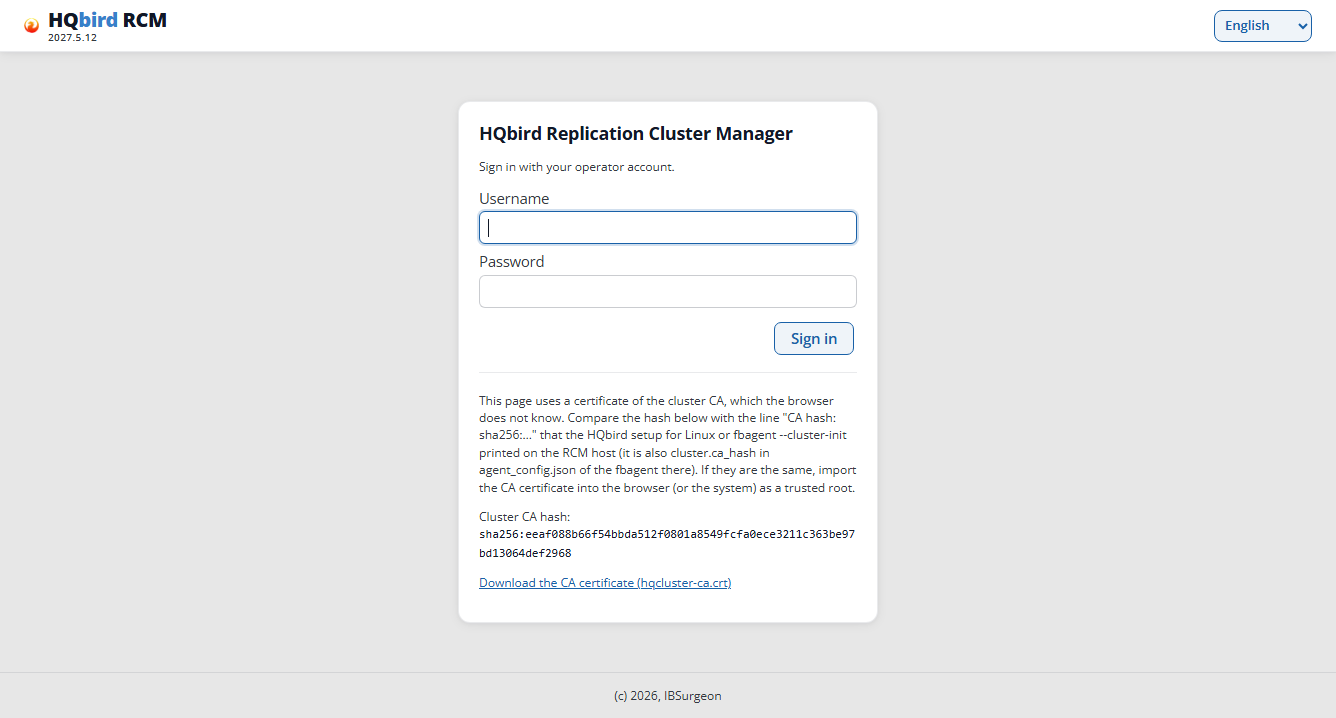
The username is rcmadmin. The password is in the file from the Password:
line:
# the path is from the Password: line of your output
sudo cat /opt/hqbird/fbagent-fb50/clusterca/hq27d-m/rcm-initial-password
RCM asks for a new password at once (at least 12 characters):
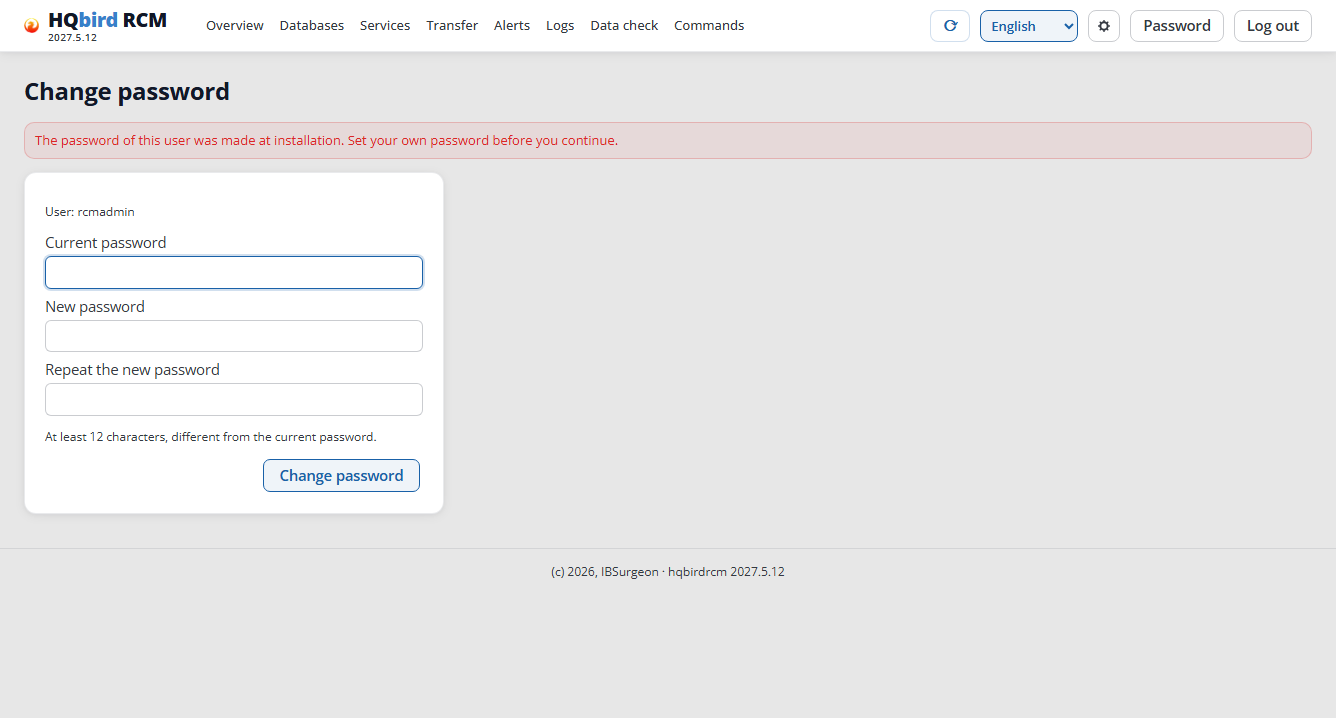
An RCM before 2027.5.12 could load this page again and again. RCM 2027.5.12 (kit 2027.2.33) has the fix.
After the password change, the agent of the master deletes the file
rcm-initial-password itself within one minute. With an older kit, the
second server has an RCM of its own too. After the link, the agent moves
that earlier cluster to the folder cluster/left/. Agent 3.1.0 deletes
its rcm-initial-password there; an older agent does not. Then delete the
file yourself:
# on server 2, after step 3
sudo find /opt/hqbird -name rcm-initial-password
sudo rm <path from the find output>
Do not delete the file /opt/hqbirdrcm/initial-admin.json: it holds
only the hash of the old password, and without it an RCM that lost its
user file starts with the default password.
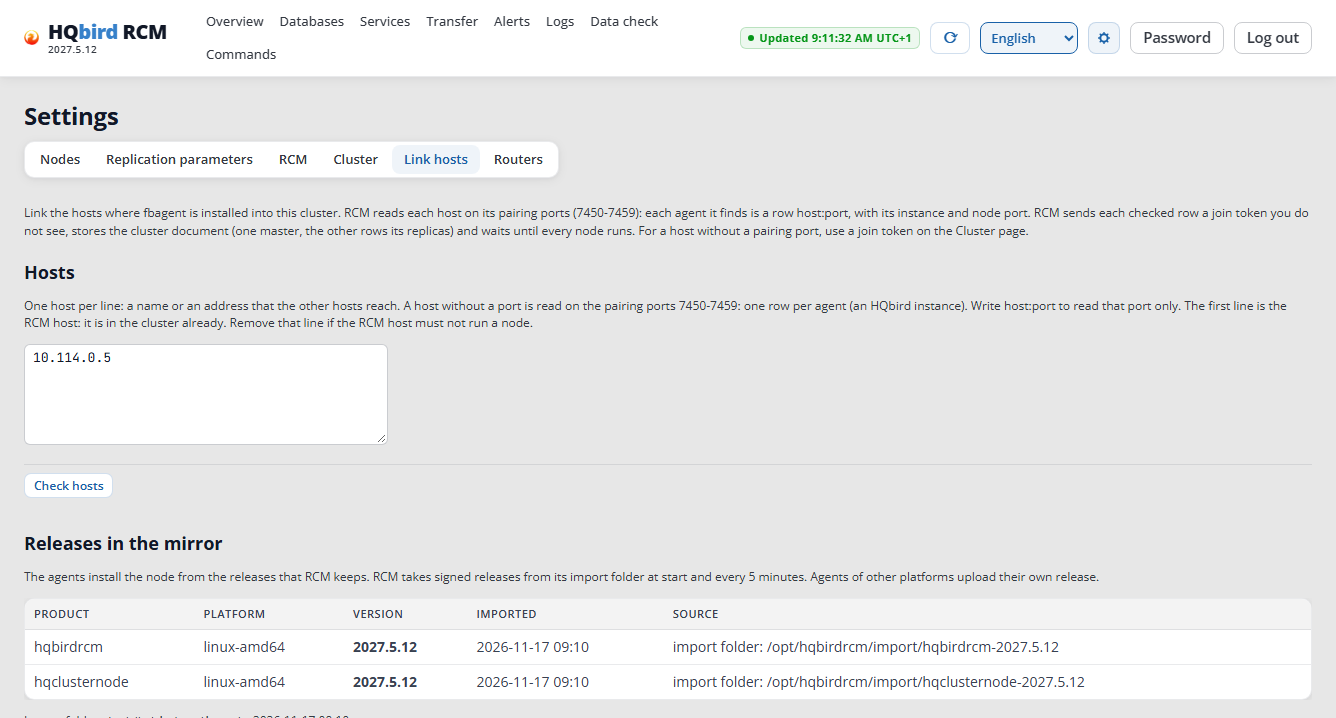
After the password change, RCM opens Settings → Link hosts at once: the
cluster has no nodes yet. The Releases in the mirror list shows the
hqbirdrcm and hqclusternode releases from which the agents install the
nodes.
Step 3. Link the hosts
The first row of the list is already filled in (the RCM host). Add a second row: the replica address that the master can reach. Enter an IP if the servers have no common DNS: RCM keeps the string as it is, and the nodes find each other by it.
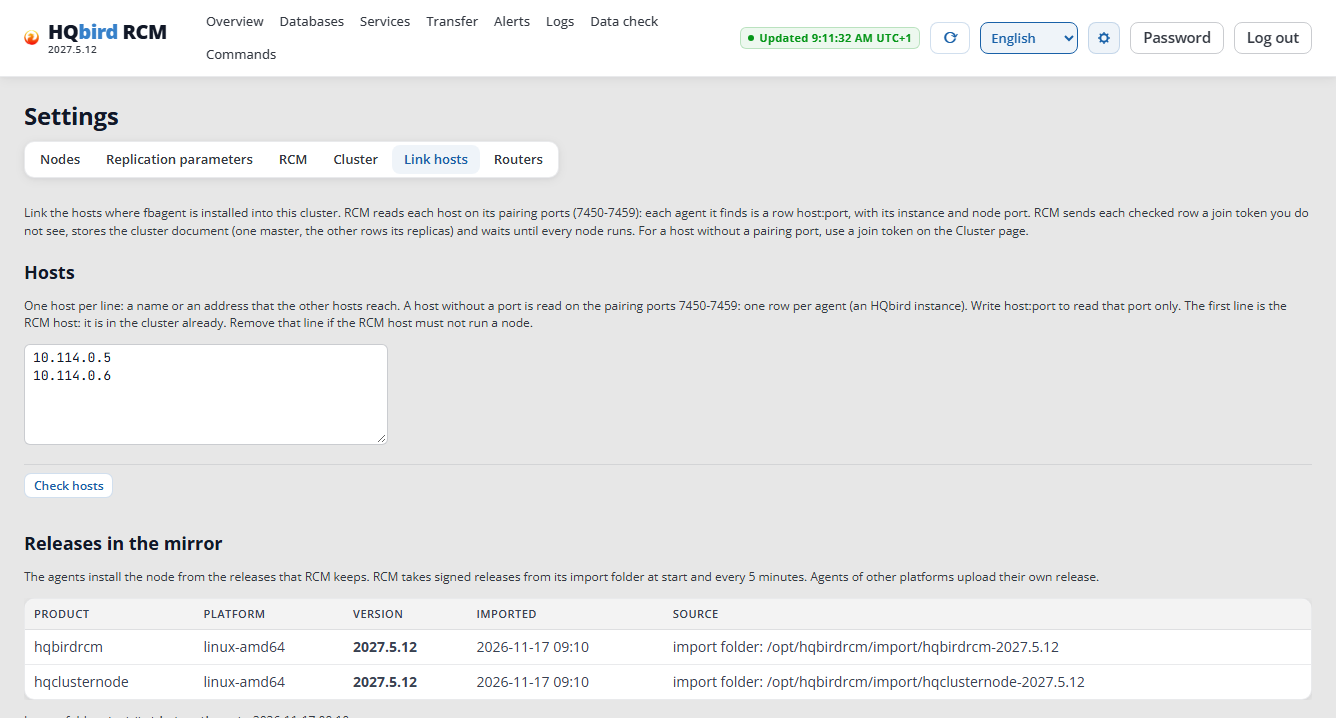
Click Check hosts. For a host without a port, RCM reads the pairing
ports 7450–7459 and shows one row for each agent that answers, as
host:port (here 10.114.0.6:7450). Write host:port to read one port
only. The RCM host needs no pairing window: RCM finds its agent in its own
registry. Compare the Certificate fingerprint with the installer output
(the Pairing: line of the replica): they must match. The state of the
second host is Ready to link.
The Member ID column shows the name that the host gets in the cluster:
<host name>-<role>, for example hq27d-m-master. The instance suffix
(-fb50) is added only when the host has several agents.
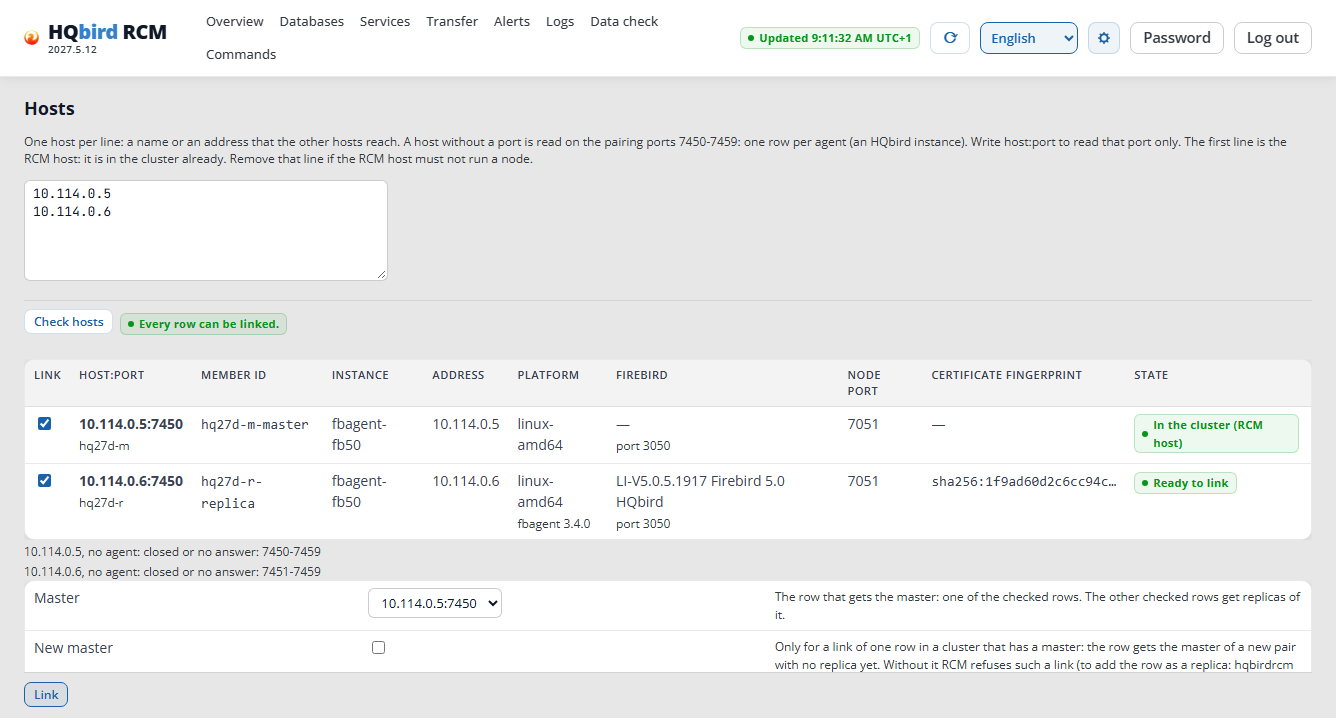
Each row has a checkbox, the port, the instance and the node port. Link takes only
the checked rows. A row in error cannot be checked and does not stop the
others. Under the table, RCM 2027.5.12 writes lines like 10.114.0.6, no agent: closed or no answer: 7451-7459: they name the pairing ports of the
host where no other agent answers. They are not errors.
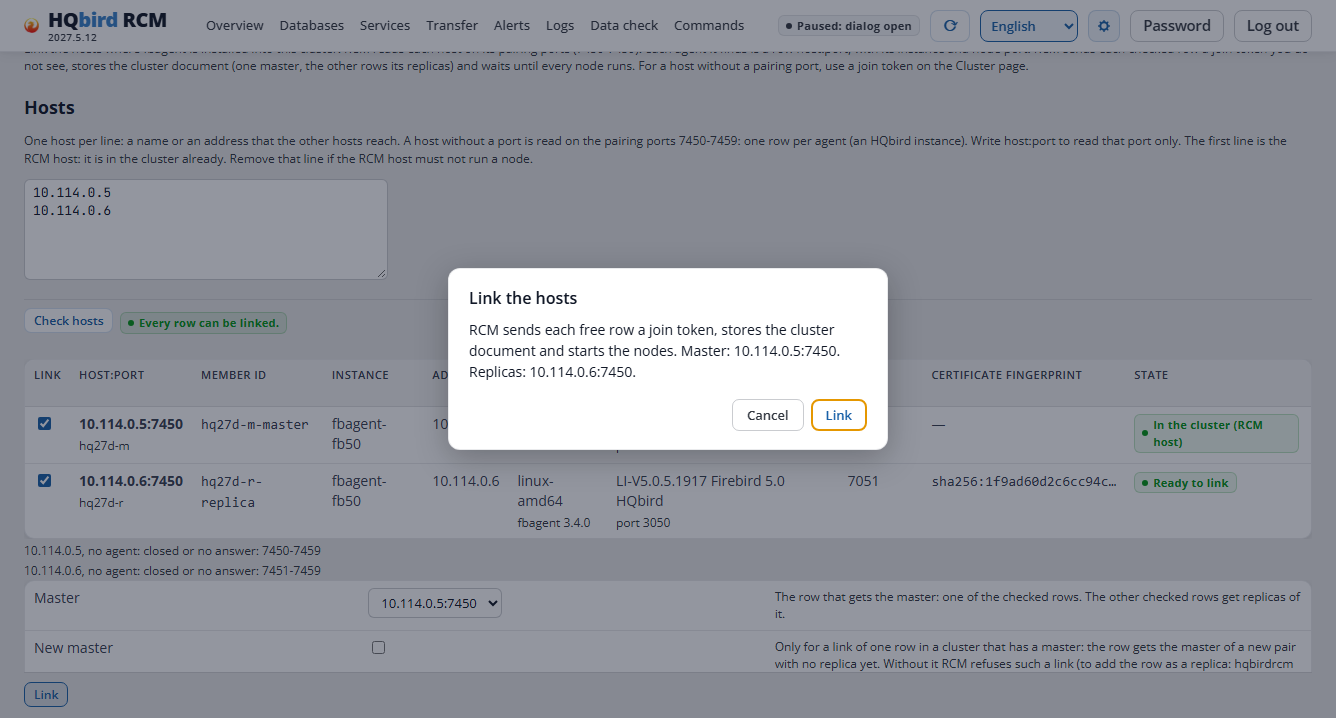
The master is the host where the production databases will be. Click Link and confirm:
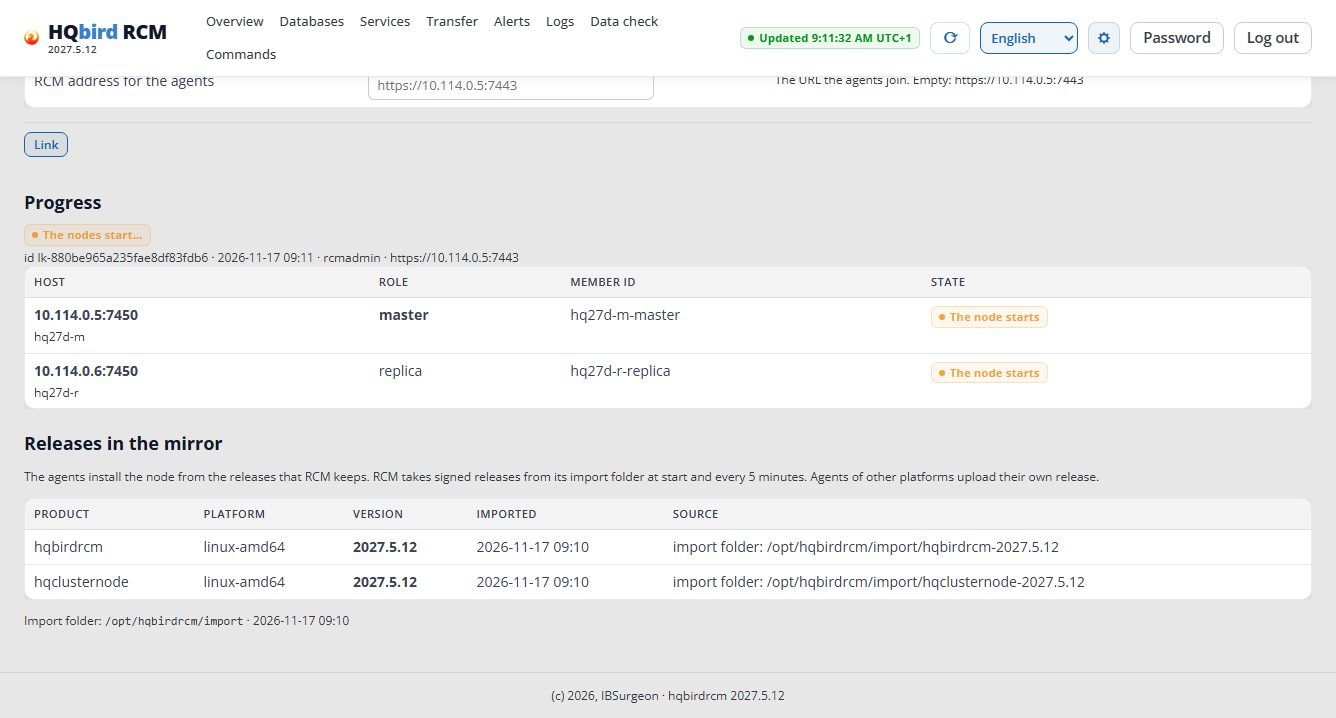
Progress: “Joining → Joined → The node starts → Running”. In the run, the link took 56 seconds (the run of 2026-11-17: 47 seconds).
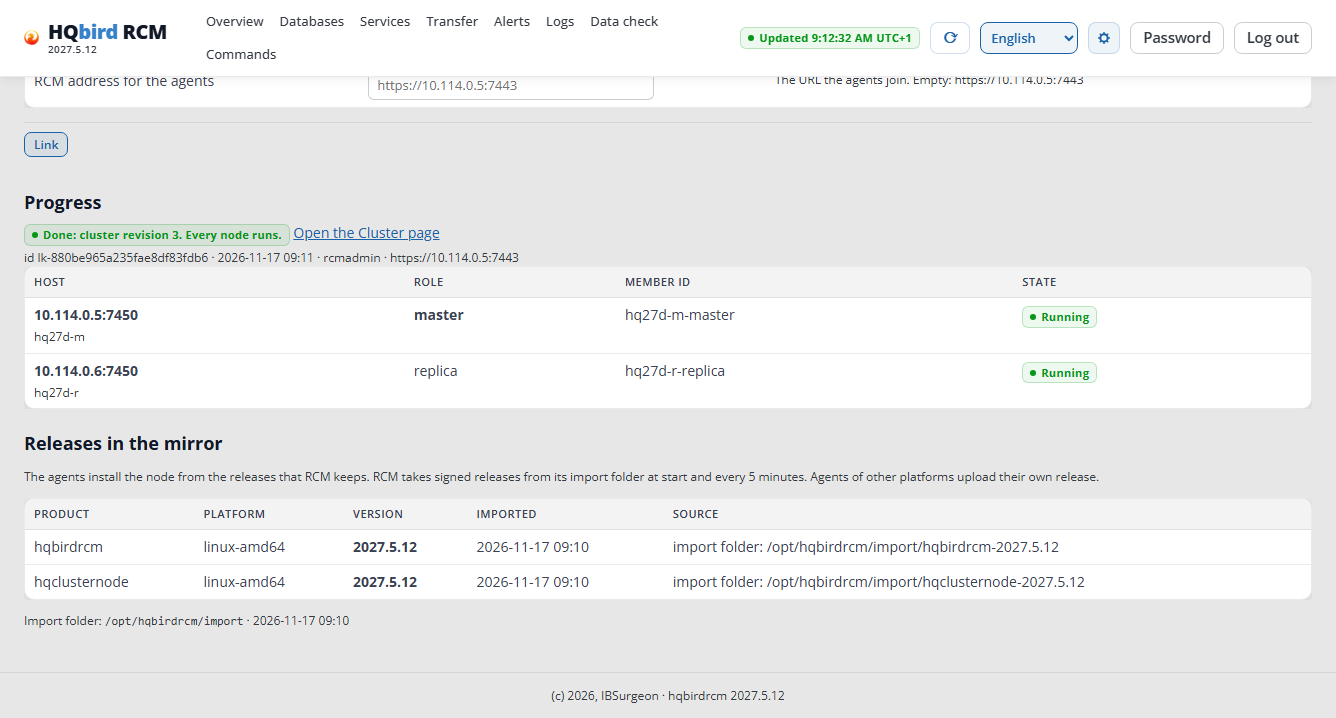
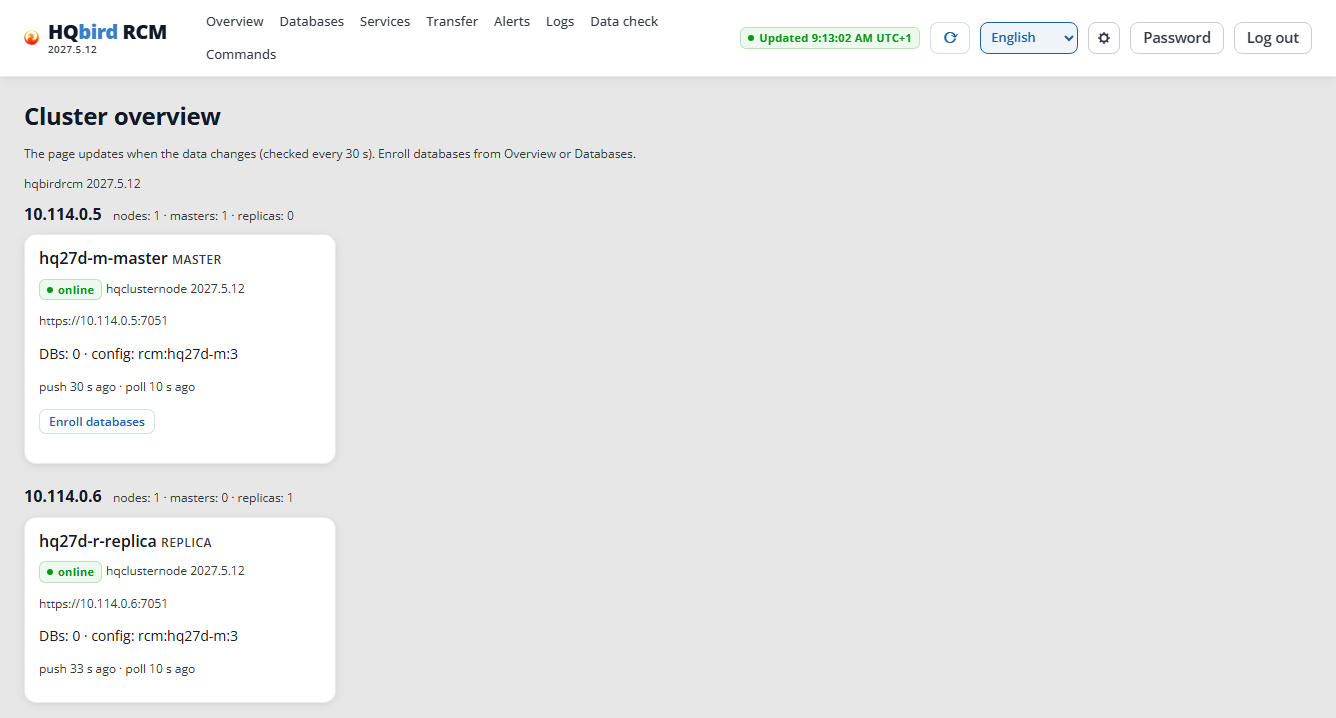
The Overview now shows two nodes: the master and the replica. Right after the link, the replica can be “stale” for one minute; then it is “online”.
If you click Check hosts again for a host that is already linked, it shows that no agent answers on the pairing ports, or that the host is unreachable: the pairing window on that host is closed, and so is its pairing port in the firewall. This is not an error.
One host into a cluster that has a master. A link of one row is refused
with lone_master: say what the row becomes. Add -replica-of <master member>
for a replica of that master, or -new-master (the checkbox on the Link hosts
page) for a master of its own.
Step 4. Database folder on the master
On the master, the database must be in a folder that the user
firebird can access:
sudo install -d -o firebird -g firebird -m 0770 /databases/master
# example: the sample database from the kit
sudo cp /opt/firebird/examples/empbuild/employee.fdb /databases/master/
sudo chown firebird:firebird /databases/master/employee.fdb
You do not need to prepare anything on the replica: the Create folder button in the Initialize dialog creates the folder for the copies (step 6).
Step 5. Enroll the databases on the master
Databases → in the Nodes table, in the row of the master → Enroll.
- Folder path on that server:
/databases/master, recursive. - Include file mask:
*.fdb. - Sync tracking tables: the tables whose row counts the Verify button compares. You set the list for each database that you enroll. Leave the field empty: then the database counts its publication tables. For a database that is already managed, change the list on the page of the master database.
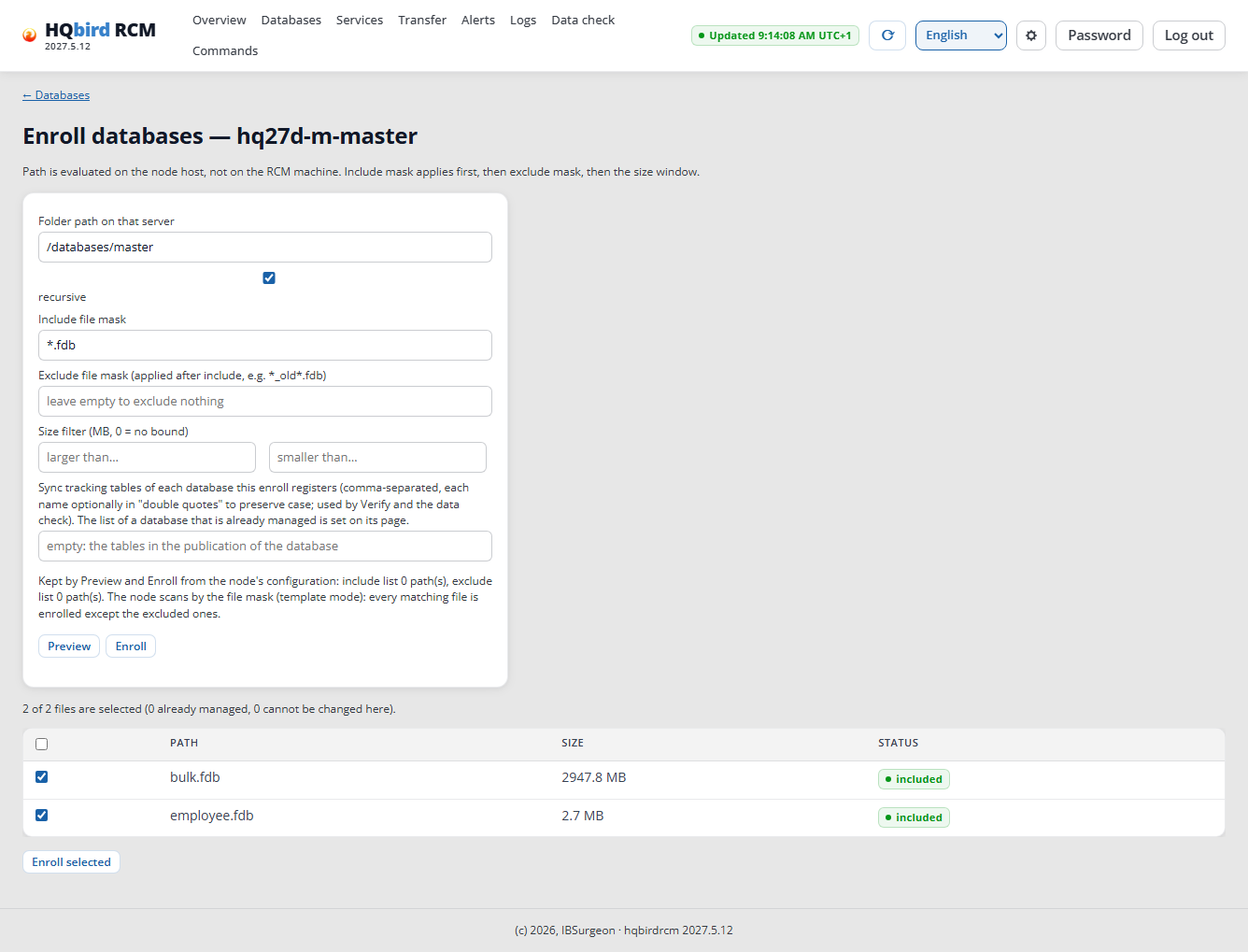
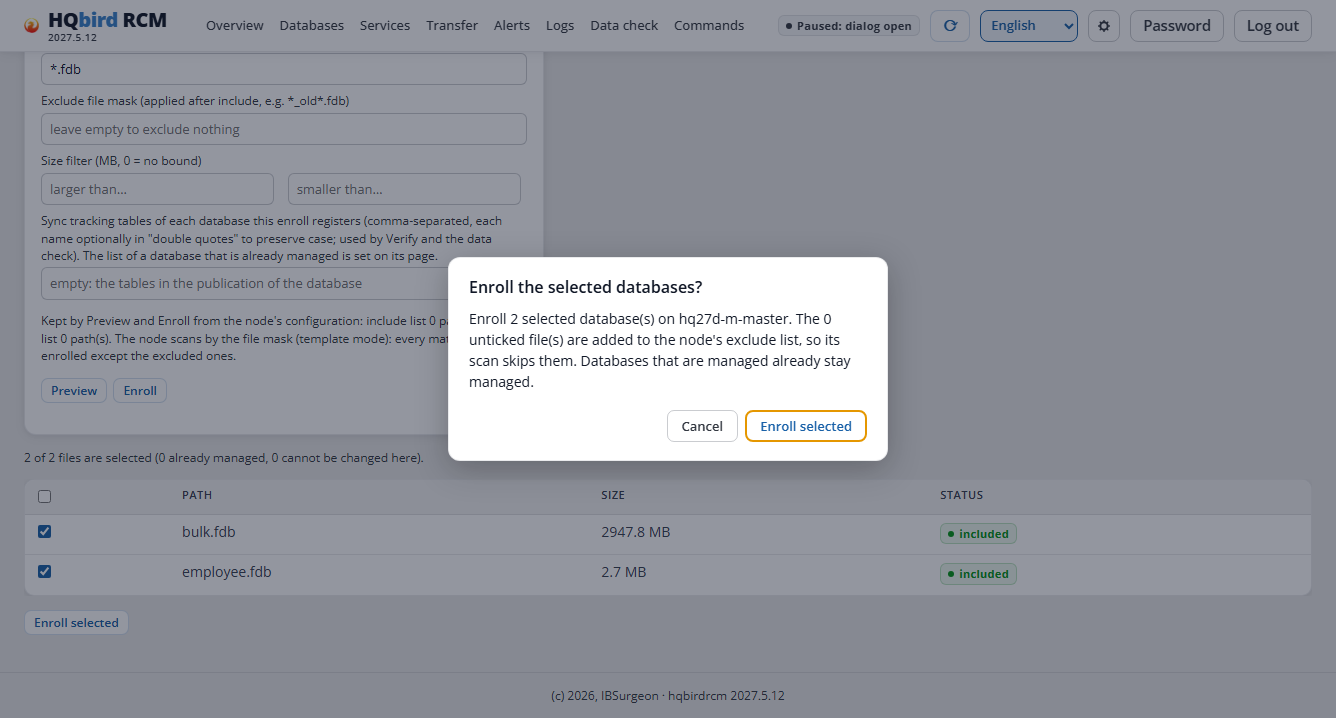
Preview → select the databases → Enroll selected and confirm.
The result is “Enrolled: 2.” and a hint: Firebird of the master must restart. The text “No new databases matched.” under it is not an error: the databases are already enrolled.
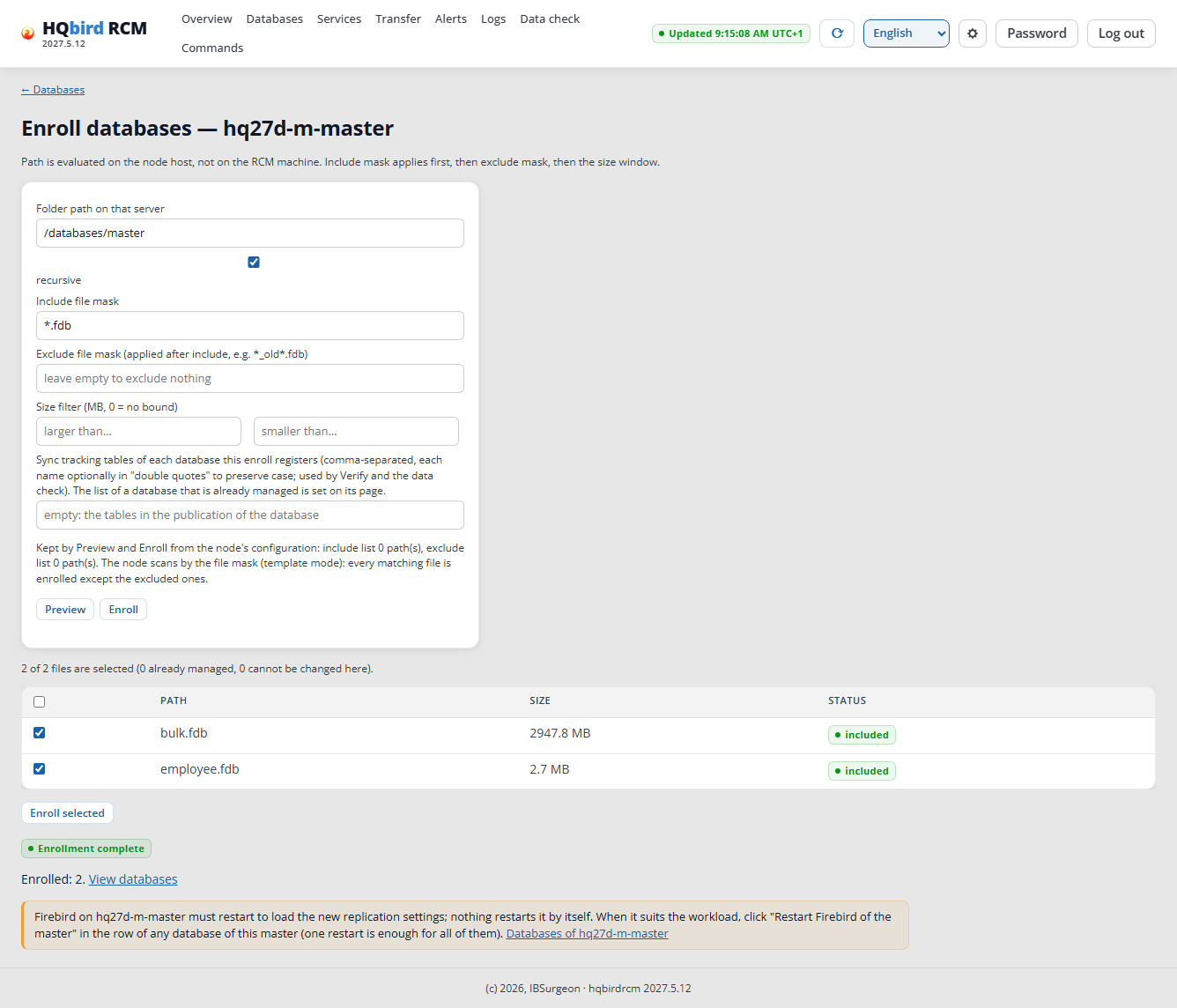
The databases wait for the restart:
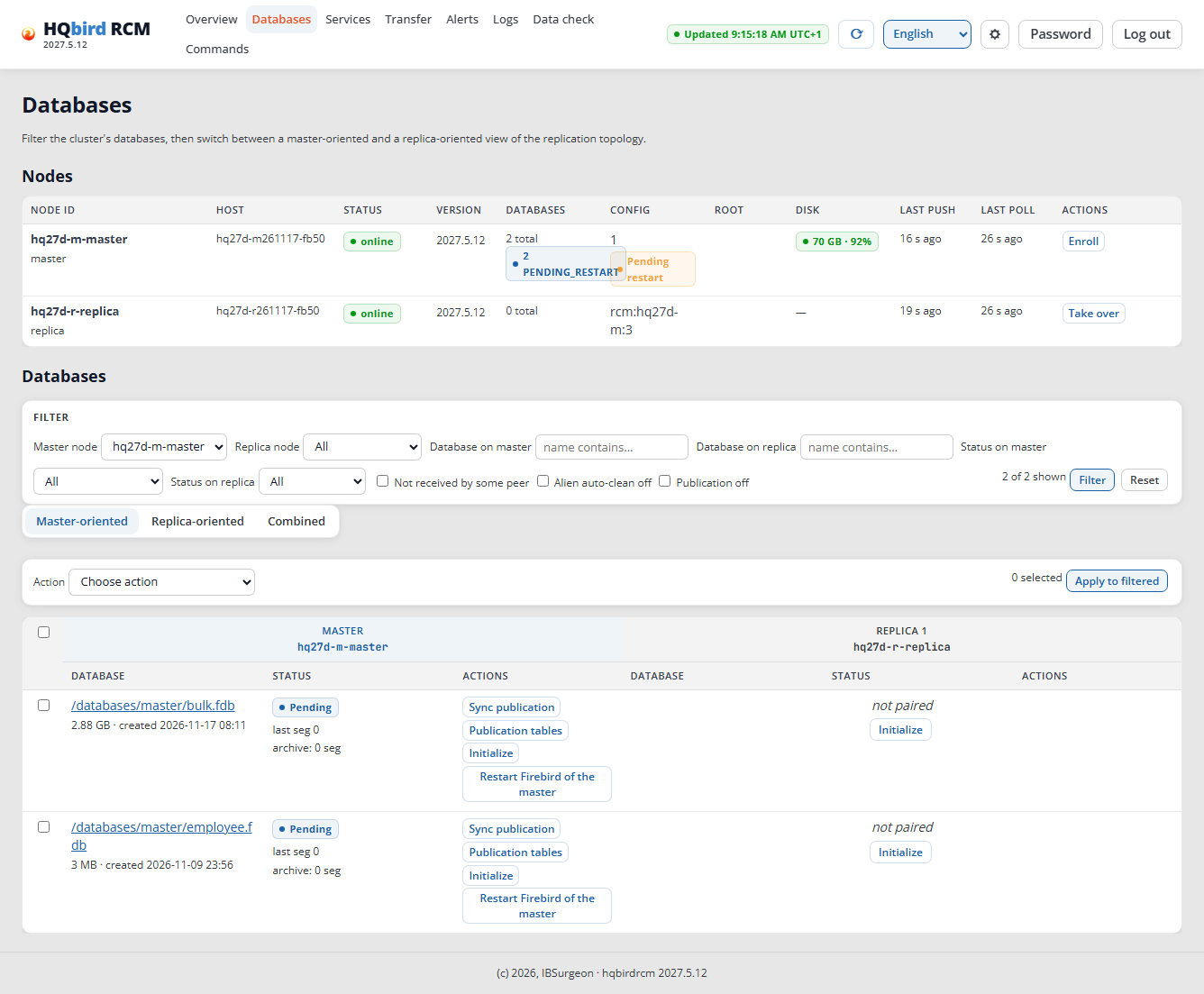
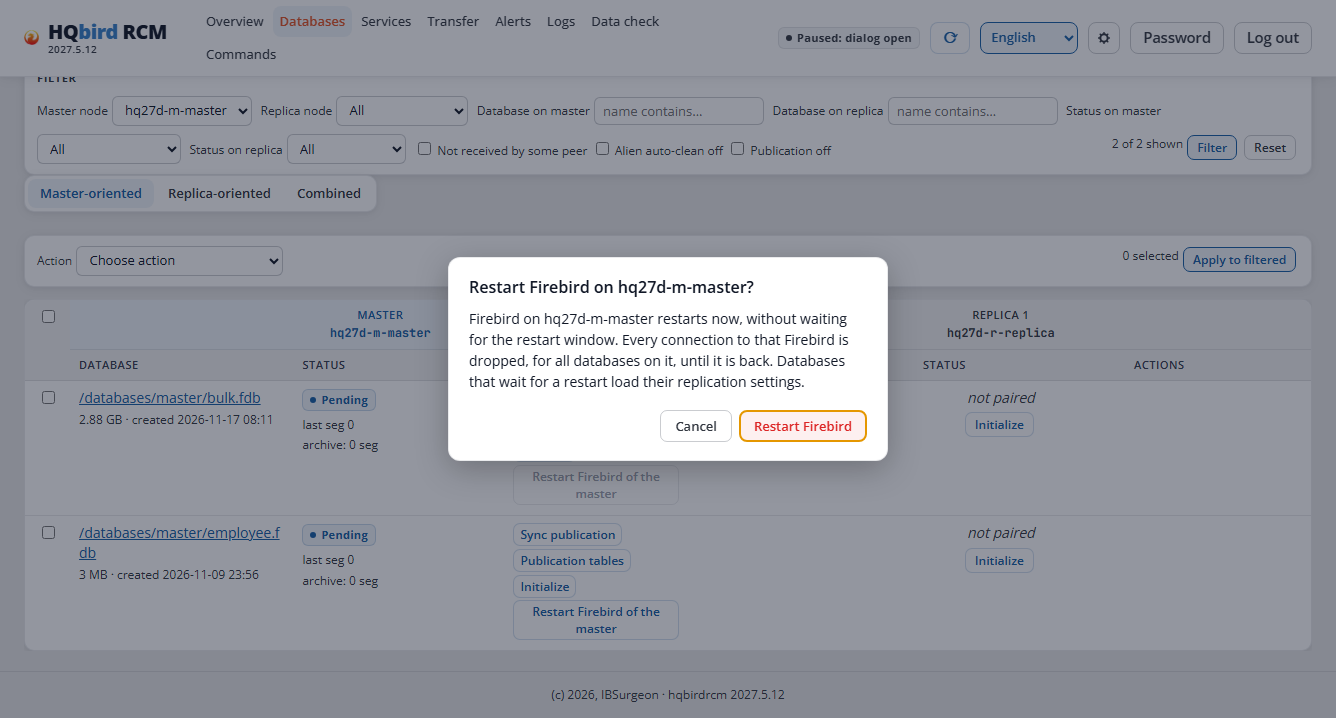
Click Restart Firebird of the master in the row of any database of the master (one restart is enough for all of them) and confirm. All connections to Firebird of the master break for a few seconds (4 seconds in the run): choose a good time.
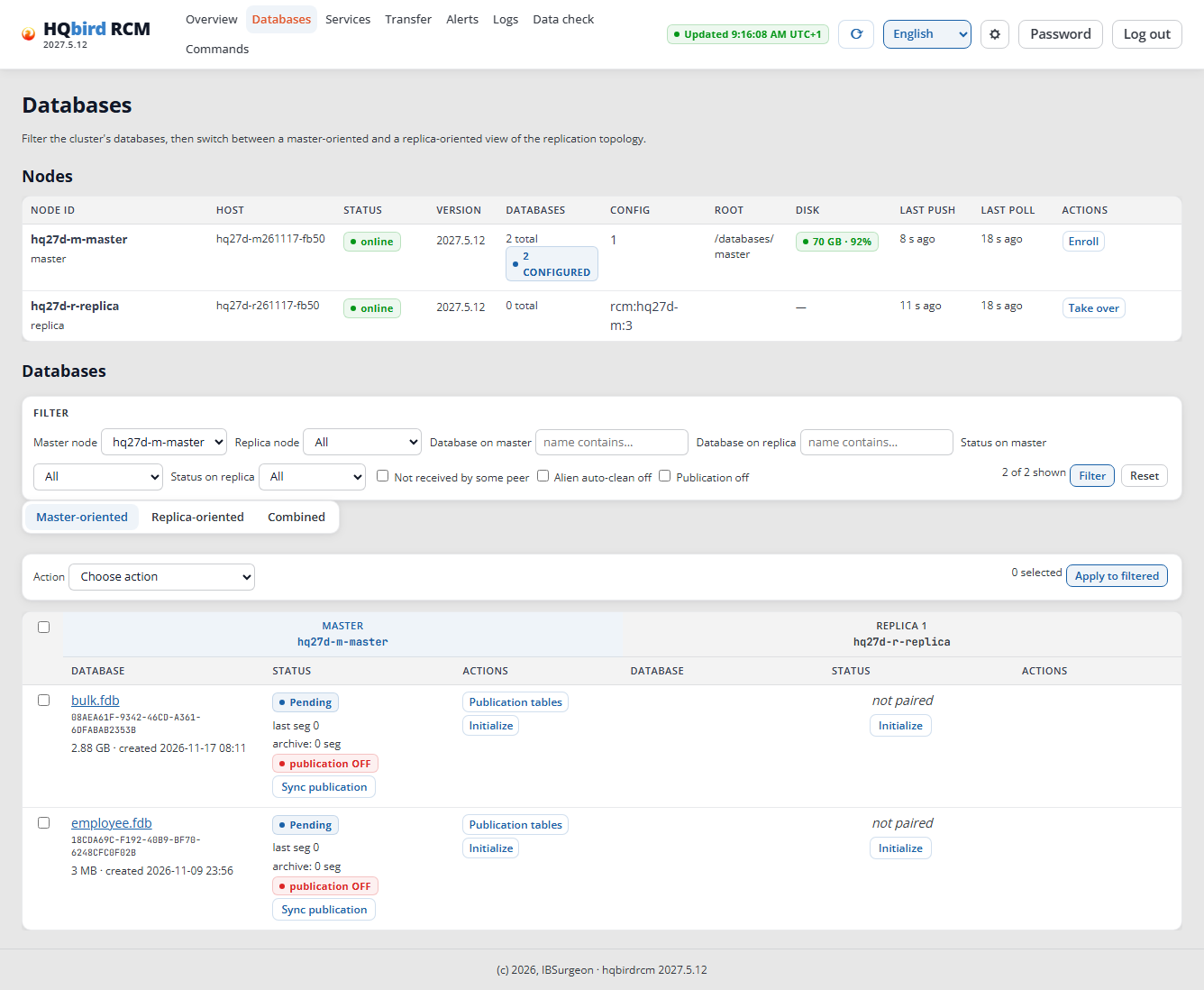
After the restart, the master node is CONFIGURED. Each database has the
badge publication OFF, and the replica shows “not paired”.
Step 6. Initialize the replica
In the database row, in the replica column → Initialize. The dialog has the title “Initialize database?”.
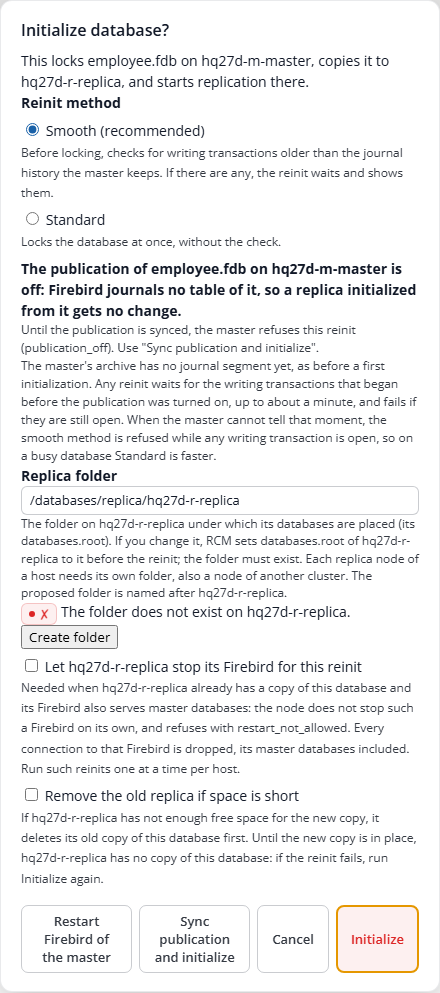
- Publication. While the publication of the database is off, Firebird
does not write the changes to the journal, and the replica gets nothing.
The dialog says so and shows a Sync publication and initialize
button. Click it: RCM adds all tables with a primary or unique key to the
publication and starts the initialization at once. The Initialize
button does not help while the publication is off: the master node
refuses (
publication_off). - Replica folder: the dialog proposes
/databases/replica/<replica node>, in the run/databases/replica/hq27d-r-replica. Each replica node of a host needs its own folder. Keep it. If the field shows “✗ The folder does not exist”, click Create folder; then you see “✓ The folder was created.” The copy goes to/databases/replica/hq27d-r-replica/hq27d-m-master/. For the next databases the folder is already set, and the dialog does not change it. - Method: Smooth (the default). It checks the writing transactions before the lock. Standard locks the database at once.
- You do not need the boxes “Let … stop its Firebird for this reinit” and “Remove the old replica if space is short” for a new replica.
Reconnect the applications after the first publication sync. A connection to the master database that was opened before the publication was turned on is not journaled until it connects again. In the run of 2026-11-17, a connection that was opened before Sync publication and initialize wrote about 9,500 rows after the copy, and the replica got none of them. RCM showed “Ok” for both sides; only Verify (step 9) showed “Not ok (desynced)”. Rows of a new connection replicated at once. So, after the first Sync publication of a database: reconnect the applications (or restart Firebird of the master), then run Verify without writes. If the replica misses rows, run a reinit (step 7).
First initialization under load. While the archive of the master has
no journal segment yet, Smooth can refuse if the database is being
written to. The database row shows
long_transactions: … the archive holds no segment yet and a hint in the
UI language:
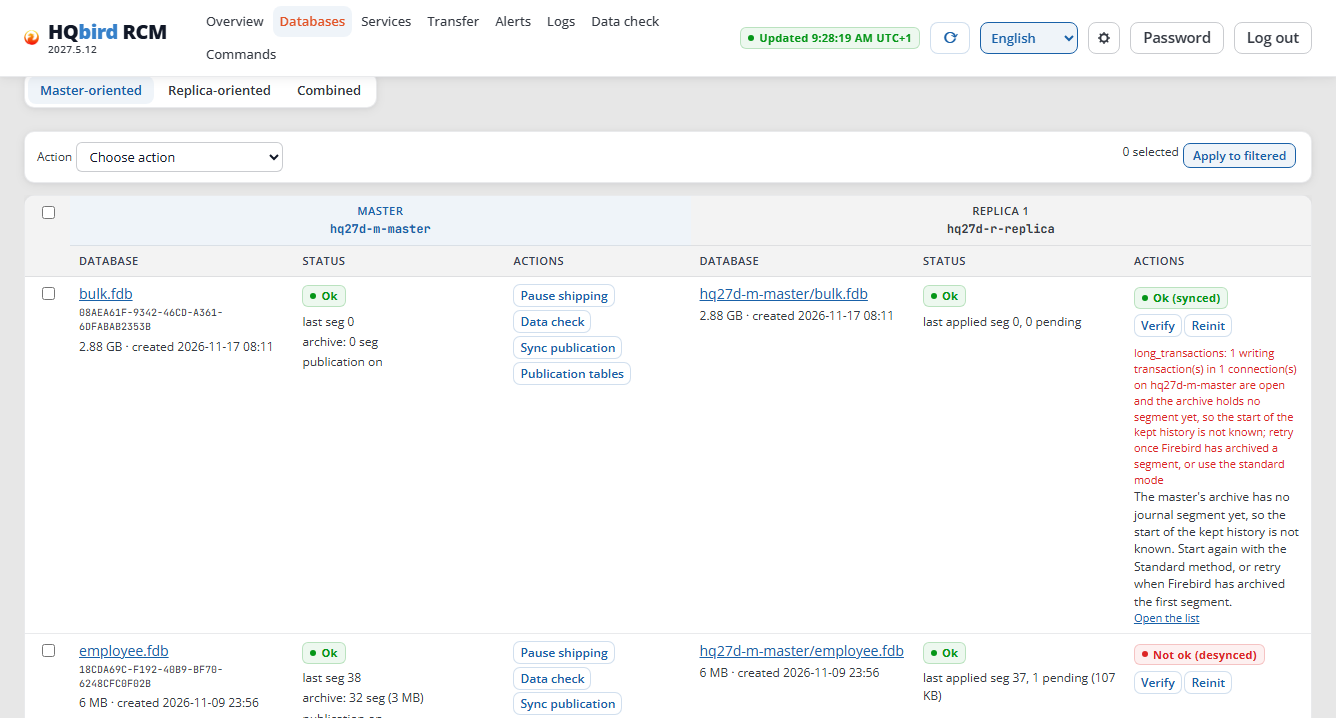
In the run, this happened also after Sync publication and initialize (finding G-04 in the report). The publication is already on at this point. Wait until the master database shows “archive: 1 seg” or more (15 seconds in the run), and click Initialize again with the Smooth method. Or choose Standard. In the run of 2026-11-17 (≈49 transactions/s from one connection), Smooth was not refused.
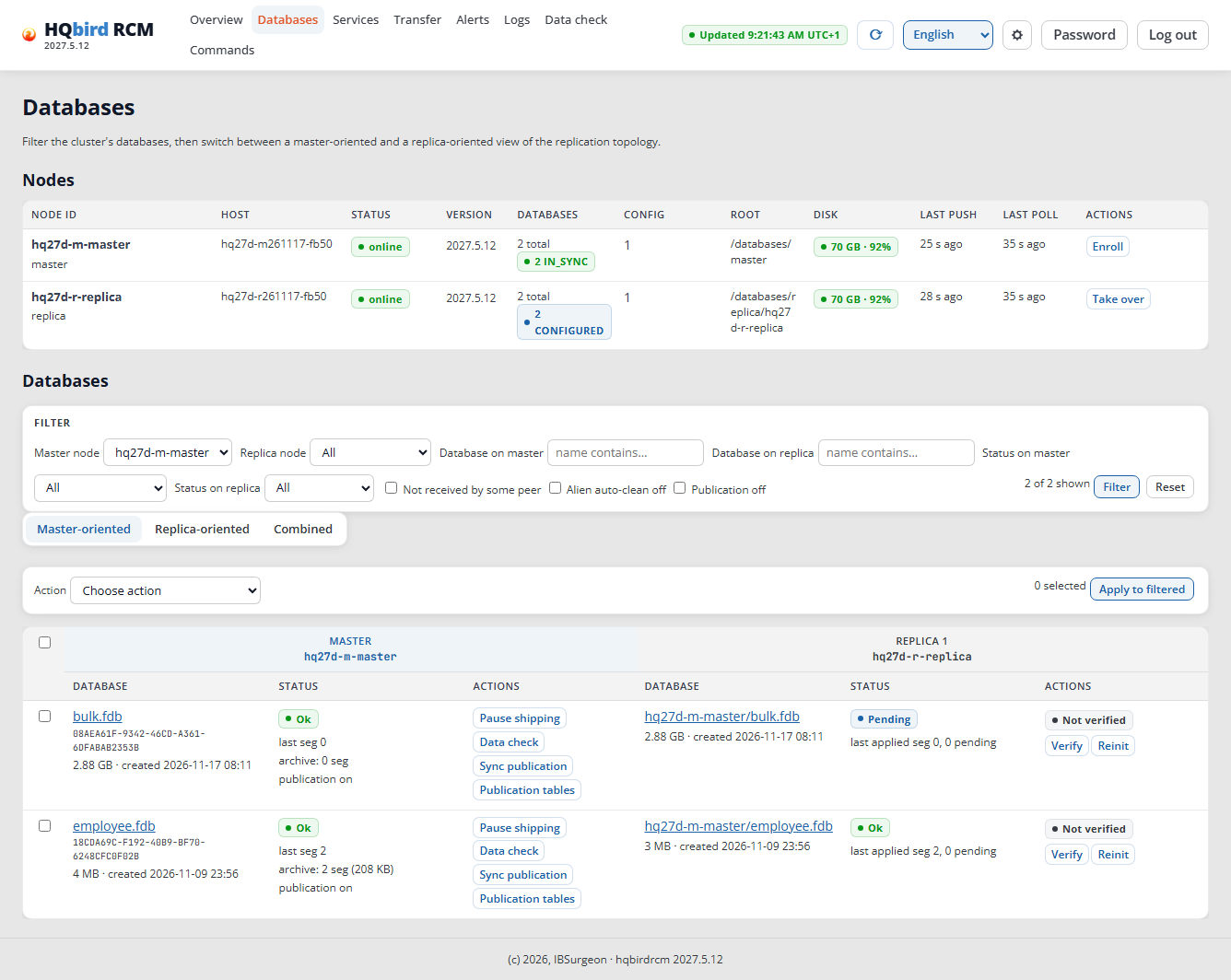
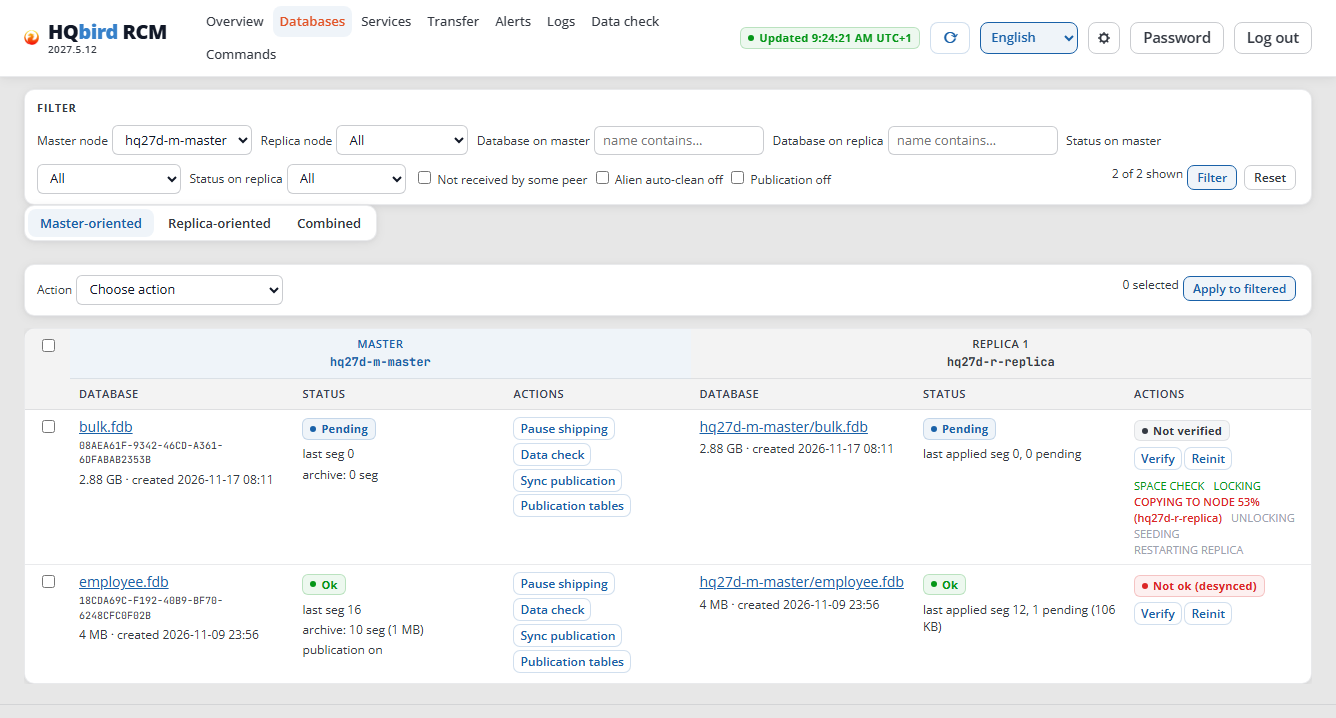
The progress shows in the database row: SPACE CHECK → LOCKING → COPYING TO NODE (%) → UNLOCKING → SEEDING → RESTARTING REPLICA. The progress is visible also after a page reload. The Initialize button is inactive during this time.
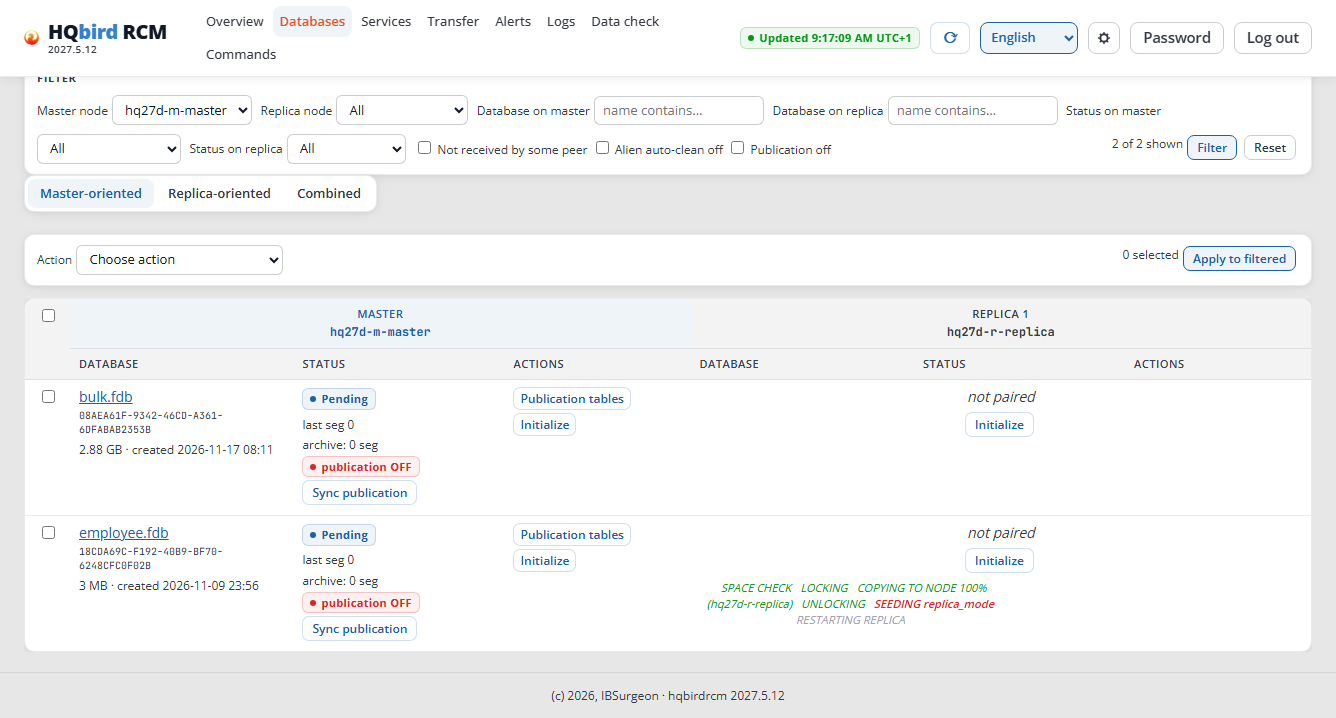
After the copy, the replica node restarts Firebird of the replica itself at the planned minute. The row says when; the Restart Firebird of the replica button does it at once. All connections to Firebird of the replica break at this moment.
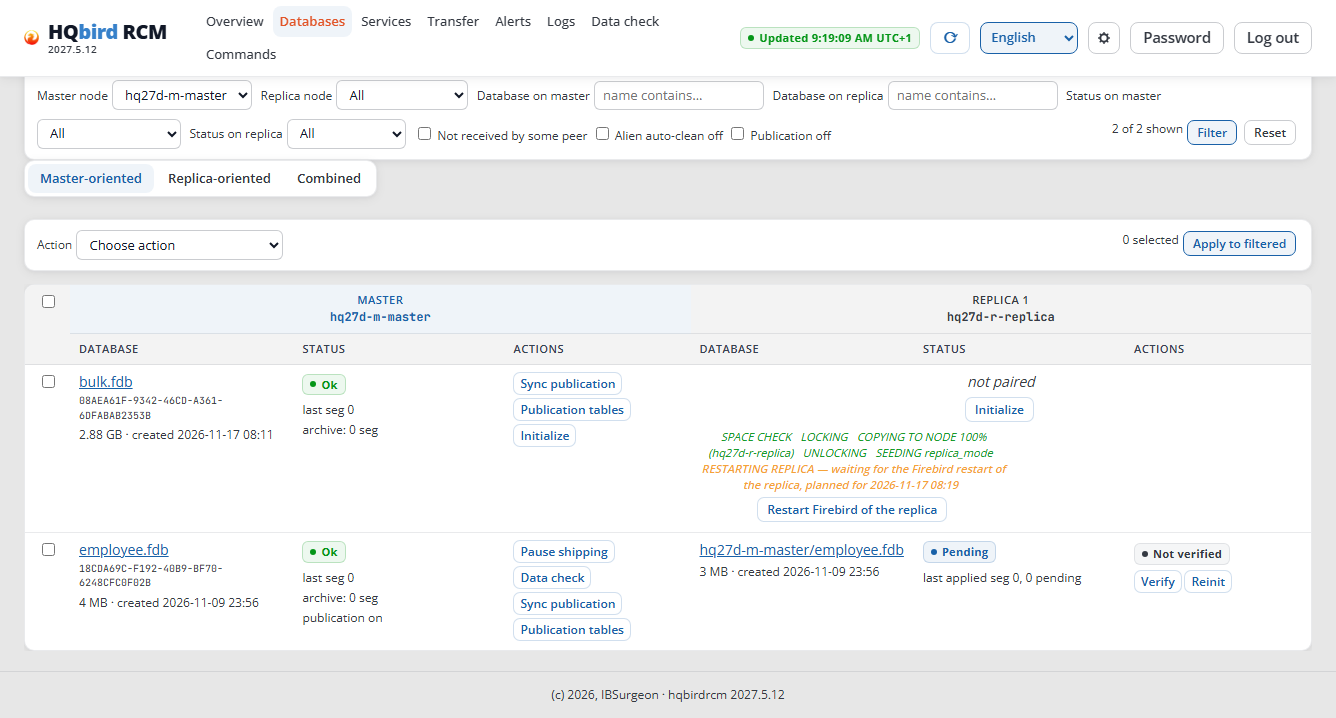
A large database works the same way. In the run, bulk.fdb (3.13 GB) was
initialized with the Sync publication and initialize button, with no
load on it:
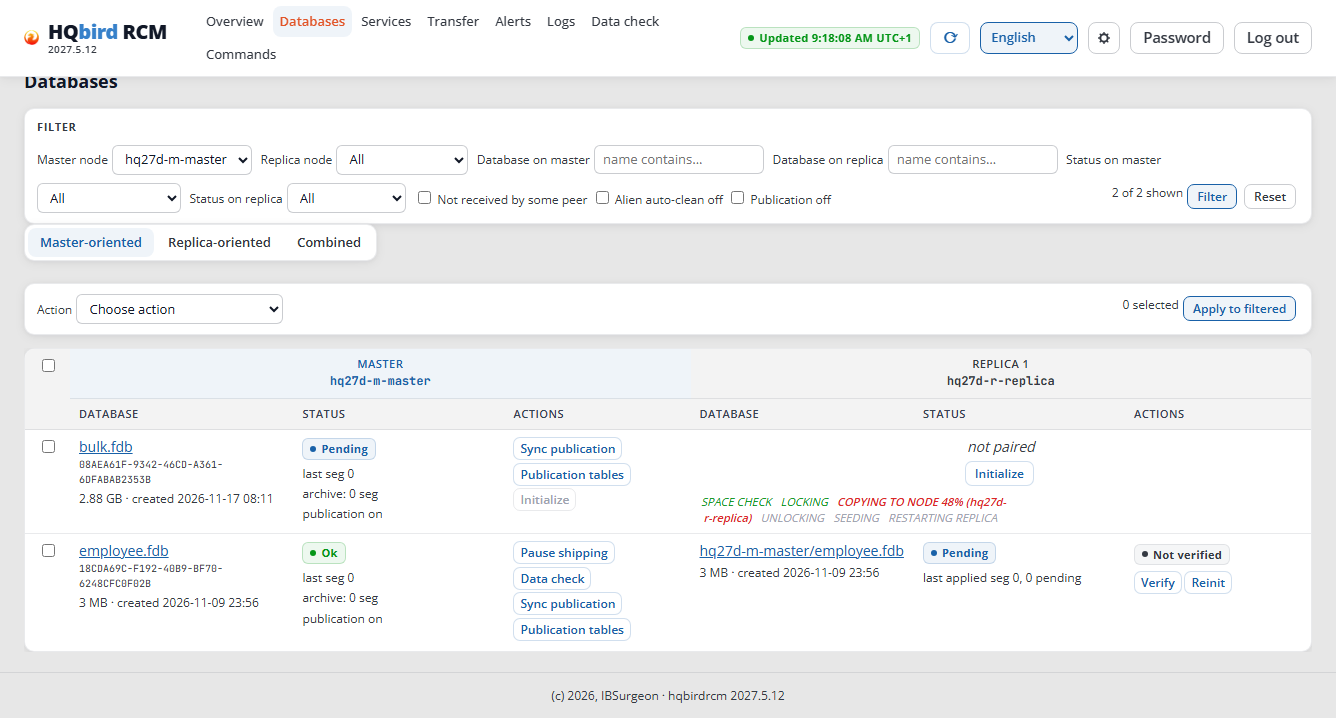
It is done when the master and the replica show “Ok”, and the “last applied
seg” of the replica reaches the “last seg” of the master. A database with
no new writes (here bulk.fdb) shows “Pending” with segment 0 for the
replica: this is normal.
Measurements of the run (employee.fdb under a load of ≈55
transactions/s):
| Database | Size | Master: from start to end | Lock on the master | Pair “Ok” |
|---|---|---|---|---|
employee.fdb |
4 MB | 0.7 s | 0.35 s | after ≈1 min (waited for the replica restart) |
bulk.fdb |
3.13 GB | 64 s (≈55 MB/s) | 59 s | after ≈2 min |
The run of 2026-11-17 (kit 2027.2.33): employee.fdb (3 MB) took 3 seconds
on the master, bulk.fdb (167 MB) 15 seconds. The replica side was paired
≈40 seconds after the start (it waited for the restart of Firebird of the
replica).
During the lock the master database works: the changes go to the .delta
file.
Publication later. You need the Sync publication button of a master database when new tables appear in the database. It makes the publication match the tables in one transaction; Firebird does not restart.
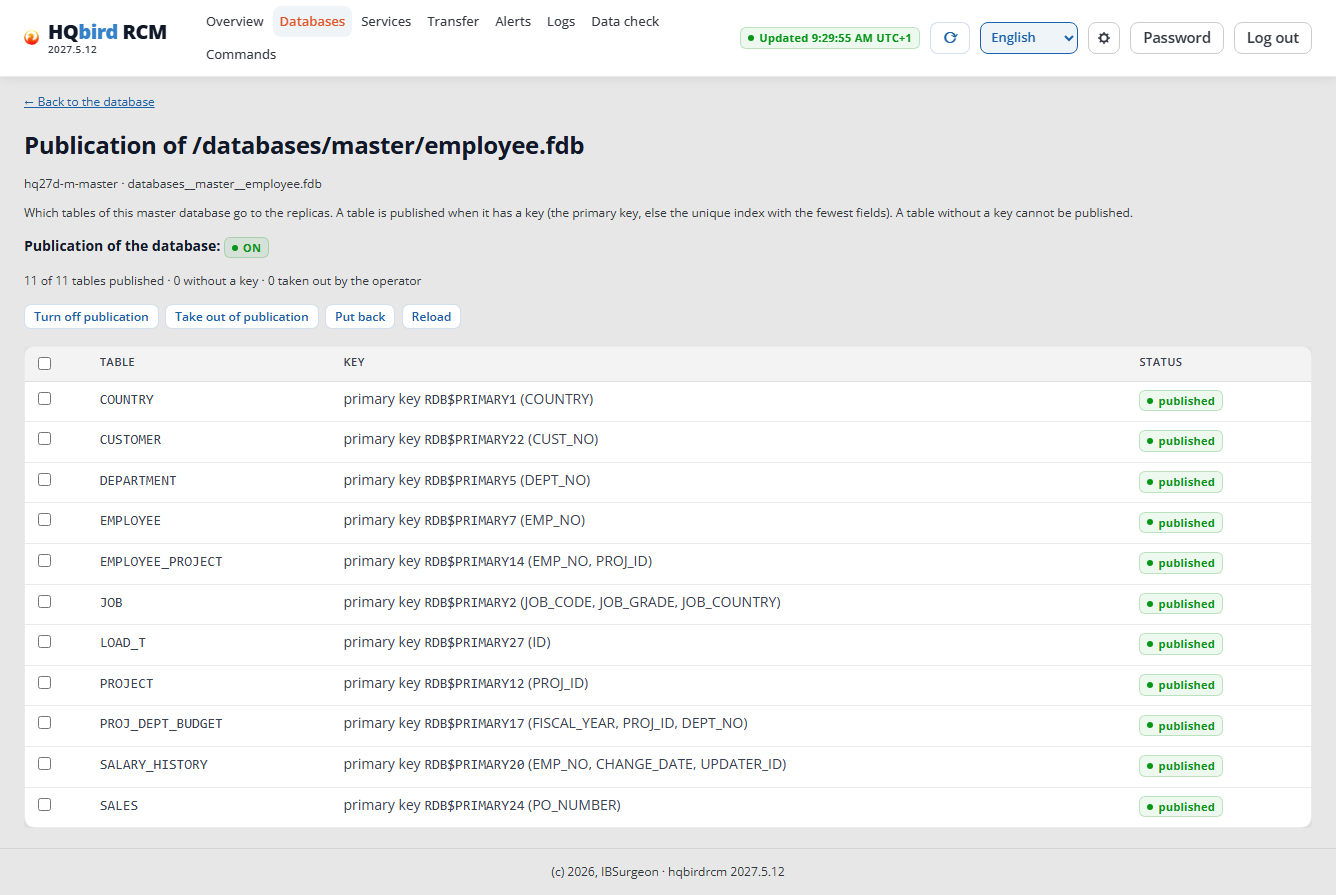
Publication tables shows which tables replicate. You cannot publish a table without a key: give it a primary key.
Step 7. Reinitialization
You need it when the replica differs from the master, or when the node asks
for it (NEEDS_REINIT). In the replica row → Reinit, method
Smooth. There is already a segment archive, and the smooth method works
under load. It waits for writing transactions that are older than the
journal history, and shows them.
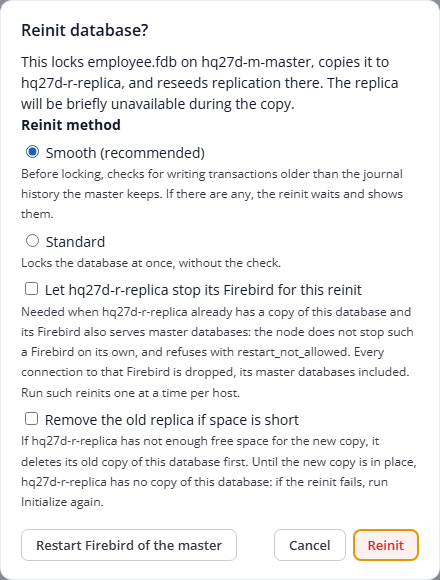
The progress is the same as at the initialization. A reinit usually does
not need a restart of Firebird of the replica. In the run of 2026-11-17 the
reinit of employee.fdb did restart Firebird of the replica: plan for a
break of the connections to the replica. That reinit took 4 seconds on the
master under ≈49 transactions/s; after the writes stopped, the row counts
matched (14,418 rows in the load table on both sides).
Measurements of the run:
| Database | Load | Time | Lock | Other |
|---|---|---|---|---|
employee.fdb |
≈55 transactions/s | 1.7 s | 0.32 s | 417 transactions replayed from the segments |
bulk.fdb |
none | 61 s | 55 s | no restart of Firebird of the replica |
After a smooth reinit under load, the replica can show the info alert
replication_conflict_resolved (“Record being inserted … already exists,
updating instead”): the replica replayed transactions that were already in
the copy. The data match: in the run, the row counts of all tables matched.
You can acknowledge the alert (finding G-07 in the report).
Step 8. Low disk space on the replica
The replica volume needs free ≥ 105 % of the database size plus 1 GB above the old copy: the old copy stays until the end, and the new file takes its full size at once. If the space is short, the dialog shows how much space is needed, how much is free, and how much the old copy takes (an RCM estimate; the replica node decides). If the space is enough without the old copy, the dialog suggests the Remove the old replica if space is short box.
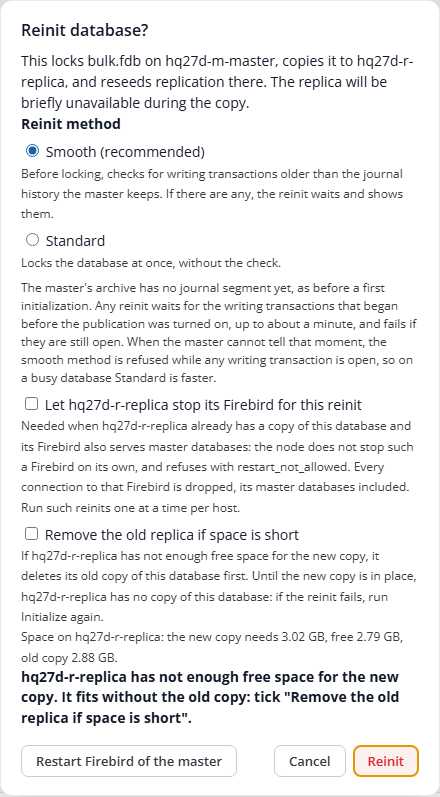
With the box, the replica node, after the lock on the master, stops
Firebird of the replica, deletes the old copy, and starts Firebird again.
In the run (2.97 GB free, the new copy needs 3.29 GB, the old copy is
3.13 GB), the reinit of bulk.fdb with the box took 65 seconds. Without
the box, the node refuses with insufficient disk space on replica.
The dialog can show no numbers when only the floor of 1 GB is short. In the
run of 2026-11-17 (1.1 GB free, the database is 167 MB) the dialog showed
no estimate, and the reinit without the box failed in 3 seconds. The
database row and the Commands page showed the reason: insufficient disk space on replica: need 184125850 bytes (105% of the database) + 1073741824 bytes free_space_floor_gb; free 1152950272 … Removing the old replica copy would free 175357952 bytes: ask again with remove_old_replica. The same reinit with the box took 9 seconds.
Risk of the box. While the copy runs, there is no replica of this database. If the reinit fails, the pair is
NEEDS_REINIT, the replica has the alertreplica_removed_for_reinit(warn), and a retry is a new full reinit. An automatic reinit deletes the old copy only if the RCM keyauto_reinit.remove_old_replica_when_shortis on (off by default).
Step 9. Verification
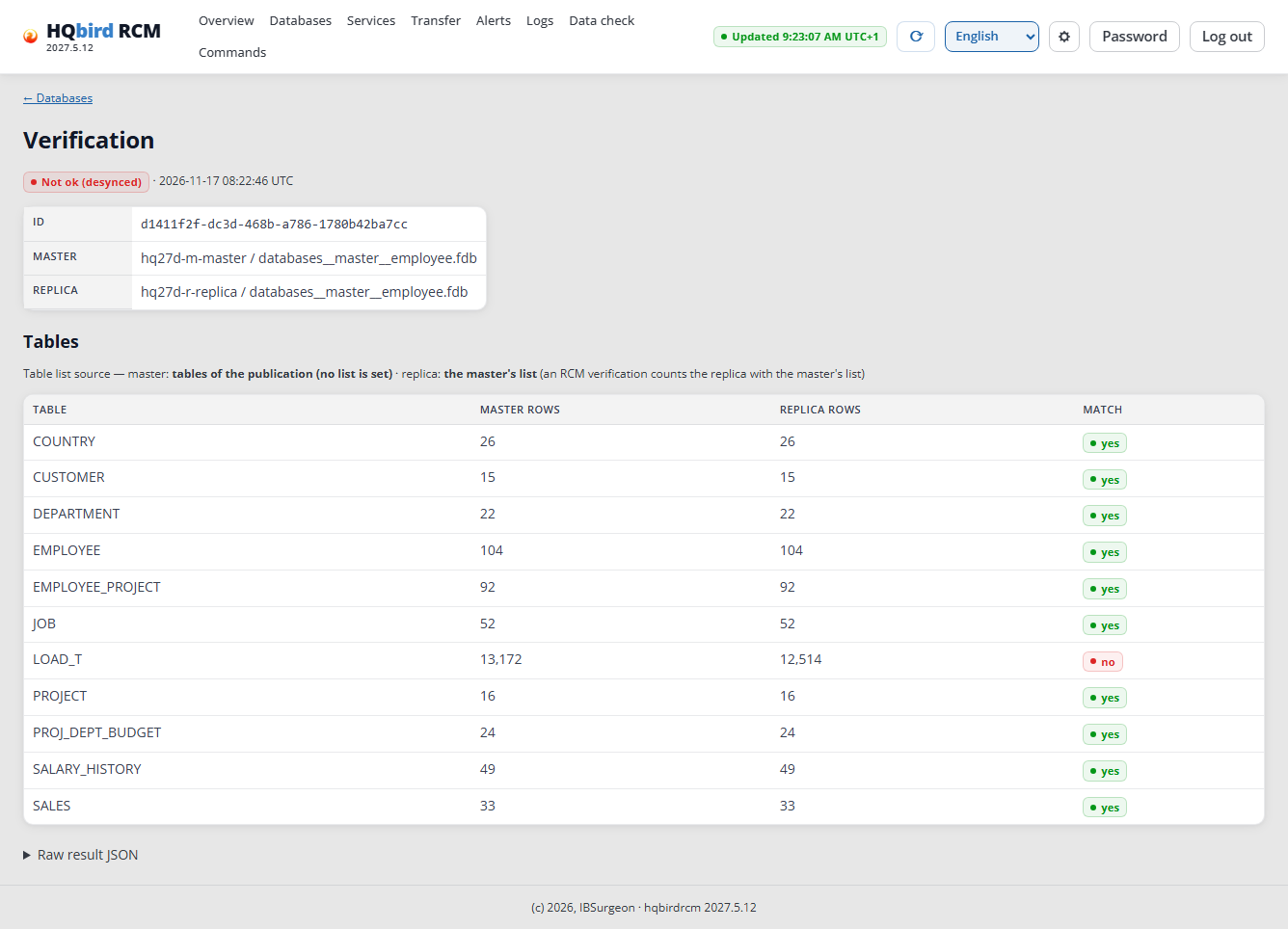
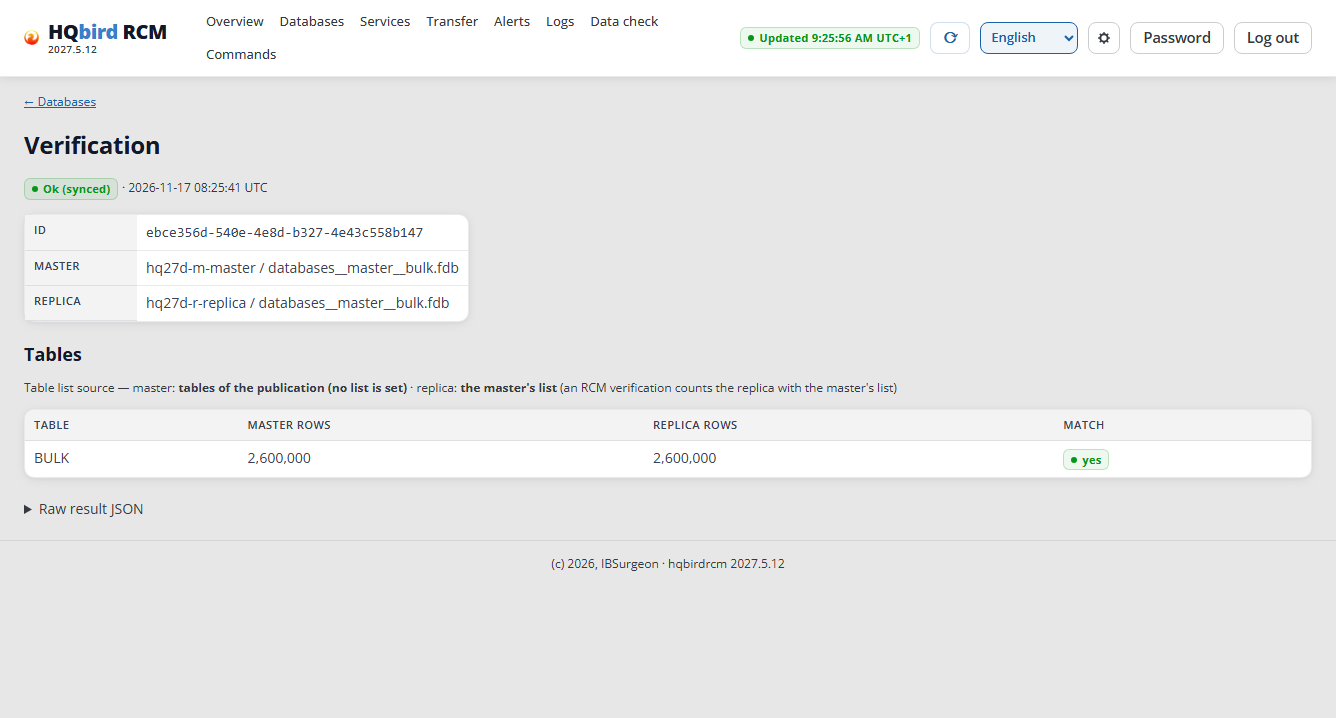
Verify in the replica row compares COUNT(*) of the tracking tables on
the master and on the replica. It does not compare the rows themselves. The
“Table list source” line names the list: the own list of the database, the
list of the node, the publication tables, or RDB$FIELDS. Row counts have
digit groups.
Under load, the replica is a few seconds behind, and Verify gives “Not ok” for the tables that are being written to:
Without writes, the counts match:
A table that is in neither database is “not in the database”: this is not a mismatch. A table on one side only is “no table”: this is a mismatch.
A safer check is the row count of all tables on both sides after the writes
stop (the script is in the
hqbird2027-linux-cluster-runbook.md). In the
run, all 11 tables matched (employee.fdb: 10, bulk.fdb: 1, with
2,800,000 rows).
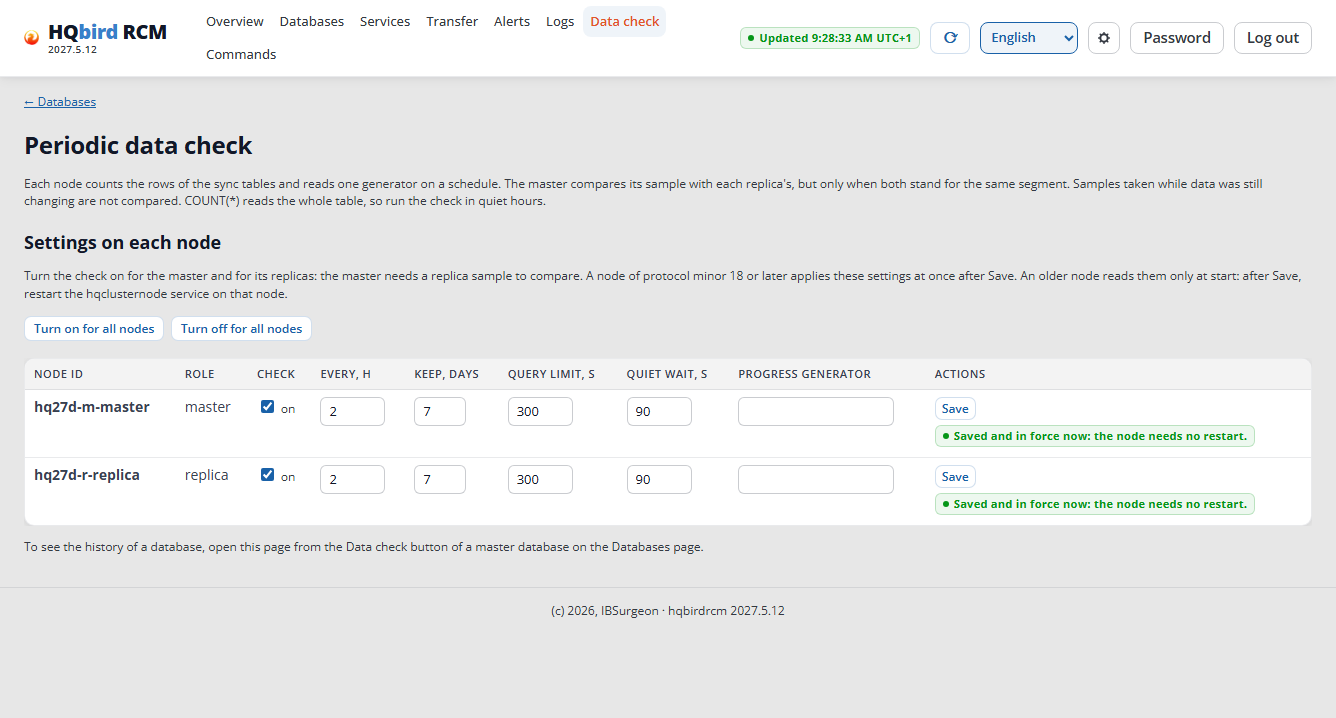
The periodic check (Data check) is off by default. Click Turn on for all nodes and confirm: each node counts its rows, and the master compares the counts. You do not need a restart: RCM shows “Saved and in force now: the node needs no restart.” The first check runs one interval later (by default 2 hours).
What to watch next
-
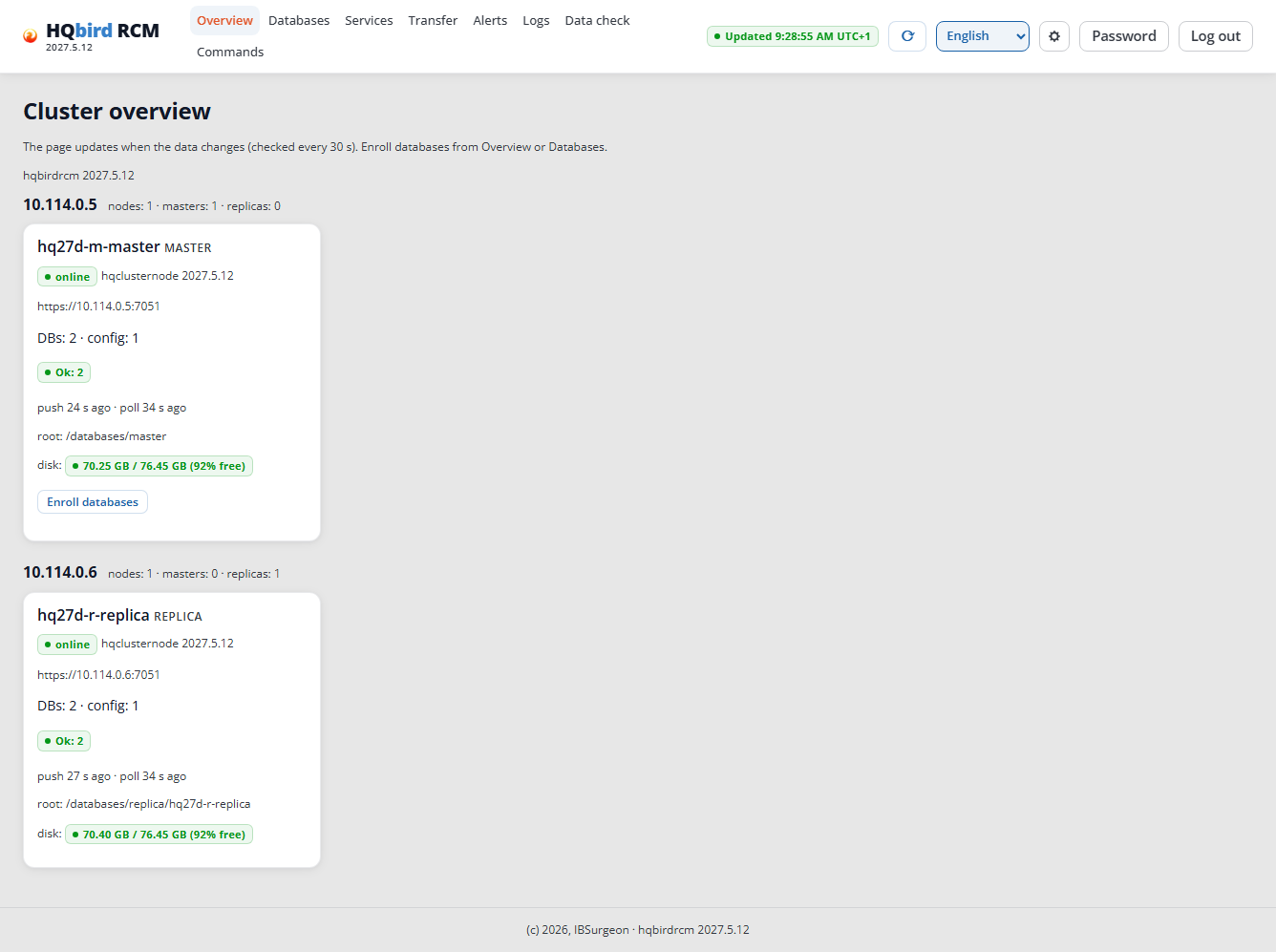
Overview: the nodes, their state, the database root, and the disk space.
Overview -
Alerts: problems of nodes and databases. The run had two alerts, and you can acknowledge both:
replication_conflict_resolvedafter the smooth reinit (step 7), andparse_no_observationson the master (“no events parsed from /opt/firebird/replication.log”). Firebird of the master writes only errors toreplication.log, so an empty log is normal (finding G-06 in the report).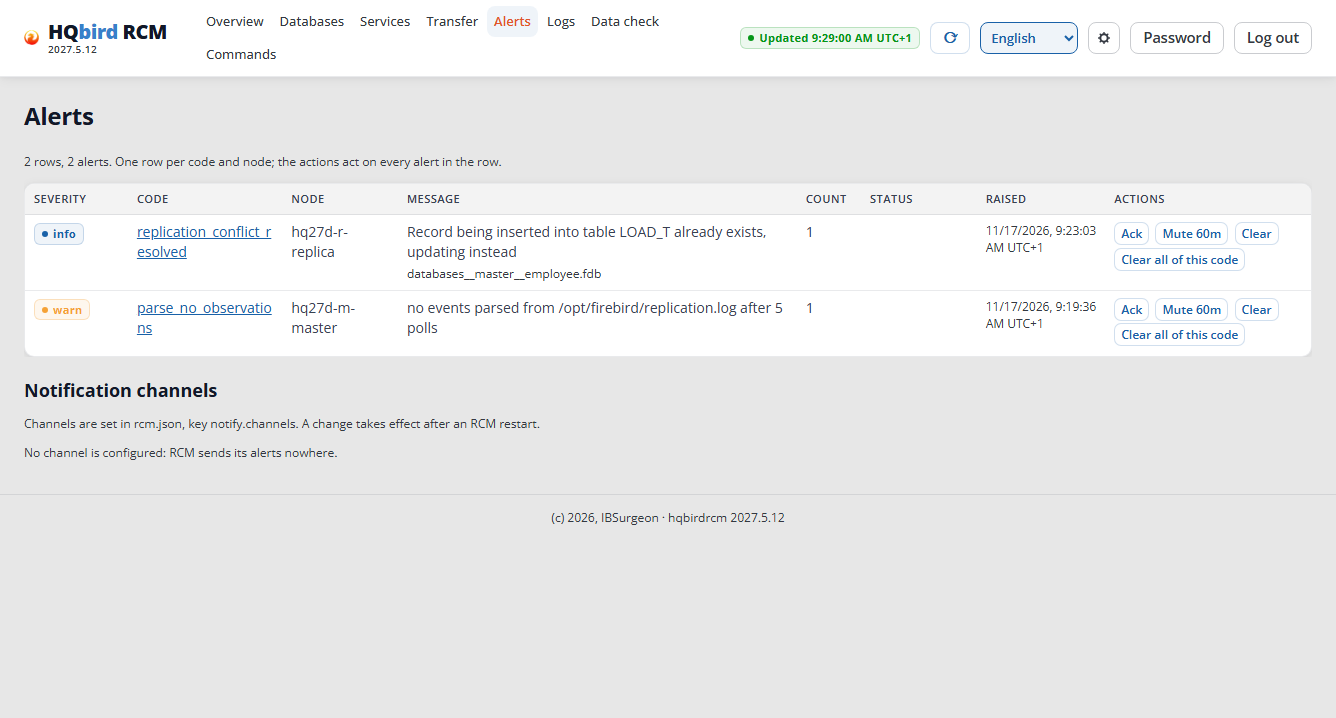
Alerts RCM 2027.5.12 and later (kit 2027.2.33) can send the alerts of severity
warnand higher to a Telegram bot of your own, a webhook or e-mail. You set the channels in the file/opt/hqbirdrcm/rcm.json, keynotify.channels, and restart RCM (sudo systemctl restart hqbirdrcm). The block Notification channels of this page then lists the channels, each with a Send test button. With no channel it says “No channel is configured: RCM sends its alerts nowhere.” A Telegram channel:"notify": { "channels": [ { "name": "ops", "type": "telegram", "token_file": "secrets/telegram-ops.token", "chat_id": "-1001234567890" } ] }The run of 2026-11-17 checked the block without a channel; no message was sent.
-
Services (RCM 2027.5.11 and later, kits from 2027.2.31): the master, the replicas and the routers of a service, and the operations switchover, failover and rejoin. This guide does not cover them: see the RCM user guide. Update RCM and the nodes to the same version before you use them.
-
Commands: each RCM operation with its result. The time is the local time of the browser with its zone (for example,
17:59:45 UTC+1); the tooltip shows the time in UTC. The node logs use UTC.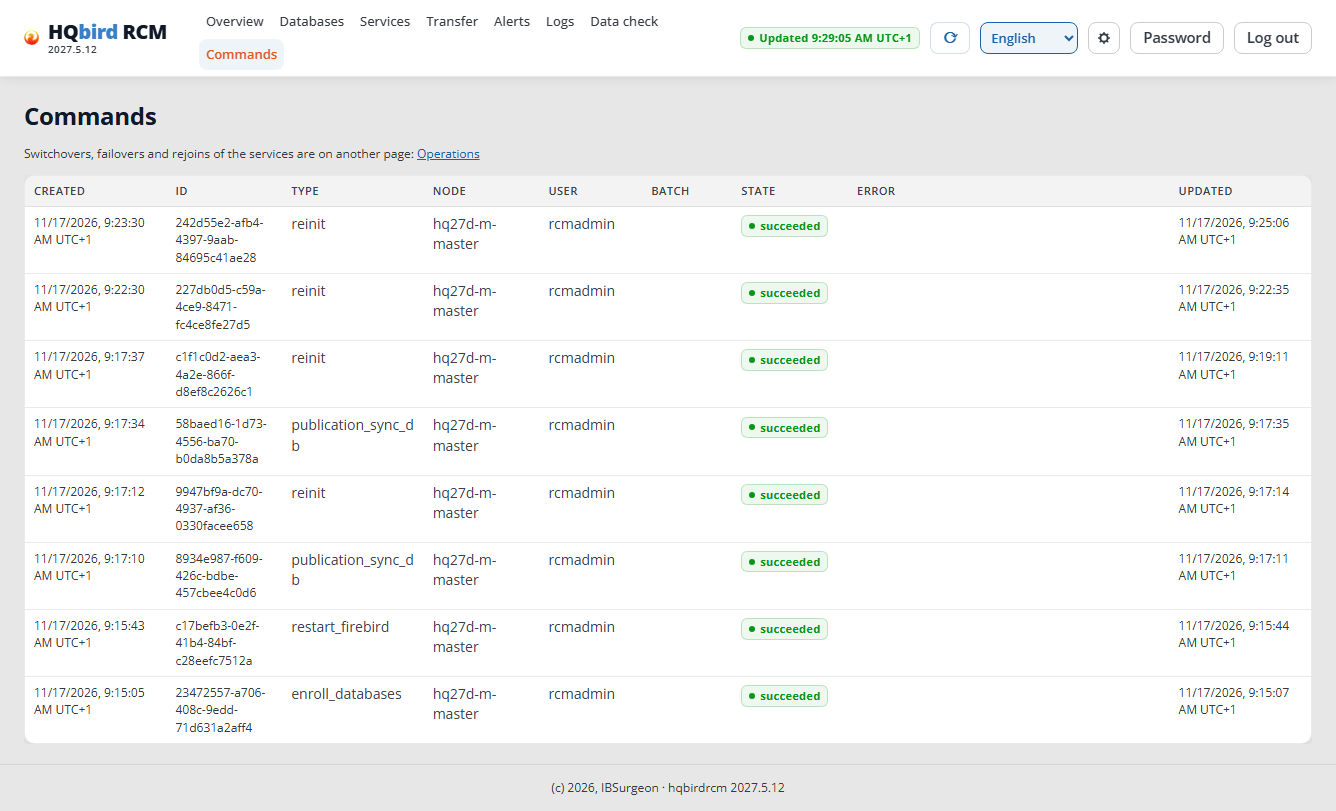
Commands -
HQ Monitor:
http://<server>:23050/, usernameadmin, the password is in/opt/hqbird/conf/access.properties. It shows the server and the databases. In the kits with agent 3.1.0 and later, HQ Monitor has the Clusters page. On the master (the RCM host) it shows the cluster through the agent, with no RCM settings in HQ Monitor. On the replica it names the host of the RCM and links to its console. HQ Monitor 1.49.0 has no replication state and no link to RCM. From kit 2027.2.33 (agent 3.4.0) the agent sends the problems of its server to your channels too: Servers → Notifications.
Update the cluster
Update HQbird RCM first, then the nodes. From kit 2027.2.31, a server that is attached to no HQCenter updates the agent, HQ Monitor and fbmcp by itself (“Updates without HQCenter” in hqbird2027-linux-setup-guide.md); a server attached to an HQCenter takes its updates from that HQCenter.
Take a host out of the cluster
cd /opt/hqbird/fbagent-fb50
sudo ./fbagent --cluster-leave
The agent stops and unregisters its node services, closes their node ports,
deletes its cluster certificates and sets cluster.source to none. The node
folder stays (--remove-data deletes it). The agent that runs the RCM is
refused. The agent also leaves by itself when RCM revokes it or takes its last
member away. An uninstall always leaves the cluster: a reinstall in the same
folder starts free. In the run of 2026-11-17 the command printed Cluster: left <cluster id>, the replica databases stayed in their folder, and RCM
still showed the node of that host one minute later. The removal of HQbird
from a cluster server, also from
the server that runs the RCM:
hqbird2027-removal-guide.md, section 4.
Common errors
| What you see | Cause | What to do |
|---|---|---|
publication_off at the initialization |
the publication is off, or it has no table although the database has tables with a key | the Sync publication and initialize button (step 6) |
long_transactions … the archive holds no segment yet |
first initialization with the smooth method while the database is being written to, and the archive of the master is empty | wait for “archive: 1 seg” and retry Smooth, or choose Standard |
reinit_pre_publication_transactions |
a writing transaction started before the publication was turned on and is open longer than one minute | finish it (COMMIT or ROLLBACK) and retry |
| “✗ The folder does not exist on …” in the dialog | nobody created the replica folder | the Create folder button in the dialog, or install -d -o firebird -g firebird -m 0770 <folder> on the replica |
| “Not ok (desynced)” in Verify | the database is being written to, and the replica is seconds behind | retry without load; look at the Match column |
| “Not ok (desynced)” in Verify without writes; both sides show “Ok” | an application connection was opened before the publication was turned on: it is not journaled | reconnect the application, then Reinit (step 6, the note about the first publication sync) |
| Host “unreachable” or “no agent” in Link hosts | the pairing window of the host is closed (off by default, or the 24 h ended), or a firewall between the servers closes 7450–7459 | open the window on the host: HQ Monitor → Clusters → Open the pairing window for 24 hours, or fbagent --cluster-pairing on; open the port in the cloud firewall |
insufficient disk space on replica at a reinit |
the old replica stays until the end, and the new file takes its full size | free ≥ 105 % of the database size + 1 GB above the old file on the replica volume, or the Remove the old replica if space is short box (step 8) |
| The node does not appear after Link hosts | the RCM mirror has no signed hqclusternode release |
Releases in the mirror on the Link hosts page (step 2) |