Firebird용 독립형 모니터링
Firebird 독립형 모니터링
Firebird Advanced Monitoring 독립형 설치 및 구성 방법
1. 설치
1.1. “Online Tools For Firebird"에 등록하여 keyanswers.txt 파일 받기
고급 모니터링을 사용하려면 포털 “Online Tools For Firebird”(https://cc.ib-aid.com/)에서 무료 계정을 만들어야 하며, 계정과 서버를 연결하기 위해 keyanswers.txt 파일을 다운로드해야 합니다.
개인 Control Center를 사용하는 사용자의 경우, 해당 계정은 관리자가 생성해야 합니다.
1.1.1. 등록 절차
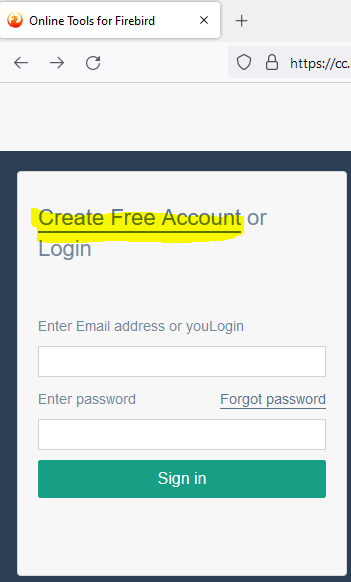
1. https://cc.ib-aid.com/을 열고 “Create new account"를 클릭합니다:
2. 그런 다음 유효한 이메일, 사용자 이름 및 회사(선택 사항)를 지정합니다:
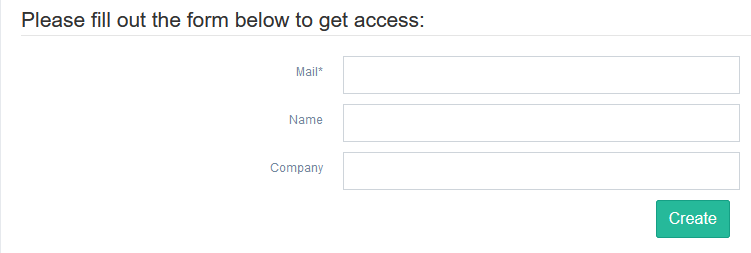
3. 그 후 2-3분간 확인 이메일을 기다렸다가 확인 링크를 클릭합니다. 비밀번호와 비밀번호 확인을 입력해야 하는 양식이 열리며, 이후 “Online Tools For Firebird” 포털에 로그인할 수 있습니다.
1.1.2. keyanswers.txt 다운로드
로그인 후 “Download Firebird Monitoring Agents” 위젯이 표시됩니다:
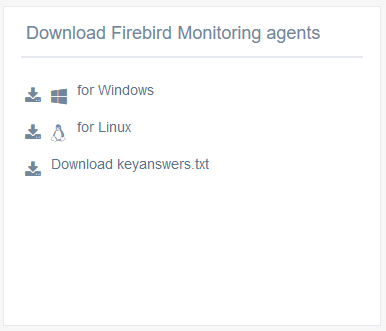
필요한 OS용 에이전트를 다운로드합니다(현재 Windows 7+/Server 2008+ 및 systemd를 사용하는 Linux만 지원됨).
또한 keyanswers.txt 파일을 다운로드합니다.
keyanswers.txt에는 Control Center 계정과 Advanced Monitoring을 연결하는 데 필요한 정보가 포함되어 있으며, 이후 설치를 진행합니다.
1.2. Windows에 설치
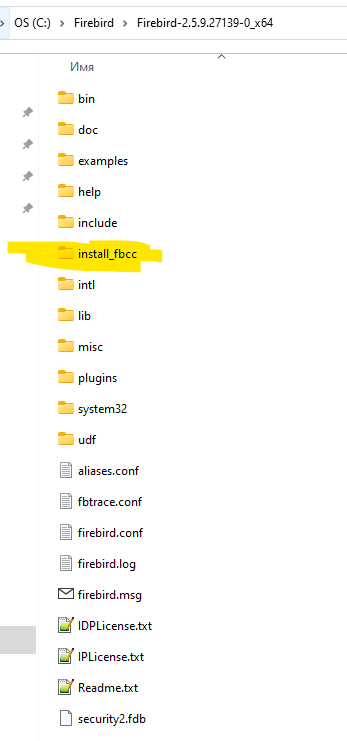
Windows용 Advanced Monitoring 에이전트 배포판은 zip 아카이브 파일인 install_fbcc.zip입니다.
설치 아카이브 fbcc.zip을 Firebird 폴더(예: C:\Program Files\Firebird\Firebird_3_0\fbcc)에 압축 해제한 다음, 이전 단계의 keyanswers.txt 파일을 fbcc 폴더에 복사합니다.
결과적으로 폴더는 다음과 같아야 합니다:
또한 keyanswers.txt가 고급 모니터링 파일이 있는 폴더에 있는지 확인합니다:
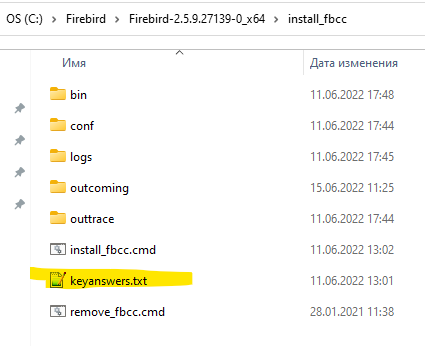
그런 다음 “Run As Administrator” 옵션으로 명령 파일 install_fbcc.cmd를 실행합니다. cmd 파일은 다음 작업을 수행합니다:
- FBHQbird Monitor 4 및 FBHQbird Trace 4라는 2개의 서비스 생성
- 23:50에 모니터링을 재시작하는 작업 스케줄러 작업 생성
- Firebird 찾기(표준 경로에 있는 경우) 및 구성. Advanced Monitoring 설치 시 기본 사용자/비밀번호로 Firebird에 대한 액세스를 자동으로 구성하고 예제 데이터베이스 employee.fdb에 대한 연결을 확인합니다. 소유자 사용자가 SYSDBA가 아니거나 비밀번호가 masterkey가 아닌 경우 설치 시 사용자와 비밀번호를 입력하라는 메시지가 표시됩니다.
- keyanswers.txt에 지정된 Control Center 포털에 연결하고 해당 계정에 서버를 등록합니다.
1.2.1. 기본 SYSDBA/masterkey로 설치
다음은 기본 사용자/비밀번호(SYSDBA/masterkey)를 사용하는 Firebird의 설치 로그 예입니다:
c:\Firebird30\fbcc>install_fbcc.cmd
The Service FBHQbirdMON4 has been installed
2022-02-12 09:41:40 ERROR MainCreateConf:287 - Not found location, return empty string

Checking access to Firebird Monitoring Portal...
Connected to Portal: Ok
Determined architecture: SuperServer and version: 3.0.6
Verified connection with Firebird user: SYSDBA: Ok.
Using autodiscovery to watch for all active databases.

Registering server in Firebird Monitoring Control Center
Registered new server with name=SRV-DESKTOP-NS28RCG-2202012214,  GUID=99c54d1jjqxj0r   (id=314285)
Successful! Now you can see your server in Firebird Control Center: https://cc.ib-aid.com
The Service FBHQbirdTrace4 has been installed
SUCCESS: The scheduled task "Restart Mon4 Service (Firebird Monitoring)" has successfully been created.
The FBHQbird Monitor 4 service is starting.
The FBHQbird Monitor 4 service was started successfully.

The FBHQbird Trace 4 service is starting.
The FBHQbird Trace 4 service was started successfully.

c:\Firebird30\fbcc>
1.2.2. 사용자 지정 사용자 이름/비밀번호로 설치
기본이 아닌 사용자 이름 및/또는 비밀번호를 사용하는 경우, cmd에서 설치 과정 중에 입력하라는 메시지가 표시됩니다.
1.2.3. Windows에서 Advanced Monitoring 제거
설치 중 실수를 하거나 오류가 발생하거나 Advanced Monitoring 에이전트를 제거하기로 결정한 경우 remove_fbcc.cmd를 실행하면 서비스와 작업 스케줄러 작업이 중지 및 제거됩니다. 제거 로그는 다음과 같습니다:
c:\Firebird30\fbcc>remove_fbcc.cmd
The FBHQbird Monitor 4 service is stopping.
The FBHQbird Monitor 4 service was stopped successfully.

The FBHQbird Trace 4 service is stopping.
The FBHQbird Trace 4 service was stopped successfully.

The FBHQbird Monitor 4 service is not started.

More help is available by typing NET HELPMSG 3521.

[SC] DeleteService SUCCESS
The FBHQbird Trace 4 service is not started.

More help is available by typing NET HELPMSG 3521.

[SC] DeleteService SUCCESS
SUCCESS: The scheduled task "Restart Mon4 Service (Firebird Monitoring)" was successfully deleted.
c:\Firebird30\fbcc>
1.3. Linux에 설치
“Online Tools For Firebird"에서 install_fbcc.sh 파일을 다운로드합니다(자세한 내용은 1.1.2 참조):
sudo wget /download/fbcc/install_fbcc.sh이 파일에는 Linux용 Firebird Advanced Monitoring 설치 프로그램이 포함되어 있습니다.
설치 프로그램은 필요한 파일을 /opt/fbcc 위치에 설치하므로 해당 위치에 충분한 여유 공간이 있는지 확인하세요.
1.3.1 사전 요구 사항: Java 8 및 jsvc
Java 8
모니터링을 실행할 서버에 Java 8이 설치되어 있어야 합니다.
OpenJDK 8 Corretto(Amazon 제공) 설치를 권장합니다:
wget -O- https://apt.corretto.aws/corretto.key | sudo apt-key add -
 sudo add-apt-repository 'deb https://apt.corretto.aws stable main'

sudo apt-get update; sudo apt-get install -y java-1.8.0-amazon-corretto-jdk자세한 내용: https://docs.aws.amazon.com/corretto/latest/corretto-8-ug/generic-linux-install.htmljsvc
jsvc는 Java 애플리케이션을 서비스로 실행하는 도구로, Firebird Advanced Monitoring 에이전트에서 사용합니다.
CentOS에 jsvc 설치
yum install jsvcUbuntu에 설치
apt install jsvc1.3.3. install_fbcc.sh 옆에 keyanswers.txt 배치
1.1.2에서 keyanswers.txt를 가져와 install_fbcc.sh 옆에 배치합니다.
keyanswers.txt는 포털에서 동적으로 생성되며 등록된 사용자가 로그인하여 다운로드해야 하므로 wget 명령이 없다는 점에 유의하세요.
1.3.4. 설치 단계
설치 스크립트를 실행 가능하게 만듭니다:
sudo chmod +x install_fbcc.sh설치를 실행합니다:
sudo install_fbcc.sh설치 전에 있어야 하는 파일의 예는 다음과 같습니다:
total 18624
drwxr-xr-x  3 root root     4096 May  3 23:32 ./
drwxr-xr-x 20 root root     4096 Feb 14 02:06 ../
drwxr-xr-x 12 root root     4096 May  3 23:19 firebird/
-rwxr-xr-x  1 root root 19050609 Sep 29  2021 install_fbcc.sh*
-rwxrwxrwx  1 root root      110 May  3 23:26 keyanswers.txt*
그런 다음 install_fbcc.sh를 실행합니다.
스크립트는 공식 tar 아카이브에서 /opt/firebird에 수동으로 설치된 기본 Firebird를 기대한다는 점에 유의하세요.
저장소에서 Firebird를 설치한 경우, 제거하고 www.firebirdsql.org 웹 사이트의 공식 tar 아카이브에서 설치하는 것이 좋습니다.
2. 문제 해결
성공적인 문제 해결을 위한 일반적인 조언
Firebird Monitoring 설치의 Bin 폴더에서 *.log 파일을 확인하세요.
로그 파일 이름은 jar 이름에 따라 지정됩니다. 예를 들어 런처의 경우 launcher.log입니다.
로그 파일에는 기본적으로 오류와 중요한 메시지가 포함됩니다.
문제: keyanswers.txt 없이 설치 시도
keyanswers.txt 파일을 install_fbcc.cmd(Windows) 또는 install_fbcc.sh(Linux)와 같은 폴더에 넣지 않은 경우, 서비스는 설치되지만 구성되지 않습니다:
c:\Firebird30\fbcc>install_fbcc.cmd
The Service FBHQbirdMON4 has been installed

 설치가 중지되었습니다: install_fbcc.cmd 근처에서 keyanswers.txt 파일을 찾을 수 없습니다.
 cc.ib-aid.com에서 다운로드하거나 수동 모드 설치를 사용하십시오.
 설치를 다시 시도하려면 remove_fbcc 스크립트를 실행한 다음 install_fbcc를 다시 실행하십시오.
해결 방법:
제거 명령 파일을 실행하십시오 (Windows에서는 uninstall.cmd를 마우스 오른쪽 버튼으로 클릭하고 “관리자 권한으로 실행"을 선택하거나, Linux에서는 /opt/fbcc/uninstall.sh의 uninstall.sh를 실행). 그러면 다음과 같은 출력과 함께 모니터링이 제거됩니다:
c:\Firebird30\fbcc>remove_fbcc.cmd
The FBHQbird Monitor 4 service is not started.

More help is available by typing NET HELPMSG 3521.

The FBHQbird Trace 4 service is not started.

More help is available by typing NET HELPMSG 3521.

The FBHQbird Monitor 4 service is not started.

More help is available by typing NET HELPMSG 3521.

[SC] DeleteService SUCCESS
The FBHQbird Trace 4 service is not started.

More help is available by typing NET HELPMSG 3521.

[SC] DeleteService SUCCESS
SUCCESS: The scheduled task "Restart Mon4 Service (Firebird Monitoring)" was successfully deleted.
C:\fbcc>
그런 다음 keyanswers.txt를 install_fbcc.cmd 근처 폴더에 넣고 다시 설치하십시오.
문제: 설치 패키지가 Firebird 폴더를 찾을 수 없음
모니터링 설치 패키지가 Firebird 폴더를 찾지 못하면 다음과 같은 출력이 표시됩니다:
c:\Firebird30\fbcc>install_fbcc.cmd

The Service FBHQbirdMON4 has been installed
2022-02-12 09:11:23 ERROR MainCreateConf:287 - Not found location, return empty string
2022-02-12 09:11:23 ERROR MainCreateConf:287 - Not found location, return empty string
2022-02-12 09:11:23 ERROR MainCreateConf:287 - Not found location, return empty string

Checking access to Firebird Monitoring Portal...
Connected to Portal: Ok
2022-02-12 09:11:24 ERROR MainCreateConf:592 - Cannot find test database - setting version to 3.0.0 and arch to Classic
Paths checked:
2022-02-12 09:11:24 ERROR MainCreateConf:594 - /../examples/empbuild/employee.fdb
2022-02-12 09:11:24 ERROR MainCreateConf:594 - /../help/help.fdb
2022-02-12 09:11:24 ERROR MainCreateConf:594 - /examples/empbuild/employee.fdb
2022-02-12 09:11:24 ERROR MainCreateConf:594 - /help/help.fdb

Please enter owner user for Firebird databases, or hit Enter to use SYSDBA
위의 “Not found location, return empty” 메시지는 설치 스크립트가 Windows의 다음 경로에서 Firebird를 찾지 못했음을 나타냅니다:
"C:/Program Files/Firebird/Firebird_4_0",
"D:/Program Files/Firebird/Firebird_4_0",
"E:/Program Files/Firebird/Firebird_4_0",
"F:/Program Files/Firebird/Firebird_4_0",
"C:/Program Files/Firebird/Firebird_3_0",
"C:/Program Files/Firebird/Firebird_2_5/bin",
"D:/Program Files/Firebird/Firebird_3_0",
"D:/Program Files/Firebird/Firebird_2_5/bin",
"E:/Program Files/Firebird/Firebird_3_0",
"E:/Program Files/Firebird/Firebird_2_5/bin",
"F:/Program Files/Firebird/Firebird_3_0",
"F:/Program Files/Firebird/Firebird_2_5/bin",
"C:/HQbird/Firebird40",
"D:/HQbird/Firebird40",
"E:/HQbird/Firebird40",
"F:/HQbird/Firebird30",
"C:/HQbird/Firebird30",
"C:/HQbird/Firebird25/bin",
"D:/HQbird/Firebird30",
"D:/HQbird/Firebird25/bin",
"E:/HQbird/Firebird30",
"E:/HQbird/Firebird25/bin",
"F:/HQbird/Firebird30",
"F:/HQbird/Firebird25/bin"
그리고 Linux에서는
"/opt/firebird/bin"해결 방법:
Firebird를 표준 경로(Windows의 경우 C:\Program Files\Firebird\Firebird_N_N 또는 /opt/firebird)에 설치하거나, Firebird 사용자 지정 경로를 지원하는 Advanced Monitoring이 포함된 HQbird를 사용하십시오.
문제: 구성 파일 없이 모니터링을 시작하면 로그에 오류가 발생함
Starting service...Windows 10
Current folder = E:\fbcc\_OUT
2022-02-09 10:43:20 ERROR Main:350 - Stopping: not found mainconfig.enc or mainconfig.json in ../conf/mainconfig.enc
해결 방법:
Control Center에서 keyanswers.txt 파일을 사용하여 올바른 설치를 수행하십시오.