HQbird Linux Setup Guide
Installation guide for HQbird 2027 on Linux (.run installer). Installers: HQbird 2027 Download.
Contents
- 1. What the installer installs
- 2. The installation at a glance
- 3. New installation
- 4. After the installation
- 5. Update of an older HQbird (2024 and earlier)
- 6. Update of HQbird 2027 to a new version
- 7. Maintenance commands
- 8. Attach to your HQCenter
- 9. Unattended installation and scripts
- 10. Troubleshooting
This guide is for the administrator who installs HQbird 2027 on a Linux
server with the offline installer hqbird2027-fbNN-linux-<version>.run. It
covers a new installation, the update of an older HQbird and of an earlier
HQbird 2027, the maintenance commands, the connection to your HQCenter, the
unattended (scripted) installation, and where the files are after the
installation.
The examples show the installer for Firebird 5.0 on Ubuntu 24.04. The installers for Firebird 2.5, 3.0 and 4.0 work the same way; only the version, the default port and the folder names differ. The Windows setup is described in the Windows setup guide.
1. What the installer installs
One .run file = one Firebird line. Pick the installer of the Firebird
version your databases use:
| Installer | Firebird it installs or updates | First Firebird on the host | Size |
|---|---|---|---|
hqbird2027-fb50-linux-<version>.run |
Firebird 5.0 (HQbird build) | /opt/firebird, port 3050 |
about 250 MB |
hqbird2027-fb40-linux-<version>.run |
Firebird 4.0 (HQbird build) | /opt/firebird, port 3050 |
about 220 MB |
hqbird2027-fb30-linux-<version>.run |
Firebird 3.0 (HQbird build) | /opt/firebird, port 3050 |
about 130 MB |
hqbird2027-fb25-linux-<version>.run |
Firebird 2.5 (HQbird build) | /opt/firebird, port 3050 |
about 80 MB |
Every installer contains, and installs without the Internet:
- Firebird (the HQbird build of that line): a new server, or an in-place
update of the Firebird of that line that is already on the host. Your
firebird.conf,databases.conf(aliases.conffor 2.5), the security database and the SYSDBA password are kept. - Firebird debug files (symbols for crash analysis), installed into the
Firebird folder.
--no-debugskips them. - HQbird agent (
fbagent): the systemd unithqbirdfbagent-p<port>, running as the userfirebird, that does the backups, monitoring, maintenance jobs and the updates. - HQ Monitor: the web console of this HQbird instance, unit
hqbirdmonitor-p<port>, addresshttp://<server>:<20000 + Firebird port>/(for Firebird on port 3050:http://localhost:23050/). - Cluster components (
hqclusternode,hqbirdrcm): copied into the agent’s cache for later use; no unit is created.
Requirements: x86_64, kernel 3.2 or newer, systemd; a Linux with apt,
dnf/yum or zypper (Ubuntu, Debian, AlmaLinux, Rocky, RHEL, Oracle
Linux, openSUSE, RED OS and others); root. About 300 MB free in /var/tmp
during the installation (a folder where programs may run; see --tmpdir).
A few OS libraries (libtommath, ICU) are taken from the distribution’s
repository; a server without Internet gets the exact commands to prepare
them (section 9).
Not supported: a Firebird installed from the distribution’s packages
(firebird3.0-server, firebird rpm). The installer stops before it changes
anything (exit code 7); remove the packages first (keep a gbak backup of
your databases) or use the online installer with --import-firebird.
Several Firebird lines on one server: each line has its own installer.
The first Firebird on the host goes to /opt/firebird; a second line goes to
/opt/fb<NN> (/opt/fb50, /opt/fb40, /opt/fb30) on the port of its line:
3053 for 3.0, 3054 for 4.0, 3055 for 5.0. When that port is in use, the
installer stops and asks for --port N. Several instances of one line
(a second Firebird 5.0 on another port) are installed with
--fb-root <new folder> --port <port> (section 7). Firebird 2.5 has one
instance only, in /opt/firebird; for a second server next to it use another
line (for example Firebird 5.0 in /opt/fb50).
A step-by-step runbook for two instances on ports 3050 and 3051, for every line, with copy-paste commands, is in the two-instances runbook (Russian) (Russian) and the two-instances runbook (Portuguese) (Portuguese).
Trial: without a license the agent runs a 7-day trial. The trial email
(--email) extends it to 30 days. A license file (--license) or the
connection to your HQCenter (section 8) replaces the trial.
2. The installation at a glance

The server check and the installation itself are done by the HQbird agent
that the installer carries (fbagent --install-plan,
fbagent --setup-install). Nothing is downloaded except the missing OS
packages. Nothing is changed before the plan is confirmed: the OS packages
are installed after the confirmation. Without a terminal and without --yes
the installer stops at the confirmation with exit code 4. If the installation fails before the agent unit
starts, the agent rolls the units back to the state they had before (exit
code 2; code 3 when the rollback was not complete, the summary says what to
check).
3. New installation
Step 1: Download the installer and check it
KIT=hqbird2027-fb50-linux-2027.2.3.run
curl -fL -O https://ib-aid.com/download/hqbird/v2027/$KIT -O https://ib-aid.com/download/hqbird/v2027/$KIT.sha256
sha256sum -c $KIT.sha256
The other lines have the same names with fb40, fb30, fb25. Expected:
hqbird2027-fb50-linux-2027.2.3.run: OK. A server without Internet: download
the two files on a PC with the same links and copy them to the server (scp,
a USB drive, a share).
The installer also checks its own payload before it unpacks anything: a cut or damaged download stops with exit code 5 (“download it again”).
Step 2: Check the host without changing it (optional)
sudo sh hqbird2027-fb50-linux-2027.2.3.run --check--check runs the host check, reports the missing OS libraries (and the
commands to get them on a server without Internet), shows what the agent
found and what it would do, and exits. Nothing is installed.
Step 3: Run the installer
sudo sh hqbird2027-fb50-linux-2027.2.3.runA typical run on a server without Firebird:
[install] HQbird 2027 setup 2027.2.3, Firebird 5.0 (5.0.5.1916)
[install] host: Ubuntu 24.04.5 LTS, kernel 6.8.0-142-generic
[install] checking the payload (sha256) ...
[install] unpacking into /var/tmp/hqbird2027.k3Qf1x ...
[install] OS libraries missing: libtommath.so.1 (packages: libtommath1)
[install] plan M1: Firebird new /opt/firebird (unit firebird, port 3050)
[install]              agent new in /opt/hqbird/fbagent-p3050 (unit hqbirdfbagent-p3050), HQ Monitor hqbirdmonitor-p3050
[install]              OS packages to install: libtommath1
[install] Install as planned? Yes/No y
[install] installing from the package repository: libtommath1
[install] OS libraries: installed
[install] installing (fbagent --setup-install; log /var/log/fbagent/install.log) ...
[install] HQ Monitor: http://localhost:23050/ (login admin; password in /opt/hqbird/conf/access.properties)
[install] done. Uninstall: sudo sh hqbird2027-fb50-linux-2027.2.3.run --uninstall
What the lines mean:
- host: the distribution and kernel; the installer refuses a host that is not x86_64, has no systemd, or runs a kernel older than 3.2.
- OS libraries: what the Firebird of this line needs from the OS
(section 9). The plan lists the missing packages (
OS packages to
 install
); after the confirmation the installer takes them from the distribution’s repository. Without a repository it stops with exit code 6 and prints the commands. - plan: what the agent found (
found Firebird ...,HQbird: ...lines) and what it will do:Firebird new(a new server),update(the Firebird of this line is updated in place), or a refusal with the reason (exit code 1, nothing changed). - Install as planned? Yes/No: the last question before anything is
changed. Answer
y. When the plan has questions of its own (an older HQbird, another version), they come instead (section 5). Without a terminal, pass--yes; otherwise the installer stops with exit code 4. - HQ Monitor: the address and the login. A new installation gets the
login
admin; its generated password is in/opt/hqbird/conf/access.properties(mode 0600, readable byrootand the agent only). All HQbird 2027 instances of the host share this file. Change the password in HQ Monitor.
The SYSDBA password of a new Firebird is generated and saved in
/root/fbagent-install-sysdba.txt (mode 0600): a comment line, then the line
SYSDBA_PASS=<password>. A further Firebird installed on the same host later
gets the same password from this file. To set your own, pass
--sysdba-pass-file <file> (first line of the file) or --sysdba-pass
<password>.
Step 4: Check the result
systemctl status firebird hqbirdfbagent-p3050 hqbirdmonitor-p3050 --no-pager
ss -ltnp | grep -E ':3050|:23050'
ISC_PASSWORD="$(sed -n 's/^SYSDBA_PASS=//p' /root/fbagent-install-sysdba.txt)" \
  /opt/firebird/bin/isql -user SYSDBA localhost/3050:/opt/firebird/examples/empbuild/employee.fdb
Use the full path of the sample database: it works for every line and also
after an update, while the kept databases.conf of an older installation may
have no employee alias (a new installation of 2027.2.3 has it).
Open http://<server>:23050/ in a browser and sign in as admin with the
password from /opt/hqbird/conf/access.properties. The Firebird port and
the HQ Monitor port are opened in firewalld (zone public) when it runs;
with ufw or another firewall open them yourself. A port that was open
before the installation is left as it is.
4. After the installation
Units
| Unit | What | Runs as |
|---|---|---|
firebird (2.5, 4.0, 5.0 in /opt/firebird); firebird-superserver (3.0 in /opt/firebird); for another folder the folder name with / → _: firebird.opt_fb50, firebird.opt_fb40b (4.0, 5.0 in /opt/fb50, /opt/fb40b), firebird.opt_fb30-superserver (3.0 in /opt/fb30) |
Firebird server | firebird |
hqbirdfbagent-p3050 (-p<Firebird port>) |
HQbird agent | firebird |
hqbirdmonitor-p3050 |
HQ Monitor | firebird |
All three are enabled and start at boot. journalctl -u hqbirdfbagent-p3050
shows the agent’s unit log. Firebird 3.0 also has the units
firebird-classic.socket and [email protected]
(firebird.opt_fb30-classic.* in another folder), and Firebird 2.5 has
firebird.socket: they stay inactive, this is normal. The Firebird 2.5
process is fb_smp_server (SuperClassic).
Where the files are
The example is Firebird 5.0 in /opt/firebird on port 3050. For another
port the agent folder and the unit names carry that port (fbagent-p3055,
hqbirdfbagent-p3055, hqbirdmonitor-p3055).
/opt/firebird/                         Firebird 5.0 server: bin/, lib/, plugins/, firebird.conf,
                                       databases.conf, security5.fdb, *.debug files (symbols)
/opt/fb50/                             a Firebird 5.0 next to another line (/opt/fb40, /opt/fb30)
/opt/hqbird/                           root of the HQbird agents
  conf/access.properties               HQ Monitor sign-in, shared by all instances of the host (0600)
  fbagent-p3050/                       HQbird agent of the Firebird on port 3050
    fbagent                            the agent (unit hqbirdfbagent-p3050)
    hqmonitor                          HQ Monitor (unit hqbirdmonitor-p3050)
    agent_config.json                  agent configuration (encrypted secrets: config_secret.key)
    config.properties                  HQ Monitor configuration
    hqbird2027-firebird.json           the Firebird this installer installed
    hqbird2027-hqmonitor-firewall.json the HQ Monitor port this installer opened in firewalld
    conf/                              trace and job settings
    logs/                              agent log (firebird-agent_<date>.jsonl), license_state.json;
                                       journal.log and server_status.json after the first checks
    bak/                               backups of the configuration
    outcoming/                         status reports for HQCenter
    update/                            update cache: hqmonitor/, hqclusternode/, hqbirdrcm/
    certs/                             certificates after the attach to HQCenter
  fbagent-hqbird-takeover.json         state of the older HQbird units before the takeover (section 5)
/opt/hqclusternode/, /opt/hqbirdrcm/   folders of the cluster components (owner firebird), empty until
                                       HQCenter adds this host to a cluster
/var/lib/hqmonitor/<server id>/        HQ Monitor data
/var/log/fbagent/install.log           log of the installer's steps (passwords are hidden)
/root/fbagent-install-sysdba.txt       SYSDBA password of a new Firebird (root only, 0600)
/etc/sysctl.d/90-hqbird-firebird.conf  kernel settings for Firebird (vm.max_map_count), only when
                                       the system value is lower (Ubuntu 24.04 needs none)
/etc/sudoers.d/                        the agent's sudoers rules for its root helpers (updates, HQ Monitor)
The installer keeps nothing in /var/tmp: its working folder
/var/tmp/hqbird2027.XXXXXX is removed at the end, also after an error.
Logs
| Log | Where |
|---|---|
| Installer | the terminal; /var/log/fbagent/install.log |
| Agent | /opt/hqbird/fbagent-p3050/logs/firebird-agent_<date>.jsonl, journal.log; journalctl -u hqbirdfbagent-p3050 |
| HQ Monitor | journalctl -u hqbirdmonitor-p3050; audit log /opt/hqbird/fbagent-p3050/hqmonitor_audit.log |
| Firebird | /opt/firebird/firebird.log |
5. Update of an older HQbird (2024 and earlier)
The installer finds an installed HQbird (FBDataGuard) in /opt/hqbird and
its units, and the Firebird servers it manages. It then follows the same
rules as the HQbird install scripts:

What you see on the terminal:
[install]   found Firebird 5.0.5.1878: /opt/firebird, port 3050, unit firebird, no agent
[install] plan M4: Firebird update /opt/firebird (unit firebird, port 3050)
[install]              agent new in /opt/hqbird/fbagent-p3050 (unit hqbirdfbagent-p3050), HQ Monitor hqbirdmonitor-p3050
[install]              HQbird services to turn off: hqbird
[install] Firebird 5.0.5.1878: unit firebird, port 3050, 0 TCP connections
[install] Confirm to stop running Firebird 5.0.5.1878? Yes/No y- The plan names the Firebird that is updated;
--fb-rootand--portcannot move it (its unit is taken). - The question Confirm to stop running Firebird? is asked when the
engine must be stopped; the line before it shows the open connections.
Another versionis asked when the older HQbird manages a Firebird of another version (update that one, or a new one next to it).--yesanswers all questions with Yes; without a terminal and without--yesthe installer stops with exit code 4 and changes nothing. --disable-hqbirdturns the older HQbird units off in any case;--no-hqbirdleaves the older HQbird alone (it keeps running next to HQbird 2027).- The SYSDBA password is not asked: the agent takes it from the older HQbird.
- HQ Monitor uses the sign-in of the older HQbird: its file
/opt/hqbird/conf/access.propertiesis kept, so sign in with the login and password you used before. The installer gives the file tofirebirdwith mode 0600 (the older HQbird left it readable by every user). The guest login of the older HQbird (access.guest-login) is not used by HQ Monitor.
What is kept: firebird.conf, databases.conf / aliases.conf, the
security database, the SYSDBA password, the databases, the backups and the
files of the older HQbird. The update replaces the Firebird program files in
place; the files it replaced are kept in
/opt/fbagent-update-backup/<folder name>-<id>/<time>_<old version>_to_<new version>/
(the two newest updates stay). The HQbird jobs (backups, sweeps, monitoring)
are imported into the new agent. The HQbird license of the older HQbird is
not transferred: the new agent runs the trial until a license is installed
or the server is attached to your HQCenter.
The state of the older HQbird units before the takeover is saved in
/opt/hqbird/fbagent-hqbird-takeover.json. --uninstall does not turn
them back on.
Unattended form:
sudo sh hqbird2027-fb50-linux-2027.2.3.run --yes --disable-hqbird6. Update of HQbird 2027 to a new version
A newer installer of the same line, run on a host with HQbird 2027, updates the installed instance in place: Firebird, the debug files, the agent and HQ Monitor. The configuration, the databases, the trial or license state, the HQ Monitor port and sign-in are kept.
sudo sh hqbird2027-fb50-linux-2027.2.3.run[install] HQbird 2027 setup 2027.2.3, Firebird 5.0 (5.0.5.1916)
[install] found Firebird 5.0.5.1880: /opt/firebird, port 3050, unit firebird, agent hqbirdfbagent-p3050
[install] plan M10: Firebird update /opt/firebird (unit firebird, port 3050)
[install] agent in_place in /opt/hqbird/fbagent-p3050 (unit hqbirdfbagent-p3050), HQ Monitor hqbirdmonitor-p3050
[install] Firebird 5.0.5.1880: unit firebird, port 3050, 2 TCP connections
[install] Confirm to stop running Firebird 5.0.5.1880? Yes/No y
...
Firebird updated: 5.0.5.1880 -> 5.0.5.1916
HQ Monitor updated 1.31.0 -> 1.33.0 (...)
Done: agent hqbirdfbagent-p3050 in /opt/hqbird/fbagent-p3050, Firebird 5.0.5.1916 in /opt/firebird (port 3050).When the Firebird build of the installer is the one already installed (for
example Firebird 2.5.9.27194 in every HQbird 2027 for 2.5), only the agent
and HQ Monitor are updated: Firebird is not stopped and there is no
Confirm to stop question.
The kept databases.conf of an instance installed by an older HQbird 2027
may have no employee alias; connect to the sample database by its full path
(section 3, step 4). On Firebird 3.0 an update from 2027.2.0 leaves
/opt/firebird/examples/empbuild/employee.fdb with mode 0444, and Firebird
cannot open it (no permission for read-write access); if you need the
sample database: sudo chmod 660 /opt/firebird/examples/empbuild/employee.fdb.
Your own databases are not touched.
- With several instances of the line, name the one to update:
--fb-root /opt/fb50b --port 3056. - The same installer run again over the installed version is a repair: the program files and units are written again, the data stays.
- After the connection to an HQCenter (section 8) the agent, HQ Monitor, Firebird and the cluster components are updated from the HQCenter catalog; a new installer is then not needed.
7. Maintenance commands
There is no menu: every maintenance action is a run of the installer with options, or an agent command in the agent folder.
| Action | Command |
|---|---|
| Another instance of this line | sudo sh hqbird2027-fb50-linux-<ver>.run --fb-root /opt/fb50b --port 3056 |
| Repair / update | sudo sh hqbird2027-fb50-linux-<ver>.run (with several instances: --fb-root <folder> --port <port>) |
| Attach to HQCenter | sudo sh hqbird2027-fb50-linux-<ver>.run --attach attach.json during the installation, or later cd /opt/hqbird/fbagent-p3050 && sudo ./fbagent --attach --file /path/attach.json |
| Send the trial email | cd /opt/hqbird/fbagent-p3050 && sudo -u firebird ./fbagent --trial-email [email protected] --accept-privacy |
| Confirm the trial code from the mail | cd /opt/hqbird/fbagent-p3050 && sudo -u firebird ./fbagent --trial-confirm <code> (or in HQ Monitor) |
| Install a license file | --license <file> during the installation, or cd /opt/hqbird/fbagent-p3050 && sudo -u firebird ./fbagent --license-install /path/license.json |
| State of the installation | sudo /opt/hqbird/fbagent-p3050/fbagent --install-state --json |
| Remove | sudo sh hqbird2027-fb50-linux-<ver>.run --uninstall [--remove-data] [--agent-dir /opt/hqbird/fbagent-p3050] |
Another instance
sudo sh hqbird2027-fb50-linux-2027.2.3.run --fb-root /opt/fb50b --port 3056The new Firebird goes to /opt/fb50b (a new or empty folder), unit
firebird.opt_fb50b, with its own agent (/opt/hqbird/fbagent-p3056, unit
hqbirdfbagent-p3056) and its own HQ Monitor (http://localhost:23056/,
unit hqbirdmonitor-p3056). The HQ Monitor sign-in file
/opt/hqbird/conf/access.properties is shared by the instances of the host:
a new instance without --hqmonitor-login keeps the existing sign-in, and
--hqmonitor-login/--hqmonitor-password-file on any instance change the
sign-in of all of them (the old file is kept as
access.properties.bak-<time>). Firebird 2.5 does not support a second
instance: the installer stops with refused (M17): Firebird 2.5 works only in
/opt/firebird, not in <folder> (exit code 1, nothing changed). Install a
Firebird of another line next to it, for example
sudo sh hqbird2027-fb50-linux-<ver>.run --fb-root /opt/fb50 --port 3051.
Remove
# the agent and HQ Monitor of this instance; Firebird, the databases, configs and logs stay
sudo sh hqbird2027-fb50-linux-2027.2.3.run --uninstall
# the same, and the agent's configuration, logs, license state and HQ Monitor data too
sudo sh hqbird2027-fb50-linux-2027.2.3.run --uninstall --remove-data
Without --agent-dir the installer removes the only agent in
/opt/hqbird. With several agents on the host it stops (exit code 1),
lists their folders and asks for --agent-dir:
sudo sh hqbird2027-fb50-linux-2027.2.3.run --uninstall --agent-dir /opt/hqbird/fbagent-p3055--uninstall stops and removes the units hqbirdfbagent-p<port> and
hqbirdmonitor-p<port>, the sudoers rules of the agent and its programs
(fbagent, hqmonitor), and closes the HQ Monitor port that the
installation opened in firewalld. The agent folder stays with the configuration and
logs; --remove-data removes the folder and the HQ Monitor data in
/var/lib/hqmonitor/ too. Firebird stays installed (unit, program
folder, databases); the older HQbird units that were turned off stay off.
With several agents on the host, the shared HQ Monitor sign-in file stays
until the last agent is removed.
The hint at the end of an installation (Uninstall: sudo sh ... --uninstall)
has no --agent-dir: with several instances add it as shown above.
To remove the Firebird of an instance too (the installer does not do it;
make gbak backups of its databases first), for example the Firebird in
/opt/fb50b:
B=/opt/fb50b
U=firebird.$(echo ${B#/} | tr / _)          # /opt/fb50b -> firebird.opt_fb50b
systemctl list-unit-files "$U*"             # the units that will be removed
sudo systemctl disable --now $(systemctl list-unit-files "$U*" --no-legend | awk '$1 !~ /@/ {print $1}')
sudo rm -f /usr/lib/systemd/system/$U* /etc/systemd/system/$U*
sudo systemctl daemon-reload
sudo rm -rf $B
8. Attach to your HQCenter
HQCenter is the central server of your company that manages the HQbird agents: licenses, configuration, updates, backups overview. Without an HQCenter the agent works on its own with the versions of the installer and the trial or license file.
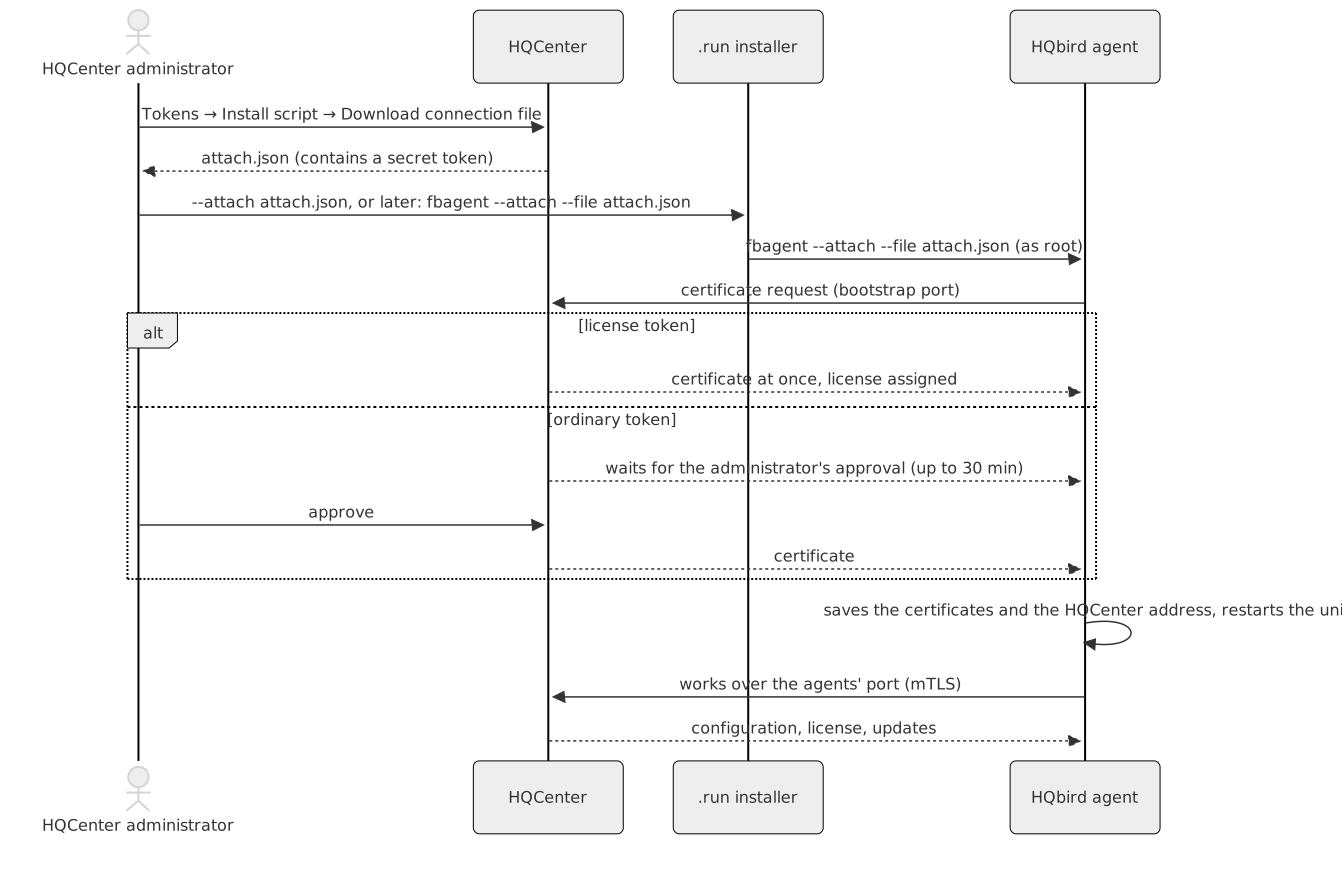
- In the HQCenter admin panel open Tokens
(
https://<hqcenter>:8443/admin/tokens). In the Install script form choose the license (or none), the mode, the number of servers and the validity (1 to 365 days); the platform and Firebird fields are not used. Click Download connection file and saveattach.json. The file contains a secret token: keep it safe (chmod 600), delete it after use and revoke the token in the list on the same page. The form is shown only whenadmin_panel.install_script_urlis set. - Copy
attach.jsonto the server. - Attach in one of two ways:
# during the installation
sudo sh hqbird2027-fb50-linux-2027.2.3.run --yes --attach /root/attach.json
# later, for an installed agent
cd /opt/hqbird/fbagent-p3050 && sudo ./fbagent --attach --file /root/attach.json
With an ordinary token the command waits until the HQCenter administrator approves the request (up to 30 minutes). With a license token the agent is attached at once and gets the license. After the attach the trial ends when HQCenter gives the agent a license; the agent, HQ Monitor, Firebird and the cluster components are then updated from the HQCenter catalog. A failed attach during the installation does not undo the installation: the summary says so, and the command above repeats it.
Requirements: HQCenter (goafts) 1.15.0 or newer (older versions have no connection file button); the server reaches the HQCenter bootstrap port once for the attach and then the agents’ port (443 by default). HQCenter can be without Internet. A second attach of the same server to the same HQCenter needs the administrator’s approval even with a license token.
HQCenter address changed
When the network changes and HQCenter gets a new IP address, the agent
keeps its certificates: they are not bound to an IP address. The agent only
needs the new address. The examples use IP2 for the new address and the
agent of port 3050.
1. Check the HQCenter server certificate. The agent checks that the server certificate contains the address it connects to. Look at the addresses in the certificate:
openssl s_client -connect IP2:443 </dev/null 2>/dev/null | openssl x509 -noout -ext subjectAltNameIf IP Address:IP2 (or a DNS name that you can use) is not in the list,
do one of these before step 2:
- Ask the HQCenter administrator to issue the server certificate again with the same key and with IP2 added. The server pin stays the same, so the other agents and new attaches continue to work. A new key changes the pin and stops all attaches.
- Use a DNS name from the list: add
IP2 <name>to/etc/hostson the agent server and usehttps://<name>instead ofhttps://IP2below.
2. Change the address in the agent configuration (goafts.server_url)
and restart the agent:
B=/opt/hqbird/fbagent-p3050
sudo cp -a $B/agent_config.json $B/agent_config.json.bak-$(date +%Y%m%d%H%M%S)
sudo sed -i 's#"server_url": *"[^"]*"#"server_url": "https://IP2"#' $B/agent_config.json
sudo systemctl restart hqbirdfbagent-p3050
journalctl -u hqbirdfbagent-p3050 -n 50 --no-pager
The error x509: certificate is valid for ..., not IP2 in the log means
that step 1 is not done.
Attach again (new certificates). Use this when the agent must get new
certificates, for example when the old ones are lost or HQCenter revoked
them. Do step 1 first: the new attach writes the bootstrap address into
goafts.server_url, so the server certificate must contain it too.
- In the HQCenter admin panel remove or revoke the old record of this
agent, and download a new
attach.jsonthat contains the new address. - Keep a copy of the old attach and remove the agent certificate. Without
it the agent counts as not attached, and
--attachaccepts the new address:
B=/opt/hqbird/fbagent-p3050
TS=$(date +%Y%m%d%H%M%S)
sudo systemctl stop hqbirdfbagent-p3050
sudo cp -a $B/certs $B/certs.bak-$TS
sudo cp -a $B/agent_config.json $B/agent_config.json.bak-$TS
sudo rm -f $B/certs/agent.crt $B/certs/agent.key $B/certs/ca.crt
cd $B && sudo ./fbagent --attach --file /root/attach.json
sudo systemctl start hqbirdfbagent-p3050
journalctl -u hqbirdfbagent-p3050 -n 50 --no-pager
If the attach fails, put the old state back:
B=/opt/hqbird/fbagent-p3050
sudo cp -a $B/certs.bak-<time>/. $B/certs/
sudo cp -a $B/agent_config.json.bak-<time> $B/agent_config.json
sudo systemctl start hqbirdfbagent-p3050
9. Unattended installation and scripts
Every option works on the terminal too. An unattended run needs --yes
(answers the questions of the plan; without a terminal and without --yes
the installer stops with exit code 4). The exit code tells the result; the
details are on the terminal and in /var/log/fbagent/install.log.
Options
| Option | Meaning | Default |
|---|---|---|
--fb-root DIR |
Folder of the new Firebird (new or empty); or the folder of the Firebird to update | /opt/firebird, then /opt/fb<NN> |
--port N |
Firebird port | 3050 for the first Firebird; for another line the port of the line (3053 for 3.0, 3054 for 4.0, 3055 for 5.0) |
--sysdba-pass-file F, --sysdba-pass P |
SYSDBA password of a new Firebird (first line of F; P is written to a 0600 file) |
generated, saved in /root/fbagent-install-sysdba.txt; a further Firebird on the host takes the password from that file |
--agent-id ID |
agent.id of the new agent |
host name + date |
--hqmonitor-port N |
HQ Monitor port | 20000 + Firebird port |
--hqmonitor-login L --hqmonitor-password-file F |
HQ Monitor sign-in, shared by all instances of the host: given on one instance, it changes the sign-in of all | admin + generated password; an update or a further instance keeps the existing sign-in |
--email ADDR --accept-privacy [--trial-zone RU|EU|BR] |
Trial email (30 days); the address is sent to the vendor’s trial server | none |
--license F |
License file to install | none |
--attach F |
Attach to your HQCenter (attach.json) |
none |
--no-hqbird, --disable-hqbird |
Leave the older HQbird alone / turn all its units off | automatic |
--no-debug |
Do not install the Firebird debug files | installed |
--yes |
Answer Yes to the questions of the plan | ask |
--check |
Only the checks, the libraries and the plan; nothing is changed | — |
--tmpdir DIR |
Unpack here (a folder where programs may run) | /var/tmp |
--extract DIR |
Only unpack the payload into DIR/payload and exit |
— |
--uninstall [--remove-data] [--agent-dir DIR] |
Remove the agent and HQ Monitor (Firebird stays) | — |
Options can be written as --port 3055 or --port=3055. Relative paths
count from the current folder.
Examples
New installation with the defaults:
sudo sh hqbird2027-fb50-linux-2027.2.3.run --yes
echo "exit code $?"
New installation into a chosen folder and port, with a SYSDBA password from a file and an HQ Monitor sign-in:
umask 077
printf '%s\n' 'S3cret-Sysdba' > /root/sysdba.txt
printf '%s\n' 'S3cret-Monitor' > /root/hqm.txt
sudo sh hqbird2027-fb50-linux-2027.2.3.run --yes \
  --fb-root /opt/firebird --port 3050 \
  --sysdba-pass-file /root/sysdba.txt \
  --hqmonitor-port 24000 --hqmonitor-login ops --hqmonitor-password-file /root/hqm.txt
rm -f /root/sysdba.txt /root/hqm.txt
New installation with the trial email, a license file and the attach file:
sudo sh hqbird2027-fb50-linux-2027.2.3.run --yes \
  --email [email protected] --accept-privacy --trial-zone EU \
  --license /root/hqbird-license.json \
  --attach /root/attach.json
Update of an older HQbird, all older HQbird units off:
sudo sh hqbird2027-fb50-linux-2027.2.3.run --yes --disable-hqbirdUpdate of HQbird 2027 to a new version (one instance; with several, add
--fb-root and --port):
sudo sh hqbird2027-fb50-linux-2027.2.3.run --yesA second Firebird 5.0 instance on port 3056:
sudo sh hqbird2027-fb50-linux-2027.2.3.run --yes --fb-root /opt/fb50b --port 3056Removal:
sudo sh hqbird2027-fb50-linux-2027.2.3.run --uninstall
sudo sh hqbird2027-fb50-linux-2027.2.3.run --uninstall --remove-data
A script that stops on a failed installation:
#!/bin/sh
set -e
sh hqbird2027-fb50-linux-2027.2.3.run --yes || {
  rc=$?
  echo "HQbird setup failed with code $rc, see /var/log/fbagent/install.log" >&2
  exit $rc
}
echo "HQbird 2027 installed"
Server without Internet: OS libraries
The Firebird of a line needs these libraries from the OS (besides glibc):
| Line | Packages (Debian/Ubuntu) | Packages (RHEL family) |
|---|---|---|
| 5.0 | libtommath1, libicu<NN>, libgssapi-krb5-2 |
libtommath (EPEL), libicu, krb5-libs |
| 4.0 | libtommath1, libicu<NN> |
libtommath (EPEL), libicu |
| 3.0 | libtommath1, libicu<NN> |
libtommath (EPEL), libicu |
| 2.5 | usually nothing (libstdc++6 is in the base system) |
usually nothing |
When a package is missing and the repository is not reachable, the installer stops with exit code 6 and nothing is changed:
[install] ERROR: no access to the package repository, or a package is not there; nothing was changed.
[install] Missing: libtommath1
[install] Install them, then run this file again:
[install]   apt-get install -y libtommath1
[install] On a server without internet: on a PC with the same Ubuntu 24.04.5 LTS
[install]   apt-get download libtommath1
[install] copy the .deb files here and run:  apt-get install -y ./*.deb
On the RHEL family libtommath is in EPEL: with a reachable repository the
installer adds epel-release itself. Without one, the commands are dnf
install -y epel-release, dnf download --resolve <packages> and dnf
install -y ./*.rpm. --check prints
the same list in advance, so the packages can be prepared before the
installation window.
Exit codes
| Code | Meaning | Changes on the host |
|---|---|---|
| 0 | Done (warnings about the trial email, the attach or the license are in the summary) | yes |
| 1 | Refused: the host, an option, a file, or the plan (the reason is printed) | none |
| 2 | The installation failed and was rolled back | rolled back |
| 3 | The installation failed and the rollback was not complete (the summary says what to check) | partly |
| 4 | A question of the plan was not confirmed (no terminal, no --yes) |
none |
| 5 | The payload did not pass the check (sha256, signatures): download the file again | none |
| 6 | OS libraries are missing and the package repository is not reachable | none |
| 7 | A Firebird from the distribution’s packages is installed | none |
10. Troubleshooting
| Problem | What to do |
|---|---|
run as root (sudo sh ...) |
Run the installer with sudo or as root |
/var/tmp is mounted noexec |
Run again with --tmpdir /root (any folder where programs may run) |
is damaged or cut (exit code 5) |
Copy the .run file again and compare its sha256sum with the published value |
| Exit code 6, libraries missing | Prepare the packages as printed (section 9), then run the installer again |
| Exit code 7, Firebird from the distro packages | Remove the packages (apt-get remove firebird3.0-server, keep a gbak backup) or use the online installer with --import-firebird |
refused (M17): Firebird 2.5 works only in /opt/firebird |
A second Firebird 2.5 is not possible; install another line next to it (section 7) |
--uninstall refused (exit code 1) with several agents |
Add --agent-dir /opt/hqbird/fbagent-p<port> |
no permission for read-write access to employee.fdb after an update (3.0) |
sudo chmod 660 /opt/firebird/examples/empbuild/employee.fdb (section 6) |
refused (M14): the folder is not empty |
Choose an empty or new folder with --fb-root, or name the Firebird to update |
| Exit code 2 or 3 | Read /var/log/fbagent/install.log; the units are back to their state before the run (code 2) or need a check (code 3) |
| HQ Monitor does not open | systemctl status hqbirdmonitor-p<port>; check that nothing else listens on the port; open the port in the firewall; --hqmonitor-port for another port |
| Lost the HQ Monitor password | Run the installer again (repair) with --hqmonitor-login admin --hqmonitor-password-file <file>; the old /opt/hqbird/conf/access.properties is kept as access.properties.bak-<time>. The new sign-in holds for all instances of the host |
| The trial email was not sent (no network) | Send it later: cd /opt/hqbird/fbagent-p<port> && sudo -u firebird ./fbagent --trial-email <address> --accept-privacy |
HQCenter has a new IP address; the agent log shows x509: certificate is valid for ..., not <address> |
Section 8, “HQCenter address changed” |
| SELinux (AlmaLinux, RHEL) | Supported in enforcing mode: the installer restores the contexts of the files it writes; nothing to do |