HQbird 2027 for Linux:安装指南
本指南面向在 Linux 服务器上使用离线安装程序 hqbird2027-fbNN-linux-<version>.run 安装 HQbird 2027 的管理员。内容涵盖全新安装、旧版 HQbird 及早期 HQbird 2027 的更新、维护命令、连接到您的 HQCenter、无人值守(脚本化)安装,以及安装后文件所在的位置。
示例展示的是在 Ubuntu 24.04 上用于 Firebird 5.0 的安装程序。Firebird 2.5、3.0 和 4.0 的安装程序工作方式相同;只是版本、默认端口和文件夹名称不同。Windows 安装请参阅 Windows 安装。
目录
- 1. 安装程序会安装什么
- 2. 安装概览
- 3. 全新安装
- 4. 安装之后
- 5. 更新较旧的 HQbird(2024 及更早版本)
- 6. 将 HQbird 2027 更新到新版本
- 7. 维护命令
- 8. 连接到您的 HQCenter
- 9. 无人值守安装和脚本
- 10. 故障排除
1. 安装程序会安装什么
一个 .run 文件 = 一个 Firebird 系列。请选择与您的数据库所用 Firebird 版本对应的安装程序:
| 安装程序 | 安装或更新的 Firebird | 主机上的首个 Firebird | 大小 |
|---|---|---|---|
hqbird2027-fb50-linux-<version>.run |
Firebird 5.0(HQbird 构建) | /opt/firebird,端口 3050 |
约 250 MB |
hqbird2027-fb40-linux-<version>.run |
Firebird 4.0(HQbird 构建) | /opt/firebird,端口 3050 |
约 220 MB |
hqbird2027-fb30-linux-<version>.run |
Firebird 3.0(HQbird 构建) | /opt/firebird,端口 3050 |
约 130 MB |
hqbird2027-fb25-linux-<version>.run |
Firebird 2.5(HQbird 构建) | /opt/firebird,端口 3050 |
约 80 MB |
每个安装程序都包含以下内容,并且无需互联网即可安装:
- Firebird(该系列的 HQbird 构建):全新服务器,或对主机上已有的该系列 Firebird 进行就地更新。您的
firebird.conf、databases.conf(2.5 为aliases.conf)、安全数据库和 SYSDBA 密码都会保留。 - Firebird 调试文件(用于崩溃分析的符号),安装到 Firebird 文件夹中。
--no-debug可跳过它们。 - HQbird agent(
fbagent):systemd 单元hqbirdfbagent-fb50,以用户firebird运行,负责备份、监控、维护任务和更新。名称以 Firebird 系列结尾(-fb25…-fb50);该系列的第二个实例带有-fb50-2。 - HQ Monitor:此 HQbird 实例的 Web 控制台,单元为
hqbirdmonitor-fb50,地址为http://<server>:<20000 + Firebird port>/(对于端口 3050 上的 Firebird:http://localhost:23050/)。 - 集群组件:集群控制台 RCM(
hqbirdrcm)和集群节点(hqclusternode)会被复制到 agent 的缓存中。带有 agent(fbagent)3.1.0 及更高版本的套件默认不创建集群:没有 RCM、没有配对窗口、防火墙中没有集群端口。两个问题(或--rcm on、--cluster-pairing on)可将其开启(第 3 节中的“下一步:集群”)。启用 RCM 时,它安装在/opt/hqbirdrcm中,并作为单元hqbirdrcm运行;摘要会在RCM:行中打印其地址。当您在 RCM 中链接主机时,节点会获得其单元(例如hqclusternode-master-p3050)。2027.2.19 及之后带有较旧 agent 的套件会在每台服务器上安装 RCM(--rcm off会将其保留在缓存中)并打开配对窗口。2027.2.19 之前的套件仅将两个组件复制到 agent 的缓存中:没有单元hqbirdrcm,也没有RCM:行。
2027.2.9 之前安装的实例在 agent 名称中包含 Firebird 端口:文件夹 /opt/hqbird/fbagent-p3050,单元 hqbirdfbagent-p3050 和 hqbirdmonitor-p3050。更新不会更改这些名称。只有新实例才会获得 -fb<NN> 名称,因此一台主机可以同时存在两种形式。
要求: x86_64、内核 3.2 或更新版本、systemd;带有 apt、dnf/yum 或 zypper 的 Linux(Ubuntu、Debian、AlmaLinux、Rocky、RHEL、Oracle Linux、openSUSE、RED OS 等);root。安装期间 /var/tmp 中约有 300 MB 可用空间(一个允许程序运行的文件夹;参见 --tmpdir)。少数操作系统库(libtommath、ICU)取自发行版的软件仓库;没有互联网的服务器会获得准备它们的确切命令(第 9 节)。
不支持: 从发行版软件包(firebird3.0-server、firebird rpm)安装的 Firebird。安装程序会在更改任何内容之前停止(退出代码 7);请先移除这些软件包(保留数据库的 gbak 备份),或使用带 --import-firebird 的在线安装程序。
一台服务器上的多个 Firebird 系列: 每个系列都有自己的安装程序。主机上的首个 Firebird 安装到 /opt/firebird;第二个系列安装到 /opt/fb<NN>(/opt/fb50、/opt/fb40、/opt/fb30),并使用其系列的端口:3.0 为 3053,4.0 为 3054,5.0 为 3055。当该端口被占用时,安装程序会停止并要求 --port N。同一系列的多个实例(另一个端口上的第二个 Firebird 5.0)使用 --fb-root <new folder> --port <port> 安装(第 7 节)。Firebird 2.5 只有一个实例,位于 /opt/firebird;要在其旁边再运行一个服务器,请使用另一个系列(例如 /opt/fb50 中的 Firebird 5.0)。
针对端口 3050 和 3051 上两个实例、涵盖所有系列、带有可复制粘贴命令的分步操作手册位于
hqbird2027-linux-two-instances-runbook.ru.md
(俄语)和
hqbird2027-linux-two-instances-runbook.pt.md
(葡萄牙语)。
试用: 没有许可证时,agent 运行 7 天试用。试用电子邮件(--email)可将其延长至 30 天。许可证文件(--license)或连接到您的 HQCenter(第 8 节)会取代试用。
更新: 从套件 2027.2.31(agent 3.3.0)开始,未连接到任何 HQCenter 的服务器会检查供应商的更新服务器。默认情况下,agent、HQ Monitor 和 fbmcp 会自动更新,新的 Firebird 软件包会被下载并等待您处理。--auto-update all|agent|off 或文本界面中的 Updates 行会更改此设置(第 4 节中的“无 HQCenter 的更新”)。连接到 HQCenter 的服务器从该 HQCenter 获取更新。
2. 安装概览

服务器检查和安装本身由安装程序携带的 HQbird agent 完成(fbagent --install-plan、fbagent --setup-install)。除了缺失的操作系统软件包外,不会下载任何内容。在计划确认之前不会更改任何内容:操作系统软件包在确认后安装。在终端中,2027.2.30 之后的套件会打开文本界面(第 3 节的第 3 步);--no-tui 运行普通安装程序,它以文本行的形式提出问题。没有终端且没有 --yes 时,安装程序会在确认处停止,退出代码为 4。如果安装在 agent 单元启动之前失败,agent 会将单元回滚到之前的状态(退出代码 2;回滚未完全完成时为代码 3,摘要会说明需要检查的内容)。
3. 全新安装
第 1 步:下载安装程序并检查
KIT=hqbird2027-fb50-linux-2027.2.9.run
curl -fL -O https://ib-aid.com/download/hqbird/v2027/$KIT -O https://ib-aid.com/download/hqbird/v2027/$KIT.sha256
sha256sum -c $KIT.sha256
其他系列的名称相同,只是将 fb50 替换为 fb40、fb30、fb25。预期结果:
hqbird2027-fb50-linux-2027.2.9.run: OK。没有互联网的服务器:在具有相同链接的 PC 上下载这两个文件,并将它们复制到服务器(scp、USB 驱动器、共享)。
安装程序在解包任何内容之前还会检查自身的有效载荷:一个被截断
或下载损坏时以退出码 5 停止(“请重新下载”)。
第 2 步:在不改动主机的情况下检查主机(可选)
sudo sh hqbird2027-fb50-linux-2027.2.9.run --check--check 运行主机检查,报告缺失的操作系统库(以及在没有互联网的服务器上获取这些库的命令),显示 agent 发现了什么以及它会做什么,然后退出。不会安装任何内容。
第 3 步:运行安装程序
sudo sh hqbird2027-fb50-linux-2027.2.9.run2027.2.30 之后的套件在终端中启动时会打开文本界面:全屏页面,显示计划和设置。2027.2.30 及之前的套件,以及下文"纯文本安装程序"中的情况,会以文本行的形式提问。两者执行相同的安装,使用相同的选项。
文本界面
安装程序检查主机、解包自身、读取计划,并显示第一页。在你于 Install 页面开始安装之前,主机上不会有任何改动。
 HQbird 2027 setup <version> | Firebird 5.0 (5.0.5.1917)

 Plan M1: New Firebird and HQbird agent
   Firebird: new /opt/firebird (unit firebird, port 3050)
   Agent: new, in /opt/hqbird/fbagent-fb50
   OS packages to install: libtommath1 (see Plan details)

   Language         English (auto)
   Firebird folder  automatic (/opt/firebird)
   Firebird port    automatic (3050)
   Agent id         automatic (srv1261114-fb50)
   SYSDBA password  generated (for a new Firebird)
   HQ Monitor       port automatic, login admin
   License          not now (add it later in HQ Monitor)
   HQCenter         not attached
   Cluster          RCM off, discovery mode off
   Components       debug files: yes, fbmcp: yes
   Updates          HQbird only (recommended)

 > Install
   Plan details
   About plans
   Quit

 Up/Down: move   Enter: change or start   Esc: quit
顶部几行是当前设置对应的计划:它的代码,以及安装程序将对 Firebird 和 agent 做什么。不可能的计划显示为红色,并附上原因,光标停在可修复该问题的设置上。每次更改后,安装程序都会重新读取计划。
| 按键 | 作用 |
|---|---|
| Up、Down | 移动光标(也可用 k、j) |
| Enter | 打开光标下的设置、选择一项、接受输入的值 |
| Space | 打开或关闭某个组件(Components 页面) |
| Esc | 返回上一页;在第一页:离开安装程序(会先询问) |
| Ctrl+C | 立即停止安装程序(退出码 2)。在 Install 页面之前没有任何改动 |
在需要输入值的页面(文件夹、端口、地址),Enter 接受该值,空值表示"自动"。Esc 不会离开此类页面。
| 设置 | 你选择的内容 | 等同于选项 |
|---|---|---|
| Language | 英语、俄语、巴西葡萄牙语、德语;页面立即切换 | --lang |
| Firebird folder | 新 Firebird 的文件夹,或要更新的 Firebird 的文件夹。Firebird 2.5 只有一个文件夹,因此其安装程序没有此行 | --fb-root |
| Firebird port | Firebird 的 TCP 端口 | --port |
| Agent id | 自动、主机名、主机名加实例,或你自己的值。仅适用于新 agent:已安装的 agent 保留其 id,不显示此行 | --agent-id |
| SYSDBA password | 对于新 Firebird:生成,或使用你自己的 | --sysdba-pass-file |
| HQ Monitor | Web 控制台的端口和登录信息 | --hqmonitor-port、--hqmonitor-login、--hqmonitor-password-file |
| License | 暂不、通过电子邮件申请 30 天试用(地址、隐私声明、区域),或许可证文件 | --email --accept-privacy --trial-zone、--license |
| HQCenter | 你的 HQCenter 的 attach.json 文件 |
--attach |
| Cluster | 集群管理器 RCM(集群 id、管理员密码)、发现模式、配对端口 | --rcm、--cluster-id、--rcm-password-file、--cluster-pairing、--pairing-port |
| Components | Firebird 调试文件;fbmcp 及其远程模式的地址 | --no-debug、--no-fbmcp、--fbmcp-allow-from |
| Updates | 仅 HQbird(agent、HQ Monitor 和 fbmcp 自行更新,新 Firebird 等待你操作)、HQbird 和 Firebird(Firebird 也自行更新,夜间 03:30 至 04:00,并重启 Firebird),或关闭。套件从 2027.2.31 起;仅适用于没有 attach.json 文件的新 agent:HQCenter 控制已附加 agent 的更新 |
--auto-update |
命令行上的选项是页面启动时的值:
sudo sh hqbird2027-fb50-linux-<ver>.run --rcm on --port 3055 会以 RCM 开启、端口 3055 打开第一页。
设置下方的四行:
- Install 完整显示计划,然后询问
Start the install now?,光标停在 No 上。计划中的问题(较旧的 HQbird、需要停止的运行中的 Firebird)在同一页上:Yes 会全部回答。选择 Yes 后页面关闭,安装过程在普通屏幕上打印日志和摘要,如下文纯文本安装程序所示。 - Plan details 显示计划代码的含义、安装程序在主机上发现的内容、警告以及它将安装的操作系统包。
- About plans 列出所有代码(M1 … M17)。在某个代码上按 Enter 会解释它。
*标记当前计划的代码。 - Quit 离开安装程序(退出码 1)。没有任何改动。
纯文本安装程序
纯文本安装程序在以下任一条件成立时运行:
- 选项
--no-tui,或变量HQBIRD_NO_TUI=1; --yes、--check、--uninstall、--extract、--plan-help、--help;- stdin 或 stdout 不是终端:脚本、没有终端的
ssh host 'command',或诸如... 2>&1 | tee install.log的管道; TERM为dumb或未设置;- 窗口小于 80 列 × 24 行(在带状态行的
tmux中,80x24 终端只有 23 行:请放大窗口,或使用--no-tui); - 主机上的 bash 低于 4.4(RHEL 7、CentOS 7);
- 套件为 2027.2.30 或更早。
对于窗口和 bash 的情况,输出的第一行会说明页面为何没有打开。
在没有 Firebird 的服务器上运行纯文本安装程序的典型输出:
[install] HQbird 2027 setup 2027.2.9, Firebird 5.0 (5.0.5.1916)
[install] host: Ubuntu 24.04.5 LTS, kernel 6.8.0-142-generic
[install] checking the payload (sha256) ...
[install] unpacking into /var/tmp/hqbird2027.k3Qf1x ...
[install] OS libraries missing: libtommath.so.1 (packages: libtommath1)
[install] plan M1: Firebird new /opt/firebird (unit firebird, port 3050)
[install]              agent new in /opt/hqbird/fbagent-fb50 (unit hqbirdfbagent-fb50), HQ Monitor hqbirdmonitor-fb50
[install]              OS packages to install: libtommath1
[install] Install as planned? Yes/No y
[install] installing from the package repository: libtommath1
[install] OS libraries: installed
[install] installing (fbagent --setup-install; log /var/log/fbagent/install.log) ...
...
Done: agent hqbirdfbagent-fb50 in /opt/hqbird/fbagent-fb50, Firebird 5.0.5.1916 in /opt/firebird (port 3050).
HQ Monitor: http://localhost:23050/ (login admin; password in /opt/hqbird/conf/access.properties)
[install] done. Uninstall: sudo sh hqbird2027-fb50-linux-2027.2.9.run --uninstall
此示例来自套件 2027.2.9。从套件 2027.2.19 起,摘要还包含集群控制台的 RCM: 和 Pairing: 行(见下文"下一步:集群")。在 agent 3.1.0 及更高版本且未选择集群时,它们为:
RCM:        off; turn it on in HQbird Monitor or with fbagent --cluster-init <id>
Pairing:    off; turn it on in HQbird Monitor or with fbagent --cluster-pairing on (port 7450)
各行含义:
- host:发行版和内核;安装程序会拒绝不是 x86_64、没有 systemd,或运行低于 3.2 内核的主机。
- OS libraries:此产品线的 Firebird 需要从操作系统获取的内容(第 9 节)。计划列出缺失的包(
OS packages to install);确认后,安装程序从发行版的仓库获取它们。没有仓库时,它会以退出码 6 停止
并打印这些命令。
- plan:agent 发现了什么(
found Firebird ...、HQbird: ...行)以及它将做什么:Firebird new(新建一个服务器)、update(就地更新此行的 Firebird),或带原因的拒绝 (退出码 1,未做任何更改)。 - Install as planned? Yes/No:更改任何内容之前的最后一个问题。回答
y。当计划本身带有问题时(较旧的 HQbird、另一个版本),这些问题会取而代之(第 5 节)。没有 终端时,传入--yes;否则安装程序会以退出码 4 停止。 - 集群问题(agent 3.1.0 及更高版本):
Install the cluster manager (RCM) on this host and make a new cluster? [y/N]和Turn on discovery mode for 24 hours (an RCM on the network may invite this agent into its cluster; port 7450)? [y/N]。默认值为 No。仅当主机没有 RCM 且 agent 不在任何集群中时,才会询问第一个问题; 当 agent 已在集群中或正在运行 RCM 时,不会询问第二个问题。--yes以及在没有终端的情况下运行都会回答 No(不会产生退出码 4)。 - HQ Monitor:地址和登录名。全新安装会获得登录名
admin;其生成的密码位于/opt/hqbird/conf/access.properties(权限 0600,仅root和 agent 可读)。该主机的所有 HQbird 2027 实例共享此文件。请在 HQ Monitor 中 更改密码。
新 Firebird 的 SYSDBA 密码会生成并保存在
/root/fbagent-install-sysdba.txt(权限 0600):一行注释,然后是
SYSDBA_PASS=<password> 这一行。之后在同一主机上安装的另一个 Firebird
会从此文件获得相同的密码。要设置自己的密码,请传入
--sysdba-pass-file <file>(文件的第一行)或 --sysdba-pass <password>。
安装程序的语言
2027.2.30 之后的套件支持四种语言:英语、俄语(ru)、
巴西葡萄牙语(pt-BR)和德语(de)。安装程序按以下顺序选择
语言:
- 选项
--lang en|ru|pt-BR|de; - 变量
HQBIRD_LANG; - 控制台的区域设置(
LC_ALL,然后是LC_MESSAGES,然后是LANG), 前提是它是 UTF-8 区域设置; - 英语。
输出的第二行会说明当前语言以及如何更改 它。这一行始终为英语:
[install] Language: Русский (auto). Use --lang en to change.注意:
- PuTTY 不会将
LANG发送到服务器。服务器自身的区域设置才起作用, 因此语言通常是英语。请使用--lang。 - 使用
--yes且没有终端时,自动语言为英语: 脚本会读取该输出。--lang在那里仍然有效。 - 安装程序需要主机上有 UTF-8 区域设置才能使用其他语言
(
C.UTF-8或en_US.UTF-8)。它会为自己设置一个。没有的话 就使用英语。 - 在文本界面中,第一页的 Language 行会立即更改 语言。终端必须显示 UTF-8(PuTTY:Window、 Translation、Remote character set UTF-8,这是其默认值)。
- 以下内容保持英语:安装本身的进度行、
Done:摘要、/var/log/fbagent/install.log,以及主机 扫描的警告。
计划的代码
计划有一个代码:M1、M2、……它表示安装程序在主机上发现的
情况。安装程序会打印该代码的含义:
[install] plan M1: New Firebird and HQbird agent
[install]              This host has no Firebird and no older HQbird. Setup installs a new Firebird and a new HQbird agent.
[install] plan M1: Firebird new /opt/firebird (unit firebird, port 3050)
--plan-help 会打印所有代码并退出。它不会更改任何内容。在
文本界面中,第一页会显示代码及其标题,“Plan details”
会显示文本,“About plans”会列出所有代码。
| 代码 | 安装程序发现了什么 | Firebird | Agent | 较旧的 HQbird |
|---|---|---|---|---|
| M1 | 无 | 新建 | 新建 | — |
| M2 | 此行的 Firebird,无较旧的 HQbird | 更新 | 新建 | — |
| M3 | 另一行的 Firebird,无较旧的 HQbird | 新建,端口 305N | 新建 | — |
| M4 | 为此行 Firebird 提供服务的较旧 HQbird | 更新 | 新建 | 已关闭,其作业以启用状态导入 |
| M5 | 另一行的较旧 HQbird;此处存在此行的 Firebird | 更新,需先回答一个问题 | 新建 | 继续工作 |
| M6 | 另一行的较旧 HQbird;没有此行的 Firebird | 新建,需先回答一个问题 | 新建 | 继续工作 |
| M7 | 较旧的 HQbird,没有已知版本的本地 Firebird | 更新或新建 | 新建 | 继续工作,并给出警告 |
| M8 | 为另一个 Firebird 服务的 HQbird 2027 agent | 更新或新建 | 新建,位于第一个旁边 | 未更改 |
| M9 | 同 M8,且较旧的 HQbird 为此行提供服务 | 更新 | 新建,位于第一个旁边 | 已关闭,其作业以启用状态导入 |
| M10 | 已有 agent 为此 Firebird 服务(重复运行) | 更新 | 就地 | 运行时关闭 |
| M11 | --fb-root 是此行的 Firebird |
更新 | 新建或就地 | 同上 |
| M13 | --fb-root 是空文件夹或新文件夹 |
在该文件夹中新建 | 新建 | 同上 |
拒绝的代码(退出码 1,未做任何更改):M12 该文件夹中的
Firebird 无法由安装程序更新(另一行、无法读取的版本、已禁用的服务);M14 该文件夹非空且没有
Firebird;M16 存在多个此行的 Firebird 服务器,请提供 --fb-root;
M17 Firebird 2.5 仅在 /opt/firebird 中工作。M15 是
仅 agent 套件:Firebird 不会被安装,也不会被更新。
agent id
agent id 在 HQCenter、许可证和集群中标识该 agent。它仅在首次安装时 设置:
- 默认值:主机名 + 日期 + 实例,例如
srv1261114-fb50。 --agent-id ID提供你自己的 id(1-128 个字母、数字、.、_或-;第一个字符为字母或数字)。- 安装程序会拒绝该主机上另一个 agent 已使用的 id。
- 在文本界面中,Agent id 页面会提供自动 id、主机 名、带实例的主机名以及你自己的值,并列出该主机 已有的 id。
- 已安装的 agent 会保留其 id。重复运行会在计划中显示它
(
id srv1 (kept)),此时文本界面没有 Agent id 行, 并且此处的--agent-id只会给出警告。在早先安装留下其配置的文件夹中新建 agent 也会保留该配置的 id。
第 4 步:检查结果
systemctl status firebird hqbirdfbagent-fb50 hqbirdmonitor-fb50 --no-pager
ss -ltnp | grep -E ':3050|:23050'
ISC_PASSWORD="$(sed -n 's/^SYSDBA_PASS=//p' /root/fbagent-install-sysdba.txt)" \
  /opt/firebird/bin/isql -user SYSDBA localhost/3050:/opt/firebird/examples/empbuild/employee.fdb
请使用示例数据库的完整路径:它适用于每一行,也适用于
更新之后,而较旧安装保留的 databases.conf 可能
没有 employee 别名(2027.2.3 的全新安装则有)。
在浏览器中打开 http://<server>:23050/,并使用
/opt/hqbird/conf/access.properties 中的密码以 admin 身份登录。当 firewalld 运行时,Firebird 端口和
HQ Monitor 端口会在其中打开(区域 public),
否则在 ufw 处于活动状态时在其中打开;使用其他防火墙时请自行打开它们。
集群端口仅在启用集群选项时打开:使用 --rcm on 时打开 7443、7444 和节点
端口;使用
--cluster-pairing on 时打开节点端口和配对端口。没有活动防火墙时,安装程序会打印一行
说明它未打开的端口。安装前已打开的端口
保持原样。
下一步:集群
要将数据库从主服务器复制到副本服务器,请在集群控制台 RCM 中将两台服务器
关联起来。使用 agent 3.1.0 及更高版本时,
仅在主服务器上安装 RCM(--rcm on,或回答 y),并在副本上开启
发现模式(--cluster-pairing on)。发现模式会开启
24 小时的配对窗口:agent 槽位的配对端口(第一个实例为 7450,
第二个为 7451,最多到 7459)会在
防火墙中打开,RCM 可能会邀请该 agent。一台主机只有一个 RCM(端口 7443
和 7444);创建它的 agent 会运行它,并且不会打开配对窗口。
之后,无需安装程序:HQ Monitor → Clusters → Cluster on this
server,或 fbagent --cluster-init <id> 和 fbagent --cluster-pairing on。2027.2.19 及之后版本的套件搭配较旧的 agent 时,会在每台服务器上启动 RCM,并在摘要的 RCM: 行中打印其地址;2027.2.19 之前的安装在使用较新套件更新后(第 6 节)会获得 RCM。集群指南(适用于套件 2027.2.33)从两台新服务器开始,逐步讲解到可用的副本,并附有截图:
Linux 集群指南
(也有俄语版和
葡萄牙语版)。仅以命令形式呈现的相同步骤:
hqbird2027-linux-cluster-runbook.md
(hqbird2027-linux-cluster-runbook.ru.md、
hqbird2027-linux-cluster-runbook.pt.md)。
4. 安装之后
单元
| 单元 | 内容 | 运行身份 |
|---|---|---|
firebird(2.5、4.0、5.0 位于 /opt/firebird);firebird-superserver(3.0 位于 /opt/firebird);对于其他文件夹,文件夹名中的 / → _:firebird.opt_fb50、firebird.opt_fb40-2(4.0、5.0 位于 /opt/fb50、/opt/fb40-2)、firebird.opt_fb30-superserver(3.0 位于 /opt/fb30) |
Firebird 服务器 | firebird |
hqbirdfbagent-fb50(第二个实例为 hqbirdfbagent-fb50-2;2027.2.9 之前为 hqbirdfbagent-p<Firebird port>) |
HQbird agent | firebird |
hqbirdmonitor-fb50(hqbirdmonitor-fb50-2;2027.2.9 之前为 hqbirdmonitor-p<Firebird port>) |
HQ Monitor | firebird |
这三个单元均已启用并在启动时运行。journalctl -u hqbirdfbagent-fb50
显示 agent 的单元日志。Firebird 3.0 还有单元
firebird-classic.socket 和 [email protected]
(在其他文件夹中为 firebird.opt_fb30-classic.*),Firebird 2.5 则有
firebird.socket:它们保持 inactive,这是正常的。Firebird 2.5
进程是 fb_smp_server(SuperClassic)。
文件位置
示例为 /opt/firebird 中端口 3050 上的第一个 Firebird 5.0 实例。该行的第二个实例在 agent 名称中带有 -2
(fbagent-fb50-2、hqbirdfbagent-fb50-2、hqbirdmonitor-fb50-2)。
2027.2.9 之前安装的实例在这些名称中带有端口
(fbagent-p3050、hqbirdfbagent-p3050、hqbirdmonitor-p3050)。
/opt/firebird/                         Firebird 5.0 server: bin/, lib/, plugins/, firebird.conf,
                                       databases.conf, security5.fdb, *.debug files (symbols)
/opt/fb50/                             a Firebird 5.0 next to another line (/opt/fb40, /opt/fb30)
/opt/hqbird/                           root of the HQbird agents
  conf/access.properties               HQ Monitor sign-in, shared by all instances of the host (0600)
  fbagent-fb50/                        HQbird agent of this Firebird
    fbagent                            the agent (unit hqbirdfbagent-fb50)
    hqmonitor                          HQ Monitor (unit hqbirdmonitor-fb50)
    agent_config.json                  agent configuration (encrypted secrets: config_secret.key)
    config.properties                  HQ Monitor configuration
    hqbird2027-firebird.json           the Firebird this installer installed
    hqbird2027-hqmonitor-firewall.json the HQ Monitor port this installer opened in firewalld or ufw
    conf/                              trace and job settings
    logs/                              agent log (firebird-agent_<date>.jsonl), license_state.json;
                                       journal.log and server_status.json after the first checks
    bak/                               backups of the configuration
    outcoming/                         status reports for HQCenter
    update/                            update cache: hqmonitor/, hqclusternode/, hqbirdrcm/
    certs/                             certificates after the attach to HQCenter
  fbagent-hqbird-takeover.json         state of the older HQbird units before the takeover (section 5)
/opt/hqbirdrcm/                        the cluster console RCM (unit hqbirdrcm, owner firebird):
                                       with agent 3.1.0 only after --rcm on (or HQ Monitor);
                                       kits 2027.2.19+ with an older agent: unless --rcm off
/opt/hqclusternode/                    the cluster node (owner firebird), empty until the host is
                                       linked in RCM or HQCenter adds it to a cluster
/var/lib/hqmonitor/<server id>/        HQ Monitor data
/var/log/fbagent/install.log           log of the installer's steps (passwords are hidden)
/root/fbagent-install-sysdba.txt       SYSDBA password of a new Firebird (root only, 0600)
/etc/sysctl.d/90-hqbird-firebird.conf  kernel settings for Firebird (vm.max_map_count), only when
                                       the system value is lower (Ubuntu 24.04 needs none)
/etc/sudoers.d/                        the agent's sudoers rules for its root helpers (updates, HQ Monitor)
安装程序不会在 /var/tmp 中保留任何内容:其工作文件夹
/var/tmp/hqbird2027.XXXXXX 会在结束时删除,出错后也是如此。
日志
| 日志 | 位置 |
|---|---|
| 安装程序 | 终端;/var/log/fbagent/install.log |
| Agent | /opt/hqbird/fbagent-fb50/logs/firebird-agent_<date>.jsonl、journal.log;journalctl -u hqbirdfbagent-fb50 |
| HQ Monitor | journalctl -u hqbirdmonitor-fb50;审计日志 /opt/hqbird/fbagent-fb50/hqmonitor_audit.log |
| Firebird | /opt/firebird/firebird.log |
不使用 HQCenter 的更新
从套件 2027.2.31(agent 3.3.0)起,未附加到任何 HQCenter 的 agent
会从供应商的更新服务器获取新版本。更新模式是
agent_config.json 中的键 update.mode:
| 模式 | 自动更新的内容 |
|---|---|
agent(默认) |
agent、HQ Monitor 和 fbmcp。新的 Firebird 包会被下载并等待管理员处理 |
all |
同上,还包括 Firebird,在其应用窗口内(夜间 03:30 至 04:00;更新会重启 Firebird) |
off |
不更新:agent 不进行任何更新检查。要更新,请运行新版本的安装程序(第 6 节) |
- 安装时:文本界面的 Updates 行,或
--auto-update all|agent|off。不指定时,安装程序不会更改 模式。 - 之后:HQ Monitor 的 Updates 页面,或再次运行安装程序并带上
--auto-update <mode>。 - 状态:
sudo /opt/hqbird/fbagent-fb50/fbagent --update-status(添加--json以供脚本使用)。它会打印发布源、区域以及 更新服务器的最后响应。
agent 仅向以下地址发起出站 HTTPS 连接。无需 入站端口。
| 用途 | 地址 |
|---|---|
| 更新,EU 区域 | liceu.ibsurgeon.com:9443 |
| 更新,BR 区域 | licbr.ibsurgeon.com:9443 |
| 更新,RU 区域 | licru.ibsurgeon.com:20943 |
| 试用许可证 | trialeu.ibsurgeon.com:9443、trialbr.ibsurgeon.com:19443、trialru.ibsurgeon.com:23943 |
已附加到 HQCenter 的服务器不使用更新地址: 它从该 HQCenter 获取更新(第 8 节)。
通知
从套件 2027.2.33(agent 3.4.0)起,agent 会将服务器
问题消息发送到您自己的 Telegram 机器人、webhook 或电子邮件(SMTP)。安装程序不设置任何渠道,在您添加渠道之前不会发送任何内容:HQ
Monitor → Servers → Notifications。要从命令行测试渠道:sudo -u firebird /opt/hqbird/fbagent-fb50/fbagent --notify-test <channel>;--notify-history 会打印最近的投递记录。
5. 更新较旧的 HQbird(2024 及更早版本)
安装程序会在 /opt/hqbird 中发现已安装的 HQbird(FBDataGuard)及其单元,以及它管理的 Firebird 服务器。然后它遵循与 HQbird 安装脚本相同的规则:

您在终端上看到的内容:
[install]   found Firebird 5.0.5.1878: /opt/firebird, port 3050, unit firebird, no agent
[install] plan M4: Firebird update /opt/firebird (unit firebird, port 3050)
[install]              agent new in /opt/hqbird/fbagent-fb50 (unit hqbirdfbagent-fb50), HQ Monitor hqbirdmonitor-fb50
[install]              HQbird services to turn off: hqbird
[install] Firebird 5.0.5.1878: unit firebird, port 3050, 0 TCP connections
[install] Confirm to stop running Firebird 5.0.5.1878? Yes/No y- 计划中指明了要更新的 Firebird;
--fb-root和--port无法改变它(其单元已被占用)。 - 当必须停止引擎时会询问 确认停止正在运行的 Firebird?;
其上一行显示已打开的连接。
当旧版 HQbird 管理的是另一版本的 Firebird 时,会询问
Another version(更新那一个,或在它旁边新建一个)。--yes对所有问题回答“是”;没有终端且没有--yes时,安装程序以退出码 4 停止,不做任何更改。 --disable-hqbird在任何情况下都会关闭旧版 HQbird 单元;--no-hqbird则不动旧版 HQbird(它继续与 HQbird 2027 并行运行)。- 不会询问 SYSDBA 密码:agent 从旧版 HQbird 获取它。
- HQ Monitor 使用旧版 HQbird 的登录信息:其文件
/opt/hqbird/conf/access.properties被保留,因此请使用之前 使用的登录名和密码登录。安装程序将该文件交给firebird, 权限为 0600(旧版 HQbird 使其对所有用户可读)。旧版 HQbird 的 访客登录(access.guest-login)不被 HQ Monitor 使用。
保留的内容:firebird.conf、databases.conf / aliases.conf、
安全数据库、SYSDBA 密码、数据库、备份以及
旧版 HQbird 的文件。更新会就地替换 Firebird 程序文件;
被替换的文件保存在
/opt/fbagent-update-backup/<folder name>-<id>/<time>_<old version>_to_<new version>/
(保留最新的两次更新)。HQbird 作业(备份、清理、监控)
被导入到新 agent 中。旧版 HQbird 的 HQbird 许可证
不会转移:新 agent 运行试用版,直到安装许可证
或将服务器连接到您的 HQCenter。
从套件 2027.2.33(agent 3.4.0)起,导入旧版 HQbird 的 配置还会做两件事:
- 它注册旧版 HQbird 的数据库到 Firebird 别名
文件(
databases.conf,2.5 则为aliases.conf)中,形式为name = path行。 旧文件会先被复制。如果数据库路径已在文件中, 或其文件不存在,则跳过该数据库。带有include指令的文件不会被更改。 - 它删除旧版 HQbird 的旧监控日志:其输出文件夹中
mon/outcoming和mon/outtrace文件夹的内容(文件夹保留)。 当旧版 HQbird 的某个服务正在运行时,不会删除任何内容。 删除无法撤销:如果您需要这些日志,请在安装前 复制它们。
两者默认开启。agent_config.json 中的键
hqbird_import.register_databases 和
hqbird_import.clean_mon_logs(两者都在 HQ Monitor 的
配置编辑器中)可为后续导入关闭它们;安装程序
没有针对它们的选项。
接管前旧版 HQbird 单元的状态保存在
/opt/hqbird/fbagent-hqbird-takeover.json。--uninstall 不会
重新开启它们。
无人值守形式:
sudo sh hqbird2027-fb50-linux-2027.2.9.run --yes --disable-hqbird6. 将 HQbird 2027 更新到新版本
在同一产品线的新安装程序,在装有 HQbird 2027 的主机上运行, 会就地更新已安装的实例:Firebird、调试文件、agent 和 HQ Monitor。配置、数据库、试用或许可证状态、 HQ Monitor 端口和登录信息均保留。
sudo sh hqbird2027-fb50-linux-2027.2.9.run在文本界面中,第一页显示 Plan M10: Update of an installed HQbird 2027、带有其 id (kept) 的 agent,且没有 Agent id 行;Install
启动更新。纯安装程序输出:
[install] HQbird 2027 setup 2027.2.9, Firebird 5.0 (5.0.5.1916)
[install]   found Firebird 5.0.5.1880: /opt/firebird, port 3050, unit firebird, agent hqbirdfbagent-p3050
[install] plan M10: Firebird update /opt/firebird (unit firebird, port 3050)
[install]              agent in_place in /opt/hqbird/fbagent-p3050 (unit hqbirdfbagent-p3050), HQ Monitor hqbirdmonitor-p3050
[install] Firebird 5.0.5.1880: unit firebird, port 3050, 2 TCP connections
[install] Confirm to stop running Firebird 5.0.5.1880? Yes/No y
...
Firebird updated: 5.0.5.1880 -> 5.0.5.1916
HQ Monitor updated 1.31.0 -> 1.33.0 (...)
Done: agent hqbirdfbagent-p3050 in /opt/hqbird/fbagent-p3050, Firebird 5.0.5.1916 in /opt/firebird (port 3050).
更新不会更改 agent 文件夹和单元的名称:此示例中的
实例是在 2027.2.9 之前安装的,并保留
fbagent-p3050。
当安装程序的 Firebird 构建版本与已安装的版本相同时(例如
每个用于 2.5 的 HQbird 2027 中的 Firebird 2.5.9.27194),只更新 agent
和 HQ Monitor:Firebird 不会停止,也没有
Confirm to stop 问题。
由旧版 HQbird 2027 安装的实例所保留的 databases.conf
可能没有 employee 别名;请通过其完整路径连接示例数据库
(第 3 节,第 4 步)。在 Firebird 3.0 上,从 2027.2.0 更新会留下
/opt/firebird/examples/empbuild/employee.fdb 权限为 0444,Firebird
无法打开它(no permission for read-write access);如果您需要
示例数据库:sudo chmod 660 /opt/firebird/examples/empbuild/employee.fdb。
您自己的数据库不受影响。
- 如果同一产品线有多个实例,请指明要更新的那个:
--fb-root /opt/fb50-2 --port 3056。 - 同一安装程序在已安装版本上再次运行即为修复: 程序文件和单元被重新写入,数据保留。
- 连接到 HQCenter(第 8 节)后,agent、HQ Monitor、 Firebird 和集群组件将从 HQCenter 目录更新;之后不再需要新的安装程序。
- 未连接到任何 HQCenter 且 agent 为 3.3.0 或更高版本(套件从
2027.2.31 起)的服务器会自行更新 agent、HQ Monitor 和 fbmcp,
除非更新模式为
off(第 4 节中的“无 HQCenter 的更新”)。在 2027.2.31 之前进行的安装,在使用较新安装程序更新一次后即获得此功能。 使用安装程序更新会保留更新模式;--auto-update <mode>可更改它。
7. 维护命令
每个维护操作都是带选项运行安装程序,或
在 agent 文件夹中运行 agent 命令。在终端中,不带 --yes 运行会打开
文本界面并已预设这些选项(2027.2.30 之后的套件):
在第一页检查计划,然后选择 Install。
| 操作 | 命令 |
|---|---|
| 此产品线的另一个实例 | sudo sh hqbird2027-fb50-linux-<ver>.run --fb-root /opt/fb50-2 --port 3056 |
| 修复 / 更新 | sudo sh hqbird2027-fb50-linux-<ver>.run(有多个实例时:--fb-root <folder> --port <port>) |
| 连接到 HQCenter | 安装期间 sudo sh hqbird2027-fb50-linux-<ver>.run --attach attach.json,或稍后 cd /opt/hqbird/fbagent-fb50 && sudo ./fbagent --attach --file /path/attach.json |
| 发送试用邮件 | cd /opt/hqbird/fbagent-fb50 && sudo -u firebird ./fbagent --trial-email [email protected] --accept-privacy |
| 确认邮件中的试用代码 | cd /opt/hqbird/fbagent-fb50 && sudo -u firebird ./fbagent --trial-confirm <code>(或在 HQ Monitor 中) |
| 安装许可证文件 | 安装期间 --license <file>,或 cd /opt/hqbird/fbagent-fb50 && sudo -u firebird ./fbagent --license-install /path/license.json |
| 安装状态 | sudo /opt/hqbird/fbagent-fb50/fbagent --install-state --json |
| 更新状态(无 HQCenter) | sudo /opt/hqbird/fbagent-fb50/fbagent --update-status |
| 更改更新模式(无 HQCenter) | HQ Monitor 的 Updates 页面;或 sudo sh hqbird2027-fb50-linux-<ver>.run --auto-update all|agent|off |
| 移除 | sudo sh hqbird2027-fb50-linux-<ver>.run --uninstall [--remove-data] [--force] [--agent-dir /opt/hqbird/fbagent-fb50] |
另一个实例
sudo sh hqbird2027-fb50-linux-2027.2.9.run --fb-root /opt/fb50-2 --port 3056新的 Firebird 安装到 /opt/fb50-2(新文件夹或空文件夹),单元为
firebird.opt_fb50-2,拥有自己的 agent(/opt/hqbird/fbagent-fb50-2,单元
hqbirdfbagent-fb50-2)和自己的 HQ Monitor(http://localhost:23056/,
单元 hqbirdmonitor-fb50-2)。agent 获得该产品线中最小的空闲编号:
第二个实例为 fb50-2,在 2027.2.9 之前安装的 agent(fbagent-p3050)旁边也是如此。HQ Monitor 登录文件
/opt/hqbird/conf/access.properties 由主机上的各实例共享:
不带 --hqmonitor-login 的新实例保留现有登录信息,而在任何实例上使用
--hqmonitor-login/--hqmonitor-password-file 会更改所有实例的
登录信息(旧文件保留为
access.properties.bak-<time>)。Firebird 2.5 不支持第二个
实例:安装程序会停止并显示 refused (M17): Firebird 2.5 works only in /opt/firebird, not in <folder>(退出码 1,未做任何更改)。请在其旁边安装
另一产品线的 Firebird,例如
sudo sh hqbird2027-fb50-linux-<ver>.run --fb-root /opt/fb50 --port 3051。
移除
Windows 和 Linux 上的移除、集群中的服务器以及磁盘上保留的内容在 移除指南中有完整说明。简而言之:
# the agent and HQ Monitor of this instance; Firebird, the databases, configs and logs stay
sudo sh hqbird2027-fb50-linux-2027.2.9.run --uninstall
# the same, and the agent's configuration, logs, license state and HQ Monitor data too
sudo sh hqbird2027-fb50-linux-2027.2.9.run --uninstall --remove-data
不带 --agent-dir 时,安装程序会移除 /opt/hqbird 中唯一的 agent。如果主机上有多个
agent,安装程序会停止(退出码 1),列出它们的文件夹并要求提供 --agent-dir:
sudo sh hqbird2027-fb50-linux-2027.2.9.run --uninstall --agent-dir /opt/hqbird/fbagent-fb50-2--uninstall 会停止并移除 agent 及其 HQ Monitor 的单元
(hqbirdfbagent-fb50、hqbirdmonitor-fb50)、agent 及其程序的 sudoers 规则
(fbagent、hqmonitor),并关闭安装程序在 firewalld 或 ufw 中
打开的 HQ Monitor 端口。agent 文件夹及其配置和
日志会保留;--remove-data 还会移除该文件夹以及
/var/lib/hqmonitor/ 中的 HQ Monitor 数据。Firebird 保持安装状态(单元、程序
文件夹、数据库);之前被关闭的旧 HQbird 单元保持关闭。
如果主机上有多个 agent,共享的 HQ Monitor 登录文件会保留,
直到最后一个 agent 被移除。
如果该 agent 运行主机的 RCM 且其他 agent 使用该 RCM,
--uninstall 会拒绝执行,退出码为 5,且不做任何更改:
this agent runs the RCM of the host, and other agents use it: remove the cluster in the RCM console, or run again with --force。--force 仍会移除
该 agent;集群随后会失去其 CA(无法签发新证书、无法添加新
成员)。只要主机上的其他 agent 仍在使用 RCM 单元,该单元就会保留。要在旧所有者
已不存在时让另一个 agent 成为新 RCM 的所有者:
fbagent --cluster-init <id> --rcm-takeover(新的 CA:需要重新链接成员)。
安装结束时显示的提示(Uninstall: sudo sh ... --uninstall)
没有 --agent-dir:如果有多个实例,请按上文所示添加它。
如果还要移除某个实例的 Firebird(安装程序不会这样做;
请先为其数据库创建 gbak 备份),例如移除
/opt/fb50-2 中的 Firebird:
B=/opt/fb50-2
U=firebird.$(echo ${B#/} | tr / _)          # /opt/fb50-2 -> firebird.opt_fb50-2
systemctl list-unit-files "$U*"             # the units that will be removed
sudo systemctl disable --now $(systemctl list-unit-files "$U*" --no-legend | awk '$1 !~ /@/ {print $1}')
sudo rm -f /usr/lib/systemd/system/$U* /etc/systemd/system/$U*
sudo systemctl daemon-reload
sudo rm -rf $B
8. 连接到您的 HQCenter
HQCenter 是贵公司的中央服务器,负责管理 HQbird agent:许可证、配置、更新、备份概览。没有 HQCenter 时,agent 会依靠安装程序版本以及 试用或许可证文件独立工作。
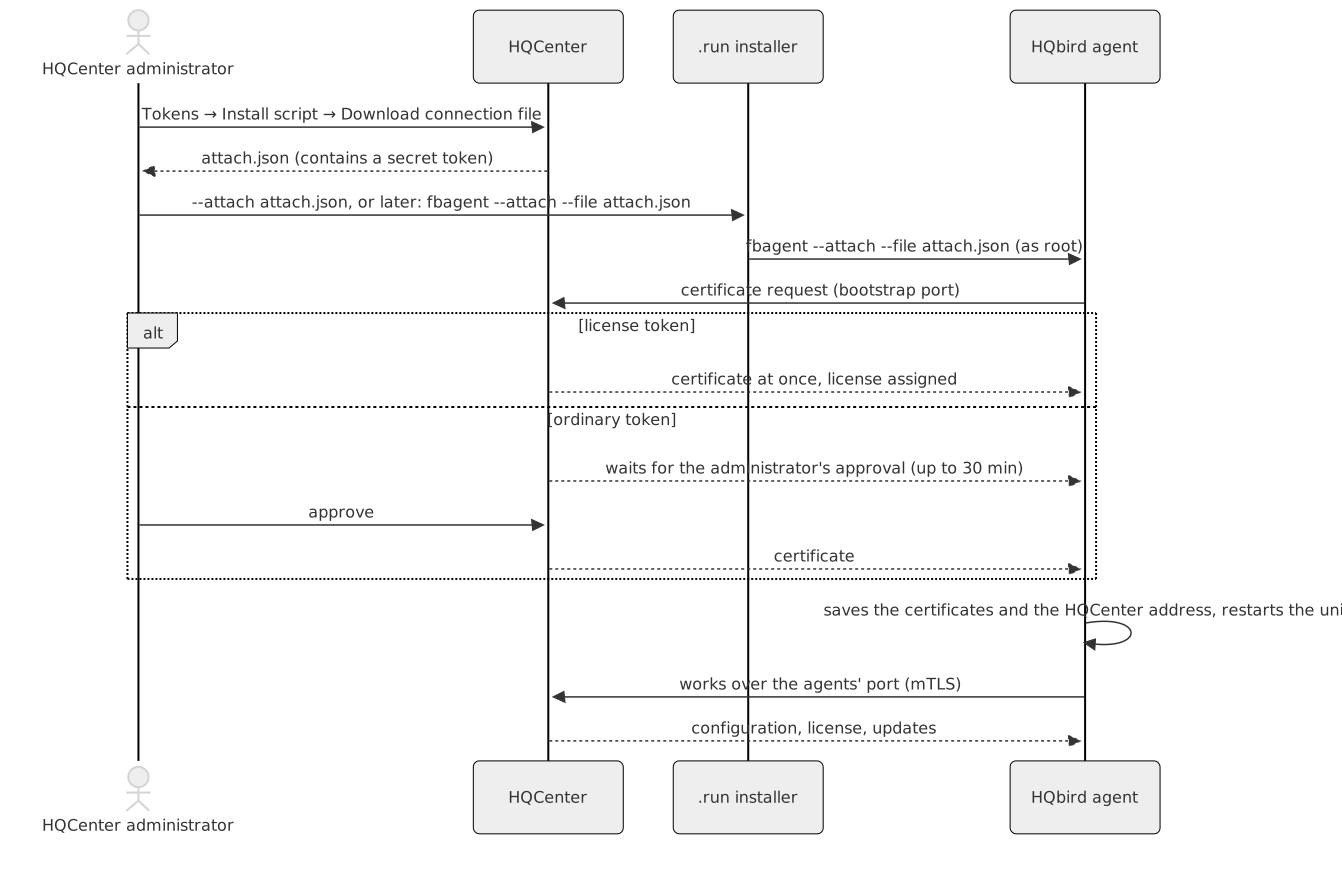
- 在 HQCenter 管理面板中打开 Tokens
(
https://<hqcenter>:8443/admin/tokens)。在 Install script 表单中 选择许可证(或不选)、模式、服务器数量和 有效期(1 到 365 天);平台和 Firebird 字段不使用。 点击 Download connection file 并保存attach.json。该文件 包含一个秘密令牌: 请妥善保管(chmod 600),使用后删除, 并在同一页面的列表中撤销该令牌。该表单仅在 设置了admin_panel.install_script_url时显示。 - 将
attach.json复制到服务器。 - 通过以下两种方式之一进行连接:
# during the installation
sudo sh hqbird2027-fb50-linux-2027.2.9.run --yes --attach /root/attach.json
# later, for an installed agent
cd /opt/hqbird/fbagent-fb50 && sudo ./fbagent --attach --file /root/attach.json
使用普通令牌时,命令会等待 HQCenter 管理员 批准请求(最多 30 分钟)。使用许可证令牌时,agent 会 立即连接并获得许可证。连接后,当 HQCenter 向 agent 授予许可证时试用即结束;随后 agent、HQ Monitor、Firebird 和 集群组件会从 HQCenter 目录进行更新。安装期间连接失败 不会撤销安装:摘要中会说明这一点,上述命令可重复执行。
要求:HQCenter (goafts) 1.15.0 或更新版本(旧版本没有 连接文件按钮);服务器需在连接时访问一次 HQCenter 引导端口,然后访问 agent 端口(默认 443)。HQCenter 可以没有 Internet。同一 服务器第二次连接到同一 HQCenter 时,即使使用许可证令牌也需要管理员 批准。
9. 无人值守安装和脚本
每个选项在终端中同样有效。无人值守运行需要 --yes
(回答计划中的问题;没有终端且没有 --yes 时
安装程序会以退出码 4 停止)。--yes 从不打开文本
界面。在终端中启动安装程序并自行回答其
问题(例如使用 expect)的脚本必须添加 --no-tui 或设置
HQBIRD_NO_TUI=1:2027.2.30 之后的套件会在那里打开页面。退出码表示结果;
详细信息在终端和 /var/log/fbagent/install.log 中。
选项
| 选项 | 含义 | 默认值 |
|---|---|---|
--fb-root DIR |
新 Firebird 的文件夹(新文件夹或空文件夹);或要更新的 Firebird 的文件夹 | /opt/firebird,然后是 /opt/fb<NN> |
--port N |
Firebird 端口 | 第一个 Firebird 为 3050;其他产品线使用该产品线的端口(3.0 为 3053,4.0 为 3054,5.0 为 3055) |
--sysdba-pass-file F、--sysdba-pass P |
新 Firebird 的 SYSDBA 密码(F 的第一行;P 会写入一个 0600 文件) |
自动生成,保存在 /root/fbagent-install-sysdba.txt;主机上的另一个 Firebird 会从该文件获取密码 |
--agent-id ID |
新 agent 的 agent.id;仅在首次安装时使用,已安装的 agent 会保留其 id(第 3 节中的“The agent id”) |
主机名 + 日期 + 实例 |
--hqmonitor-port N |
HQ Monitor 端口 | 20000 + Firebird 端口 |
--hqmonitor-login L --hqmonitor-password-file F |
HQ Monitor 登录信息,由主机上所有实例共享:在一个实例上指定,会更改所有实例的登录信息 | admin + 自动生成的密码;更新或另一个实例会保留现有登录信息 |
--email ADDR --accept-privacy [--trial-zone RU|EU|BR] |
试用电子邮件(30 天);该地址会发送到供应商的试用服务器 | 无 |
--auto-update all|agent|off |
未连接到任何 HQCenter 的服务器的更新(2027.2.31 起的套件):agent = agent、HQ Monitor 和 fbmcp 自行更新,Firebird 包会等待您处理;all = Firebird 也在其窗口内更新;off = 不检查更新(第 4 节中的“Updates without HQCenter”) |
不更改模式;新 agent 为 agent |
| --license F | 要安装的许可证文件 | 无 |
| --attach F | 附加到你的 HQCenter(attach.json) | 无 |
| --no-hqbird、--disable-hqbird | 保留旧版 HQbird 不动 / 关闭其所有单元 | 自动 |
| --no-debug | 不安装 Firebird 调试文件 | 已安装 |
| --no-fbmcp | 不安装 fbmcp(面向 AI 客户端的 MCP 服务器),也不更改此主机上的 fbmcp | 已安装 |
| --fbmcp-allow-from A,B | 为这些管理地址(IP 或 CIDR)开启 fbmcp 的远程模式 | 仅本地 |
| --fbmcp-port N、--fbmcp-dns NAME,...、--fbmcp-ip ADDR | fbmcp 的远程端口;其证书的额外名称;证书和监听器的地址 | 端口 8650 |
| --rcm on\|off | 在此主机上安装集群控制台 RCM 并创建新集群(agent 3.1.0 及更高版本) | 询问;否 |
| --rcm-password-file F | 配合 --rcm on 使用的 RCM 管理员密码(F 的第一行) | 生成,并在最后显示 |
| --cluster-id ID | 配合 --rcm on 使用的集群 ID | 主机名 |
| --cluster-pairing on\|off | 发现模式:配对窗口为 24 小时,RCM 可以邀请此 agent | 询问;否 |
| --rcm-allow A,B,... | 在发现模式下,只有这些 RCM 可以邀请此主机(IP、CIDR 或主机名) | 任何 RCM |
| --pairing-port N | 新 agent 的配对端口 7450–7459;它会选择槽位(节点端口 7051+k、7061+k)。之后的设置会保留该槽位 | 第一个空闲槽位 |
| --cluster-node on\|off | 将集群节点服务放入 agent 的缓存 | 开 |
| --yes | 对计划中的问题回答“是”(对集群问题回答“否”) | 询问 |
| --check | 仅执行检查、库和计划;不做任何更改 | — |
| --plan-help | 打印计划中代码的含义(M1、M2、……)并退出 | — |
| --no-tui | 纯安装程序,不带文本界面;也可使用变量 HQBIRD_NO_TUI=1(第 3 节中的“The plain installer”) | 终端中的文本界面 |
| --lang en\|ru\|pt-BR\|de | 安装程序的语言;也可使用变量 HQBIRD_LANG(第 3 节中的“Language of the installer”) | 控制台的 UTF-8 区域设置,否则为英语 |
| --tmpdir DIR | 在此解包(允许程序运行的文件夹) | /var/tmp |
| --extract DIR | 仅将载荷解包到 DIR/payload 并退出 | — |
| --uninstall [--remove-data] [--force] [--agent-dir DIR] | 移除 agent 和 HQ Monitor(Firebird 保留);--force 还会移除运行主机 RCM 的 agent,即使其他 agent 正在使用它 | — |
选项可以写作 --port 3055 或 --port=3055。相对路径
从当前文件夹开始计算。
示例
使用默认值进行全新安装:
sudo sh hqbird2027-fb50-linux-2027.2.9.run --yes
echo "exit code $?"
安装到选定的文件夹和端口,使用来自文件的 SYSDBA 密码 以及 HQ Monitor 登录:
umask 077
printf '%s\n' 'S3cret-Sysdba' > /root/sysdba.txt
printf '%s\n' 'S3cret-Monitor' > /root/hqm.txt
sudo sh hqbird2027-fb50-linux-2027.2.9.run --yes \
  --fb-root /opt/firebird --port 3050 \
  --sysdba-pass-file /root/sysdba.txt \
  --hqmonitor-port 24000 --hqmonitor-login ops --hqmonitor-password-file /root/hqm.txt
rm -f /root/sysdba.txt /root/hqm.txt
使用试用电子邮件、许可证文件和附加文件进行全新安装:
sudo sh hqbird2027-fb50-linux-2027.2.9.run --yes \
  --email [email protected] --accept-privacy --trial-zone EU \
  --license /root/hqbird-license.json \
  --attach /root/attach.json
更新旧版 HQbird,关闭所有旧版 HQbird 单元:
sudo sh hqbird2027-fb50-linux-2027.2.9.run --yes --disable-hqbird将 HQbird 2027 更新到新版本(一个实例;如果有多个,请添加
--fb-root 和 --port):
sudo sh hqbird2027-fb50-linux-2027.2.9.run --yes在端口 3056 上创建第二个 Firebird 5.0 实例:
sudo sh hqbird2027-fb50-linux-2027.2.9.run --yes --fb-root /opt/fb50-2 --port 3056移除:
sudo sh hqbird2027-fb50-linux-2027.2.9.run --uninstall
sudo sh hqbird2027-fb50-linux-2027.2.9.run --uninstall --remove-data
在安装失败时停止的脚本:
#!/bin/sh
set -e
sh hqbird2027-fb50-linux-2027.2.9.run --yes || {
  rc=$?
  echo "HQbird setup failed with code $rc, see /var/log/fbagent/install.log" >&2
  exit $rc
}
echo "HQbird 2027 installed"
无互联网的服务器:操作系统库
某一产品线的 Firebird 需要来自操作系统的这些库(除 glibc 外):
| 产品线 | 软件包(Debian/Ubuntu) | 软件包(RHEL 系列) |
|---|---|---|
| 5.0 | libtommath1、libicu<NN>、libgssapi-krb5-2 |
libtommath(EPEL)、libicu、krb5-libs |
| 4.0 | libtommath1、libicu<NN> |
libtommath(EPEL)、libicu |
| 3.0 | libtommath1、libicu<NN> |
libtommath(EPEL)、libicu |
| 2.5 | 通常不需要(libstdc++6 在基础系统中) |
通常不需要 |
3.0、4.0 和 5.0 产品线中 2027.2.30 之后的套件还需要程序
colrm,Firebird 安装脚本会使用它:软件包 bsdextrautils
(较旧的 Debian 和 Ubuntu 上为 bsdmainutils)。最小化 Debian 没有它;
RHEL 系列在 util-linux 中有它,而该包总是存在。
当缺少软件包且无法访问仓库时,安装程序 会以退出码 6 停止,且不做任何更改:
[install] ERROR: no access to the package repository, or a package is not there; nothing was changed.
[install] Missing: libtommath1
[install] Install them, then run this file again:
[install]   apt-get install -y libtommath1
[install] On a server without internet: on a PC with the same Ubuntu 24.04.5 LTS
[install]   apt-get download libtommath1
[install] copy the .deb files here and run:  apt-get install -y ./*.deb
在 RHEL 系列上,libtommath 位于 EPEL 中:如果仓库可访问,
安装程序会自行添加 epel-release。如果无法访问,命令为 dnf install -y epel-release、dnf download --resolve <packages> 和 dnf install -y ./*.rpm。--check 会提前打印
相同的列表,因此可以在安装窗口之前准备好软件包。
退出码
| 代码 | 含义 | 主机上的更改 |
|---|---|---|
| 0 | 完成(关于试用电子邮件、附加或许可证的警告在摘要中) | 是 |
| 1 | 拒绝:主机、选项、文件或计划(会打印原因)。还有:在文本界面中选择“退出” | 无 |
| 2 | 安装失败并已回滚。还有:安装程序被信号(Ctrl+C)停止 | 已回滚;如果在安装前停止则为无 |
| 3 | 安装失败且回滚不完整(摘要会说明要检查什么) | 部分 |
| 4 | 计划中的某个问题未得到确认(没有终端,没有 --yes)。 |
无 |
| 5 | 载荷未通过检查(sha256、签名):请重新下载文件。使用 --uninstall 时:拒绝,agent 运行主机的 RCM 且其他 agent 正在使用它(第 7 节) |
无 |
| 6 | 缺少操作系统库且无法访问软件包仓库 | 无 |
| 7 | 已安装来自发行版软件包的 Firebird | 无 |
10. 故障排除
| 问题 | 处理方法 |
|---|---|
run as root (sudo sh ...) |
使用 sudo 或以 root 身份运行安装程序 |
| 文本界面的页面无法打开 | 第一行会说明原因:needs a window of 80x24 or larger(将窗口调大;带状态行的 tmux 会占用一行)或 needs bash 4.4 or newer。随后运行的纯安装程序会执行相同的安装 |
| 页面上的字符错误或行断裂 | 将终端设置为 UTF-8,或使用 --lang en 运行;--no-tui 会运行纯安装程序 |
/var/tmp is mounted noexec |
使用 --tmpdir /root 重新运行(任何允许程序运行的文件夹) |
is damaged or cut(退出码 5) |
重新复制 .run 文件,并将其 sha256sum 与发布的值进行比较 |
| 退出码 6,缺少库 | 按打印内容准备软件包(第 9 节),然后再次运行安装程序 |
| 退出码 7,来自发行版软件包的 Firebird | 移除软件包(apt-get remove firebird3.0-server,保留 gbak 备份)或使用带 --import-firebird 的在线安装程序 |
| refused (M17): Firebird 2.5 works only in /opt/firebird | 无法再安装第二个 Firebird 2.5;请在其旁边安装另一条产品线(第 7 节) |
| --uninstall 被拒绝(退出码 1),存在多个 agent | 添加 --agent-dir,并指定列表中的文件夹,例如 --agent-dir /opt/hqbird/fbagent-fb50-2 |
| --uninstall 被拒绝(退出码 5):this agent runs the RCM of the host | 先在 RCM 控制台中移除该集群,或使用 --force 重新运行(第 7 节) |
| 更新后(3.0)对 employee.fdb 出现 no permission for read-write access | sudo chmod 660 /opt/firebird/examples/empbuild/employee.fdb(第 6 节) |
| refused (M14): the folder is not empty | 使用 --fb-root 选择一个空文件夹或新文件夹,或指定要更新的 Firebird |
| 退出码 2 或 3 | 查看 /var/log/fbagent/install.log;各单元已恢复到运行前的状态(代码 2)或需要检查(代码 3) |
| HQ Monitor 无法打开 | systemctl status hqbirdmonitor-fb50(2027.2.9 之前为 hqbirdmonitor-p<port>);检查该端口上是否有其他程序在监听;在防火墙中开放该端口;使用 --hqmonitor-port 指定其他端口 |
| 丢失了 HQ Monitor 密码 | 使用 --hqmonitor-login admin --hqmonitor-password-file <file> 重新运行安装程序(修复);旧的 /opt/hqbird/conf/access.properties 会保留为 access.properties.bak-<time>。新的登录凭据对该主机的所有实例生效 |
| 试用邮件未发送(无网络) | 稍后发送:cd /opt/hqbird/fbagent-fb50 && sudo -u firebird ./fbagent --trial-email <address> --accept-privacy |
| SELinux(AlmaLinux、RHEL) | 在 enforcing 模式下受支持:安装程序会恢复其写入文件的上下文;无需操作 |